HKLS Troubleshooting on OS 26.4

A plugin to integration Indigo devices into HomeKit (and Siri)
onlyjaymoo
Posts: 24
Joined: Fri Nov 25, 2011 4:07 pm

Re: HKLS Troubleshooting on OS 26.4

Post by onlyjaymoo »

I think we made some progress!

So the first test you had me do:

Code: Select all

unifi:~ jaymoo$ route -n get 224.0.0.251
   route to: 224.0.0.251
destination: 224.0.0.251
  interface: en0
      flags: <UP,HOST,DONE,LLINFO,WASCLONED,MULTICAST,IFSCOPE>
 recvpipe  sendpipe  ssthresh  rtt,msec    rttvar  hopcount      mtu     expire
       0         0         0         0         0         0      1500         0 
Seems fine. HOWEVER, this test:

Code: Select all

unifi:~ jaymoo$ python3 -c "
> import socket
> s = socket.socket(socket.AF_INET, socket.SOCK_DGRAM)
> s.setsockopt(socket.IPPROTO_IP, socket.IP_MULTICAST_IF, socket.inet_aton('192.168.1.3'))
> s.sendto(b'test', ('224.0.0.251', 5353))
> print('OK')
> "
Traceback (most recent call last):
  File "<string>", line 5, in <module>
    s.sendto(b'test', ('224.0.0.251', 5353))
    ~~~~~~~~^^^^^^^^^^^^^^^^^^^^^^^^^^^^^^^^
OSError: [Errno 65] No route to host
Seemed like a good BAD result :) -- not only was this error thrown (like the error we both pointed out in the logs) BUT -- TERMINAL popped up a message saying "Do you wish to allow Terminal to discover devices on the network?"

When I clicked on "Yes", a SUBSEQUENT run showed this:

Code: Select all

unifi:~ jaymoo$ python3 -c "
> import socket
> s = socket.socket(socket.AF_INET, socket.SOCK_DGRAM)
> s.setsockopt(socket.IPPROTO_IP, socket.IP_MULTICAST_IF, socket.inet_aton('192.168.1.3'))
> s.sendto(b'test', ('224.0.0.251', 5353))
> print('OK')
> "
OK
unifi:~ jaymoo$ 
So! Now I'm think that Apple introduced some sort of thing where every single application that requires network discovery access needs to get user authorization, and for some reason I am not seeing the prompt to "allow" whichever application is triggering the prompt (is it the Indigo instance of python?)

I'm wondering if there is a bash/CLI way to issue that permission so that it is no longer denied access?
User avatar
GlennNZ
Posts: 1872
Joined: Sun Dec 07, 2014 3:33 pm
Location: Central Coast, Australia

Re: HKLS Troubleshooting on OS 26.4

Post by GlennNZ »

Frick. That old basic chestnut...


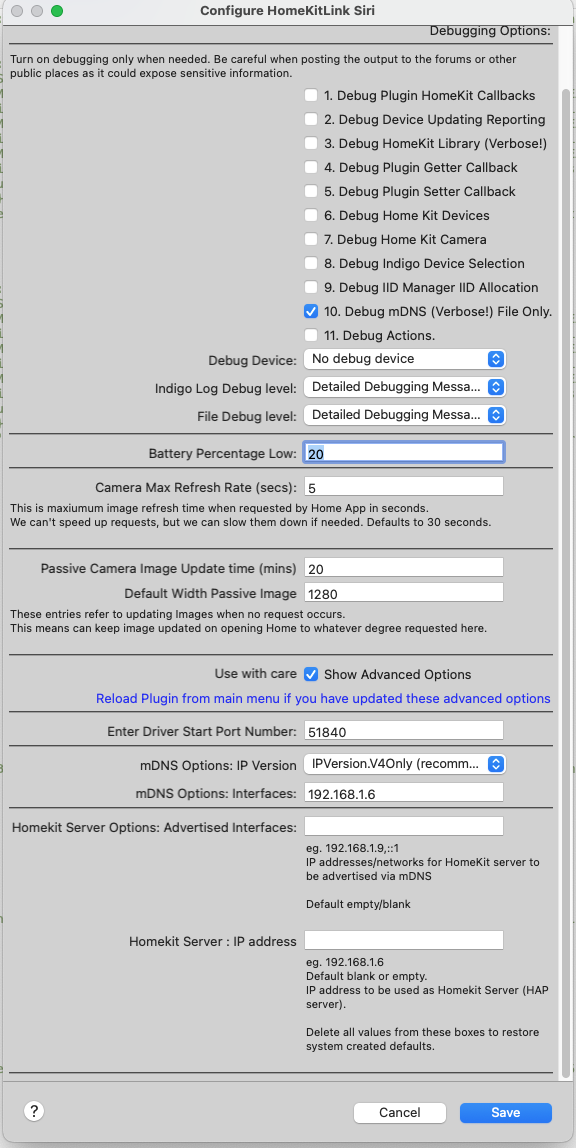
Meanwhile I have discovered that I had hidden (for safety) the mDNS address box...

Image

Which I have fixed in 0.7.50

But go to System Settings
Privacy & Secruity
Loca Network and make sure IndigoServer.app IndigoPluginHost3.app are all enabled
onlyjaymoo
Posts: 24
Joined: Fri Nov 25, 2011 4:07 pm

Re: HKLS Troubleshooting on OS 26.4

Post by onlyjaymoo »

Went to the System Settings and the only application that wasn't selected was Indigo (the plugin was not listed).

Went to turn that on, restarted everything and now the advertisement is shown on if 6 (as well as 1)... there are two advertisements now.

Switched everything back to normal, deleted the extra test Bridges, added the original Bridge with all my devices as Accessory which worked immediately.

All of my Unifi services and VPNs are also back on and everything still works.

Either Indigo was never explicitly allowed and the update to OS 26.4 finally "exposed" it, or Indigo was previously allowed (remember, it was all working all the way up to the official OS 26.4 release) and for whatever reason the 26.4 official install reset that switch.

At any rate, is there a way to donate to you for your time working with me through this? If you could point me to a way to do that, I would love to thank you for all of the time you spent to help me.

I did not install the latest 0.7.50, as everything is working as either recommended or default settings (so I didn't need to expose the Advanced settings anymore). but I am happy to do so if you wanted me to test it.

Thank you, thank you, thank you.
User avatar
GlennNZ
Posts: 1872
Joined: Sun Dec 07, 2014 3:33 pm
Location: Central Coast, Australia

Re: HKLS Troubleshooting on OS 26.4

Post by GlennNZ »

Yah!

No problem - fixed a few bugs and we finally got to the bottom of the problem which as it turns out wasn’t interesting!

Good this version of plugin installs (was some pip library changes) on this version of Indigo. So that was a good test in itself.

No donation needed by any means.


Sent from my iPad using Tapatalk
Post Reply

Return to “HomeKitLink Siri”