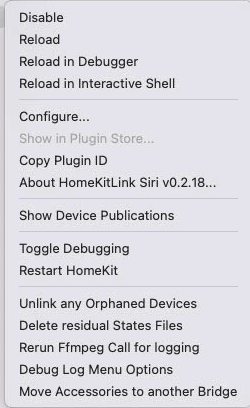
This is the output from troubleshooting 1, 2, and 3. I don't have any bridges.
Code: Select all
May 24, 2026 at 20:02:09
HomeKitLink Siri ==============================================================================================================================================================================================
HomeKitLink Siri ==================================================================================== mDNS Troubleshooting ====================================================================================
HomeKitLink Siri ==============================================================================================================================================================================================
HomeKitLink Siri ======================================================= System Information =======================================================
HomeKitLink Siri macOS version: 26.5
HomeKitLink Siri Python version: 3.13.9 (v3.13.9:8183fa5e3f7, Oct 14 2025, 10:27:13) [Clang 16.0.0 (clang-1600.0.26.6)]
HomeKitLink Siri Architecture: arm64
HomeKitLink Siri ======================================================= Advanced Settings: =======================================================
HomeKitLink Siri Selected IP version: IPVersion.All
HomeKitLink Siri Select interfaces: None
HomeKitLink Siri default_listen_address: None
HomeKitLink Siri Warning ⚠ ip_version is IPVersion.All. The HAP server is IPv4-only. IPv6 mDNS sockets will be created but serve no purpose. IPVersion.V4Only is strongly recommended.
HomeKitLink Siri HKLS Advertised Ip address: None
HomeKitLink Siri HKLS Server Ipaddress: None
HomeKitLink Siri HKLS Advertised Ipaddress and HKLS Server Ipaddress are None, which is acceptable. The server will decide the best option.
HomeKitLink Siri Starting Port Number: 51826
HomeKitLink Siri Ports currently in use: set()
HomeKitLink Siri =================================================== Running Bridges / Drivers ====================================================
HomeKitLink Siri Number of active drivers: 0
HomeKitLink Siri Number of active bridges: 0
HomeKitLink Siri =================================================== Network Adapters (ifaddr) ====================================================
HomeKitLink Siri lo0 IPv4 127.0.0.1
HomeKitLink Siri lo0 IPv6 ::1
HomeKitLink Siri lo0 IPv6 fe80::1
HomeKitLink Siri en0 IPv6 fe80::4bd:49ee:cb2b:292e
HomeKitLink Siri en0 IPv6 2601:603:301:82fb:1002:adcb:42c7:c8ca
HomeKitLink Siri en0 IPv6 2601:603:301:82fb:10aa:ca61:e83c:688b
HomeKitLink Siri en0 IPv4 10.0.1.11
HomeKitLink Siri en0 IPv6 2601:603:301:82fb:7822:aea2:523d:ec51
HomeKitLink Siri en0 IPv6 2601:603:301:82fb:1192:8030:80af:5db0
HomeKitLink Siri en0 IPv6 2601:603:301:82fb:ed86:ce8a:aab3:4000
HomeKitLink Siri en0 IPv6 2601:603:301:82fb:188d:ced5:6b80:8d83
HomeKitLink Siri en1 IPv6 fe80::1400:8c38:ab2e:6634
HomeKitLink Siri en1 IPv6 2601:603:301:82fb:ce3:b8ae:6409:ebd6
HomeKitLink Siri en1 IPv6 2601:603:301:82fb:4845:a15e:6c06:f0e2
HomeKitLink Siri en1 IPv6 2601:603:301:82fb:5c89:33a1:ef84:f646
HomeKitLink Siri en1 IPv6 2601:603:301:82fb:281f:3b0a:c5f2:798a
HomeKitLink Siri en1 IPv4 10.0.1.9
HomeKitLink Siri en1 IPv6 2601:603:301:82fb:34d2:ab35:d566:e5a5
HomeKitLink Siri en1 IPv6 2601:603:301:82fb:341d:d66c:a70e:63ff
HomeKitLink Siri (filtered 13 virtual/tunnel adapter entries: awdl0(1), llw0(1), utun0(1), utun1(1), utun10(3), utun2(1), utun3(1), utun5(1), utun6(1), utun7(1), utun8(1))
HomeKitLink Siri ================================================== Zeroconf Detected Addresses ===================================================
HomeKitLink Siri IPv4 addresses: ['10.0.1.9', '100.84.110.91', '127.0.0.1', '10.0.1.11']
HomeKitLink Siri IPv6 addresses (28): ['fe80::9e76:eff:fe4c:d402', 'fe80::2410:2b11:a983:212f', 'fe80::77c7:dfea:3cec:e073', '2601:603:301:82fb:7822:aea2:523d:ec51', '::1', '2601:603:301:82fb:341d:d66c:a70e:63ff', '2601:603:301:82fb:10aa:ca61:e83c:688b', 'fe80::1', 'fe80::98ad:95ff:fed1:aaba', 'fe80::86e2:8496:9298:c9a7', '2601:603:301:82fb:281f:3b0a:c5f2:798a', '2601:603:301:82fb:188d:ced5:6b80:8d83', 'fe80::c64f:9535:fae1:23ac', '2601:603:301:82fb:1002:adcb:42c7:c8ca', '2601:603:301:82fb:ed86:ce8a:aab3:4000', 'fe80::f24:f167:d70e:b986', 'fe80::9ac:4432:ee58:1ed0', 'fe80::4bd:49ee:cb2b:292e', '2601:603:301:82fb:34d2:ab35:d566:e5a5', 'fe80::575:4bd3:5019:50c4', '2601:603:301:82fb:5c89:33a1:ef84:f646', 'fe80::1400:8c38:ab2e:6634', 'fe80::ce81:b1c:bd2c:69e', '2601:603:301:82fb:ce3:b8ae:6409:ebd6', 'fd7a:115c:a1e0::1001:6ebf', '2601:603:301:82fb:4845:a15e:6c06:f0e2', '2601:603:301:82fb:1192:8030:80af:5db0', 'fe80::98ad:95ff:fed1:aaba']
HomeKitLink Siri ================================================= Socket Local Address Detection =================================================
HomeKitLink Siri Detected local IPv4 address: 10.0.1.11
HomeKitLink Siri ======================================================= IPv6 Support Check =======================================================
HomeKitLink Siri socket.has_ipv6: True
HomeKitLink Siri IPv6 is available on this system (but the HAP server is IPv4-only).
HomeKitLink Siri ====================================================== mDNS Port 5353 Check ======================================================
HomeKitLink Siri Port 5353 (mDNS): Successfully bound — port is available.
HomeKitLink Siri =========================================== Zeroconf: Browse _hap._tcp.local. Services ===========================================
HomeKitLink Siri Warning No HAP (_hap._tcp) services discovered on the local network.
HomeKitLink Siri Warning This may indicate mDNS is not functioning correctly, or no bridges are running.
HomeKitLink Siri ================================================== Terminal Diagnostic Commands ==================================================
HomeKitLink Siri (Note: dns-sd is a continuous browse command; timeout is expected)
HomeKitLink Siri --- dns-sd -B _hap._tcp local. ---
HomeKitLink Siri (command timed out after 6s, partial output below)
HomeKitLink Siri Browsing for _hap._tcp.local.
HomeKitLink Siri DATE: ---Sun 24 May 2026---
HomeKitLink Siri 20:02:14.438 ...STARTING...
HomeKitLink Siri Timestamp A/R Flags if Domain Service Type Instance Name
HomeKitLink Siri 20:02:14.451 Add 3 17 local. _hap._tcp. Rachio-BDFAB6
HomeKitLink Siri 20:02:14.451 Add 2 19 local. _hap._tcp. Rachio-BDFAB6
HomeKitLink Siri --- scutil --dns (DNS Configuration) ---
HomeKitLink Siri DNS configuration
HomeKitLink Siri
HomeKitLink Siri resolver #1
HomeKitLink Siri search domain[0] : tail97c2bb.ts.net
HomeKitLink Siri search domain[1] : hsd1.wa.comcast.net
HomeKitLink Siri nameserver[0] : 100.100.100.100
HomeKitLink Siri nameserver[1] : fd7a:115c:a1e0::53
HomeKitLink Siri if_index : 34 (utun10)
HomeKitLink Siri flags : Supplemental, Request A records, Request AAAA records
HomeKitLink Siri reach : 0x00000003 (Reachable,Transient Connection)
HomeKitLink Siri order : 101800
HomeKitLink Siri
HomeKitLink Siri resolver #2
HomeKitLink Siri nameserver[0] : 216.146.35.35
HomeKitLink Siri nameserver[1] : 216.146.36.36
HomeKitLink Siri flags : Request A records, Request AAAA records
HomeKitLink Siri reach : 0x00000002 (Reachable)
HomeKitLink Siri order : 200000
HomeKitLink Siri
HomeKitLink Siri resolver #3
HomeKitLink Siri domain : tail97c2bb.ts.net.
HomeKitLink Siri nameserver[0] : 100.100.100.100
HomeKitLink Siri nameserver[1] : fd7a:115c:a1e0::53
HomeKitLink Siri if_index : 34 (utun10)
HomeKitLink Siri flags : Supplemental, Request A records, Request AAAA records
HomeKitLink Siri reach : 0x00000003 (Reachable,Transient Connection)
HomeKitLink Siri order : 101801
HomeKitLink Siri
HomeKitLink Siri resolver #4
HomeKitLink Siri domain : local
HomeKitLink Siri options : mdns
HomeKitLink Siri timeout : 5
HomeKitLink Siri flags : Request A records, Request AAAA records
HomeKitLink Siri reach : 0x00000000 (Not Reachable)
HomeKitLink Siri order : 300000
HomeKitLink Siri
HomeKitLink Siri resolver #5
HomeKitLink Siri domain : 254.169.in-addr.arpa
HomeKitLink Siri options : mdns
HomeKitLink Siri timeout : 5
HomeKitLink Siri flags : Request A records, Request AAAA records
HomeKitLink Siri reach : 0x00000000 (Not Reachable)
HomeKitLink Siri order : 300200
HomeKitLink Siri
HomeKitLink Siri resolver #6
HomeKitLink Siri domain : 8.e.f.ip6.arpa
HomeKitLink Siri options : mdns
HomeKitLink Siri timeout : 5
HomeKitLink Siri flags : Request A records, Request AAAA records
HomeKitLink Siri reach : 0x00000000 (Not Reachable)
HomeKitLink Siri order : 300400
HomeKitLink Siri
HomeKitLink Siri resolver #7
HomeKitLink Siri domain : 9.e.f.ip6.arpa
HomeKitLink Siri options : mdns
HomeKitLink Siri timeout : 5
HomeKitLink Siri flags : Request A records, Request AAAA records
HomeKitLink Siri reach : 0x00000000 (Not Reachable)
HomeKitLink Siri order : 300600
HomeKitLink Siri
HomeKitLink Siri resolver #8
HomeKitLink Siri domain : a.e.f.ip6.arpa
HomeKitLink Siri options : mdns
HomeKitLink Siri timeout : 5
HomeKitLink Siri flags : Request A records, Request AAAA records
HomeKitLink Siri reach : 0x00000000 (Not Reachable)
HomeKitLink Siri order : 300800
HomeKitLink Siri
HomeKitLink Siri resolver #9
HomeKitLink Siri domain : b.e.f.ip6.arpa
HomeKitLink Siri options : mdns
HomeKitLink Siri timeout : 5
HomeKitLink Siri flags : Request A records, Request AAAA records
HomeKitLink Siri reach : 0x00000000 (Not Reachable)
HomeKitLink Siri order : 301000
HomeKitLink Siri
HomeKitLink Siri DNS configuration (for scoped queries)
HomeKitLink Siri
HomeKitLink Siri resolver #1
HomeKitLink Siri search domain[0] : hsd1.wa.comcast.net
HomeKitLink Siri nameserver[0] : 216.146.35.35
HomeKitLink Siri nameserver[1] : 216.146.36.36
HomeKitLink Siri if_index : 17 (en0)
HomeKitLink Siri flags : Scoped, Request A records, Request AAAA records
HomeKitLink Siri reach : 0x00000002 (Reachable)
HomeKitLink Siri
HomeKitLink Siri resolver #2
HomeKitLink Siri search domain[0] : hsd1.wa.comcast.net
HomeKitLink Siri nameserver[0] : 2601:603:301:82fb:dea4:caff:fe5b:8c4d
HomeKitLink Siri nameserver[1] : 10.0.1.1
HomeKitLink Siri if_index : 19 (en1)
HomeKitLink Siri flags : Scoped, Request A records, Request AAAA records
HomeKitLink Siri reach : 0x00020002 (Reachable,Directly Reachable Address)
HomeKitLink Siri
HomeKitLink Siri resolver #3
HomeKitLink Siri search domain[0] : tail97c2bb.ts.net
HomeKitLink Siri nameserver[0] : 100.100.100.100
HomeKitLink Siri nameserver[1] : fd7a:115c:a1e0::53
HomeKitLink Siri if_index : 34 (utun10)
HomeKitLink Siri flags : Scoped, Request A records, Request AAAA records
HomeKitLink Siri reach : 0x00000003 (Reachable,Transient Connection)
HomeKitLink Siri --- ifconfig (Network Interfaces) ---
HomeKitLink Siri lo0: flags=8049<UP,LOOPBACK,RUNNING,MULTICAST> mtu 16384
HomeKitLink Siri options=1203<RXCSUM,TXCSUM,TXSTATUS,SW_TIMESTAMP>
HomeKitLink Siri inet 127.0.0.1 netmask 0xff000000
HomeKitLink Siri inet6 ::1 prefixlen 128
HomeKitLink Siri inet6 fe80::1%lo0 prefixlen 64 scopeid 0x1
HomeKitLink Siri nd6 options=201<PERFORMNUD,DAD>
HomeKitLink Siri gif0: flags=8010<POINTOPOINT,MULTICAST> mtu 1280
HomeKitLink Siri stf0: flags=0<> mtu 1280
HomeKitLink Siri anpi2: flags=8863<UP,BROADCAST,SMART,RUNNING,SIMPLEX,MULTICAST> mtu 1500
HomeKitLink Siri options=400<CHANNEL_IO>
HomeKitLink Siri ether 36:bc:70:20:41:a3
HomeKitLink Siri media: none
HomeKitLink Siri status: inactive
HomeKitLink Siri anpi3: flags=8863<UP,BROADCAST,SMART,RUNNING,SIMPLEX,MULTICAST> mtu 1500
HomeKitLink Siri options=400<CHANNEL_IO>
HomeKitLink Siri ether 36:bc:70:20:41:a4
HomeKitLink Siri media: none
HomeKitLink Siri status: inactive
HomeKitLink Siri anpi0: flags=8863<UP,BROADCAST,SMART,RUNNING,SIMPLEX,MULTICAST> mtu 1500
HomeKitLink Siri options=400<CHANNEL_IO>
HomeKitLink Siri ether 36:bc:70:20:41:a1
HomeKitLink Siri media: none
HomeKitLink Siri status: inactive
HomeKitLink Siri anpi1: flags=8863<UP,BROADCAST,SMART,RUNNING,SIMPLEX,MULTICAST> mtu 1500
HomeKitLink Siri options=400<CHANNEL_IO>
HomeKitLink Siri ether 36:bc:70:20:41:a2
HomeKitLink Siri media: none
HomeKitLink Siri status: inactive
HomeKitLink Siri en6: flags=8863<UP,BROADCAST,SMART,RUNNING,SIMPLEX,MULTICAST> mtu 1500
HomeKitLink Siri options=400<CHANNEL_IO>
HomeKitLink Siri ether 36:bc:70:20:41:81
HomeKitLink Siri nd6 options=201<PERFORMNUD,DAD>
HomeKitLink Siri media: none
HomeKitLink Siri status: inactive
HomeKitLink Siri en7: flags=8863<UP,BROADCAST,SMART,RUNNING,SIMPLEX,MULTICAST> mtu 1500
HomeKitLink Siri options=400<CHANNEL_IO>
HomeKitLink Siri ether 36:bc:70:20:41:82
HomeKitLink Siri nd6 options=201<PERFORMNUD,DAD>
HomeKitLink Siri media: none
HomeKitLink Siri status: inactive
HomeKitLink Siri en8: flags=8863<UP,BROADCAST,SMART,RUNNING,SIMPLEX,MULTICAST> mtu 1500
HomeKitLink Siri options=400<CHANNEL_IO>
HomeKitLink Siri ether 36:bc:70:20:41:83
HomeKitLink Siri nd6 options=201<PERFORMNUD,DAD>
HomeKitLink Siri media: none
HomeKitLink Siri status: inactive
HomeKitLink Siri en9: flags=8863<UP,BROADCAST,SMART,RUNNING,SIMPLEX,MULTICAST> mtu 1500
HomeKitLink Siri options=400<CHANNEL_IO>
HomeKitLink Siri ether 36:bc:70:20:41:84
HomeKitLink Siri nd6 options=201<PERFORMNUD,DAD>
HomeKitLink Siri media: none
HomeKitLink Siri status: inactive
HomeKitLink Siri en2: flags=8963<UP,BROADCAST,SMART,RUNNING,PROMISC,SIMPLEX,MULTICAST> mtu 1500
HomeKitLink Siri options=460<TSO4,TSO6,CHANNEL_IO>
HomeKitLink Siri ether 36:e3:59:02:c4:80
HomeKitLink Siri media: autoselect <full-duplex>
HomeKitLink Siri status: inactive
HomeKitLink Siri en3: flags=8963<UP,BROADCAST,SMART,RUNNING,PROMISC,SIMPLEX,MULTICAST> mtu 1500
HomeKitLink Siri options=460<TSO4,TSO6,CHANNEL_IO>
HomeKitLink Siri ether 36:e3:59:02:c4:84
HomeKitLink Siri media: autoselect <full-duplex>
HomeKitLink Siri status: inactive
HomeKitLink Siri en4: flags=8963<UP,BROADCAST,SMART,RUNNING,PROMISC,SIMPLEX,MULTICAST> mtu 1500
HomeKitLink Siri options=460<TSO4,TSO6,CHANNEL_IO>
HomeKitLink Siri ether 36:e3:59:02:c4:88
HomeKitLink Siri media: autoselect <full-duplex>
HomeKitLink Siri status: inactive
HomeKitLink Siri en5: flags=8963<UP,BROADCAST,SMART,RUNNING,PROMISC,SIMPLEX,MULTICAST> mtu 1500
HomeKitLink Siri options=460<TSO4,TSO6,CHANNEL_IO>
HomeKitLink Siri ether 36:e3:59:02:c4:8c
HomeKitLink Siri media: autoselect <full-duplex>
HomeKitLink Siri status: inactive
HomeKitLink Siri en0: flags=8863<UP,BROADCAST,SMART,RUNNING,SIMPLEX,MULTICAST> mtu 1500
HomeKitLink Siri options=567<RXCSUM,TXCSUM,VLAN_MTU,TSO4,TSO6,AV,CHANNEL_IO>
HomeKitLink Siri ether 9c:76:0e:4c:d4:02
HomeKitLink Siri inet6 fe80::4bd:49ee:cb2b:292e%en0 prefixlen 64 secured scopeid 0x11
HomeKitLink Siri inet6 2601:603:301:82fb:1002:adcb:42c7:c8ca prefixlen 64 autoconf secured
HomeKitLink Siri inet6 2601:603:301:82fb:10aa:ca61:e83c:688b prefixlen 64 deprecated autoconf temporary
HomeKitLink Siri inet 10.0.1.11 netmask 0xffffff00 broadcast 10.0.1.255
HomeKitLink Siri inet6 2601:603:301:82fb:7822:aea2:523d:ec51 prefixlen 64 deprecated autoconf temporary
HomeKitLink Siri inet6 2601:603:301:82fb:1192:8030:80af:5db0 prefixlen 64 deprecated autoconf temporary
HomeKitLink Siri inet6 2601:603:301:82fb:ed86:ce8a:aab3:4000 prefixlen 64 deprecated autoconf temporary
HomeKitLink Siri inet6 2601:603:301:82fb:188d:ced5:6b80:8d83 prefixlen 64 autoconf temporary
HomeKitLink Siri nd6 options=201<PERFORMNUD,DAD>
HomeKitLink Siri media: autoselect (10Gbase-T <full-duplex>)
HomeKitLink Siri status: active
HomeKitLink Siri ap1: flags=8822<BROADCAST,SMART,SIMPLEX,MULTICAST> mtu 1500
HomeKitLink Siri options=400<CHANNEL_IO>
HomeKitLink Siri ether 72:36:cf:44:20:95
HomeKitLink Siri media: autoselect (none)
HomeKitLink Siri en1: flags=8863<UP,BROADCAST,SMART,RUNNING,SIMPLEX,MULTICAST> mtu 1500
HomeKitLink Siri options=6460<TSO4,TSO6,CHANNEL_IO,PARTIAL_CSUM,ZEROINVERT_CSUM>
HomeKitLink Siri ether d6:8b:7b:0d:7a:27
HomeKitLink Siri inet6 fe80::1400:8c38:ab2e:6634%en1 prefixlen 64 secured scopeid 0x13
HomeKitLink Siri inet6 2601:603:301:82fb:ce3:b8ae:6409:ebd6 prefixlen 64 autoconf secured
HomeKitLink Siri inet6 2601:603:301:82fb:4845:a15e:6c06:f0e2 prefixlen 64 deprecated autoconf temporary
HomeKitLink Siri inet6 2601:603:301:82fb:5c89:33a1:ef84:f646 prefixlen 64 deprecated autoconf temporary
HomeKitLink Siri inet6 2601:603:301:82fb:281f:3b0a:c5f2:798a prefixlen 64 deprecated autoconf temporary
HomeKitLink Siri inet 10.0.1.9 netmask 0xffffff00 broadcast 10.0.1.255
HomeKitLink Siri inet6 2601:603:301:82fb:34d2:ab35:d566:e5a5 prefixlen 64 deprecated autoconf temporary
HomeKitLink Siri inet6 2601:603:301:82fb:341d:d66c:a70e:63ff prefixlen 64 autoconf temporary
HomeKitLink Siri nd6 options=201<PERFORMNUD,DAD>
HomeKitLink Siri media: autoselect
HomeKitLink Siri status: active
HomeKitLink Siri bridge0: flags=8863<UP,BROADCAST,SMART,RUNNING,SIMPLEX,MULTICAST> mtu 1500
HomeKitLink Siri options=63<RXCSUM,TXCSUM,TSO4,TSO6>
HomeKitLink Siri ether 36:e3:59:02:c4:80
HomeKitLink Siri Configuration:
HomeKitLink Siri id 0:0:0:0:0:0 priority 0 hellotime 0 fwddelay 0
HomeKitLink Siri maxage 0 holdcnt 0 proto stp maxaddr 100 timeout 1200
HomeKitLink Siri root id 0:0:0:0:0:0 priority 0 ifcost 0 port 0
HomeKitLink Siri ipfilter disabled flags 0x0
HomeKitLink Siri member: en2 flags=3<LEARNING,DISCOVER>
HomeKitLink Siri ifmaxaddr 0 port 12 priority 0 path cost 0
HomeKitLink Siri member: en3 flags=3<LEARNING,DISCOVER>
HomeKitLink Siri ifmaxaddr 0 port 13 priority 0 path cost 0
HomeKitLink Siri member: en4 flags=3<LEARNING,DISCOVER>
HomeKitLink Siri ifmaxaddr 0 port 14 priority 0 path cost 0
HomeKitLink Siri member: en5 flags=3<LEARNING,DISCOVER>
HomeKitLink Siri ifmaxaddr 0 port 15 priority 0 path cost 0
HomeKitLink Siri nd6 options=201<PERFORMNUD,DAD>
HomeKitLink Siri media: <unknown type>
HomeKitLink Siri status: inactive
HomeKitLink Siri awdl0: flags=8863<UP,BROADCAST,SMART,RUNNING,SIMPLEX,MULTICAST> mtu 1500
HomeKitLink Siri options=6460<TSO4,TSO6,CHANNEL_IO,PARTIAL_CSUM,ZEROINVERT_CSUM>
HomeKitLink Siri ether 9a:ad:95:d1:aa:ba
HomeKitLink Siri inet6 fe80::98ad:95ff:fed1:aaba%awdl0 prefixlen 64 scopeid 0x15
HomeKitLink Siri nd6 options=201<PERFORMNUD,DAD>
HomeKitLink Siri media: autoselect
HomeKitLink Siri status: active
HomeKitLink Siri llw0: flags=8863<UP,BROADCAST,SMART,RUNNING,SIMPLEX,MULTICAST> mtu 1500
HomeKitLink Siri options=400<CHANNEL_IO>
HomeKitLink Siri ether 9a:ad:95:d1:aa:ba
HomeKitLink Siri inet6 fe80::98ad:95ff:fed1:aaba%llw0 prefixlen 64 scopeid 0x16
HomeKitLink Siri nd6 options=201<PERFORMNUD,DAD>
HomeKitLink Siri media: autoselect (none)
HomeKitLink Siri status: inactive
HomeKitLink Siri utun0: flags=8051<UP,POINTOPOINT,RUNNING,MULTICAST> mtu 1500
HomeKitLink Siri inet6 fe80::77c7:dfea:3cec:e073%utun0 prefixlen 64 scopeid 0x17
HomeKitLink Siri nd6 options=201<PERFORMNUD,DAD>
HomeKitLink Siri utun1: flags=8051<UP,POINTOPOINT,RUNNING,MULTICAST> mtu 1380
HomeKitLink Siri inet6 fe80::575:4bd3:5019:50c4%utun1 prefixlen 64 scopeid 0x18
HomeKitLink Siri nd6 options=201<PERFORMNUD,DAD>
HomeKitLink Siri utun2: flags=8051<UP,POINTOPOINT,RUNNING,MULTICAST> mtu 2000
HomeKitLink Siri inet6 fe80::9ac:4432:ee58:1ed0%utun2 prefixlen 64 scopeid 0x19
HomeKitLink Siri nd6 options=201<PERFORMNUD,DAD>
HomeKitLink Siri utun3: flags=8051<UP,POINTOPOINT,RUNNING,MULTICAST> mtu 1000
HomeKitLink Siri inet6 fe80::ce81:b1c:bd2c:69e%utun3 prefixlen 64 scopeid 0x1a
HomeKitLink Siri nd6 options=201<PERFORMNUD,DAD>
HomeKitLink Siri utun5: flags=8051<UP,POINTOPOINT,RUNNING,MULTICAST> mtu 1380
HomeKitLink Siri inet6 fe80::c64f:9535:fae1:23ac%utun5 prefixlen 64 scopeid 0x1c
HomeKitLink Siri nd6 options=201<PERFORMNUD,DAD>
HomeKitLink Siri utun6: flags=8051<UP,POINTOPOINT,RUNNING,MULTICAST> mtu 1380
HomeKitLink Siri inet6 fe80::86e2:8496:9298:c9a7%utun6 prefixlen 64 scopeid 0x1d
HomeKitLink Siri nd6 options=201<PERFORMNUD,DAD>
HomeKitLink Siri utun7: flags=8051<UP,POINTOPOINT,RUNNING,MULTICAST> mtu 1380
HomeKitLink Siri inet6 fe80::f24:f167:d70e:b986%utun7 prefixlen 64 scopeid 0x1e
HomeKitLink Siri nd6 options=201<PERFORMNUD,DAD>
HomeKitLink Siri utun8: flags=8051<UP,POINTOPOINT,RUNNING,MULTICAST> mtu 1380
HomeKitLink Siri inet6 fe80::2410:2b11:a983:212f%utun8 prefixlen 64 scopeid 0x1f
HomeKitLink Siri nd6 options=201<PERFORMNUD,DAD>
HomeKitLink Siri utun4: flags=8051<UP,POINTOPOINT,RUNNING,MULTICAST> mtu 1500
HomeKitLink Siri options=6460<TSO4,TSO6,CHANNEL_IO,PARTIAL_CSUM,ZEROINVERT_CSUM>
HomeKitLink Siri nd6 options=201<PERFORMNUD,DAD>
HomeKitLink Siri utun9: flags=8051<UP,POINTOPOINT,RUNNING,MULTICAST> mtu 1500
HomeKitLink Siri options=6460<TSO4,TSO6,CHANNEL_IO,PARTIAL_CSUM,ZEROINVERT_CSUM>
HomeKitLink Siri en10: flags=8863<UP,BROADCAST,SMART,RUNNING,SIMPLEX,MULTICAST> mtu 1500
HomeKitLink Siri options=50b<RXCSUM,TXCSUM,VLAN_HWTAGGING,AV,CHANNEL_IO>
HomeKitLink Siri ether ac:87:a3:38:9e:68
HomeKitLink Siri nd6 options=201<PERFORMNUD,DAD>
HomeKitLink Siri media: autoselect (none)
HomeKitLink Siri status: inactive
HomeKitLink Siri utun10: flags=8051<UP,POINTOPOINT,RUNNING,MULTICAST> mtu 1280
HomeKitLink Siri options=6460<TSO4,TSO6,CHANNEL_IO,PARTIAL_CSUM,ZEROINVERT_CSUM>
HomeKitLink Siri inet6 fe80::9e76:eff:fe4c:d402%utun10 prefixlen 64 scopeid 0x22
HomeKitLink Siri inet 100.84.110.91 --> 100.84.110.91 netmask 0xffffffff
HomeKitLink Siri inet6 fd7a:115c:a1e0::1001:6ebf prefixlen 48
HomeKitLink Siri nd6 options=201<PERFORMNUD,DAD>
HomeKitLink Siri --- networksetup -listallhardwareports ---
HomeKitLink Siri Hardware Port: Ethernet
HomeKitLink Siri Device: en0
HomeKitLink Siri Ethernet Address: 9c:76:0e:4c:d4:02
HomeKitLink Siri
HomeKitLink Siri Hardware Port: Display Ethernet
HomeKitLink Siri Device: en10
HomeKitLink Siri Ethernet Address: ac:87:a3:38:9e:68
HomeKitLink Siri
HomeKitLink Siri Hardware Port: Ethernet Adapter (en6)
HomeKitLink Siri Device: en6
HomeKitLink Siri Ethernet Address: 36:bc:70:20:41:81
HomeKitLink Siri
HomeKitLink Siri Hardware Port: Ethernet Adapter (en7)
HomeKitLink Siri Device: en7
HomeKitLink Siri Ethernet Address: 36:bc:70:20:41:82
HomeKitLink Siri
HomeKitLink Siri Hardware Port: Ethernet Adapter (en8)
HomeKitLink Siri Device: en8
HomeKitLink Siri Ethernet Address: 36:bc:70:20:41:83
HomeKitLink Siri
HomeKitLink Siri Hardware Port: Ethernet Adapter (en9)
HomeKitLink Siri Device: en9
HomeKitLink Siri Ethernet Address: 36:bc:70:20:41:84
HomeKitLink Siri
HomeKitLink Siri Hardware Port: Thunderbolt Bridge
HomeKitLink Siri Device: bridge0
HomeKitLink Siri Ethernet Address: 36:e3:59:02:c4:80
HomeKitLink Siri
HomeKitLink Siri Hardware Port: Wi-Fi
HomeKitLink Siri Device: en1
HomeKitLink Siri Ethernet Address: 9c:76:0e:36:3c:a1
HomeKitLink Siri
HomeKitLink Siri Hardware Port: Thunderbolt 1
HomeKitLink Siri Device: en2
HomeKitLink Siri Ethernet Address: 36:e3:59:02:c4:80
HomeKitLink Siri
HomeKitLink Siri Hardware Port: Thunderbolt 2
HomeKitLink Siri Device: en3
HomeKitLink Siri Ethernet Address: 36:e3:59:02:c4:84
HomeKitLink Siri
HomeKitLink Siri Hardware Port: Thunderbolt 3
HomeKitLink Siri Device: en4
HomeKitLink Siri Ethernet Address: 36:e3:59:02:c4:88
HomeKitLink Siri
HomeKitLink Siri Hardware Port: Thunderbolt 4
HomeKitLink Siri Device: en5
HomeKitLink Siri Ethernet Address: 36:e3:59:02:c4:8c
HomeKitLink Siri
HomeKitLink Siri VLAN Configurations
HomeKitLink Siri ===================
HomeKitLink Siri --- Check firewall status (socketfilterfw) ---
HomeKitLink Siri Firewall is disabled. (State = 0)
HomeKitLink Siri =================================================== mDNSResponder Diagnostics ====================================================
HomeKitLink Siri --- Check mDNSResponder process ---
HomeKitLink Siri 210 mDNSResponder
HomeKitLink Siri 260 mDNSResponderHe
HomeKitLink Siri --- mDNSResponder process details (ps) ---
HomeKitLink Siri 210 1 0.1 0.1 04-13:43:42 /usr/sbin/mDNSResponder
HomeKitLink Siri 260 1 0.0 0.0 04-13:43:42 /usr/sbin/mDNSResponderHelper
HomeKitLink Siri --- mDNSResponderHelper process ---
HomeKitLink Siri 260 mDNSResponderHe
HomeKitLink Siri --- mDNSResponder recent logs (last 2m, errors/faults) ---
HomeKitLink Siri Timestamp Ty Process[PID:TID]
HomeKitLink Siri --- mDNSResponder recent logs (last 30s, all levels incl. info) ---
HomeKitLink Siri Timestamp Ty Process[PID:TID]
HomeKitLink Siri 2026-05-24 20:02:03.625 Df mDNSResponder[210:f71] [com.apple.mDNSResponder:Default] [R157982] DNSServiceQueryRecord START -- qname: <mask.hash: '9wpV7MBSeXzzwoMWake1Bw=='>, qtype: A, flags: 0x1D000, interface index: 0, client pid: 36265 (Google Chrome H), name hash: 23a7572e
HomeKitLink Siri 2026-05-24 20:02:03.625 Df mDNSResponder[210:f71] [com.apple.mDNSResponder:Default] [R157982->Q50684] Question for <mask.hash: '9wpV7MBSeXzzwoMWake1Bw=='> (Addr) assigned DNS service -- id: 213, type: Do53, source: sc, scope: none, interface: utun10/34, servers: {<IPv4:BBjlhvkc>:53, [<IPv6:BBwduhFp>]:53}, domains: {BBvgHJAA (102001), . (102000)}, attributes: {a-ok, aaaa-ok}, interface properties: {ipv4, ipv6, vpn}, use count: 1
HomeKitLink Siri 2026-05-24 20:02:03.626 Df mDNSResponder[210:f71] [com.apple.mDNSResponder:Default] [R157983] DNSServiceQueryRecord START -- qname: <mask.hash: '9wpV7MBSeXzzwoMWake1Bw=='>, qtype: AAAA, flags: 0x1D000, interface index: 0, client pid: 36265 (Google Chrome H), name hash: 23a7572e
HomeKitLink Siri 2026-05-24 20:02:03.626 Df mDNSResponder[210:8170a2] [com.apple.mdns:resolver] [Q50684] Sent 37-byte query #1 to <IPv4:BBjlhvkc> over UDP via utun10/34 -- id: 0xA057 (41047), flags: 0x0100 (Q/Query, RD, NoError), counts: 1/0/0/0, BBtzZVVO IN A?
HomeKitLink Siri 2026-05-24 20:02:03.626 Df mDNSResponder[210:f71] [com.apple.mDNSResponder:Default] [R157983->Q32572] Question assigned DNS service 213
HomeKitLink Siri 2026-05-24 20:02:03.626 Df mDNSResponder[210:f71] [com.apple.mDNSResponder:Default] [R157983->Q32572] DNSServiceQueryRecord result -- event: add, expired: no, ifindex: 0, name hash: 23a7572e, type: AAAA, rdata: <mask.hash: 'k/BGjB4ekWUcSSTMZtV7Yg=='>
HomeKitLink Siri 2026-05-24 20:02:03.660 Df mDNSResponder[210:8170a2] [com.apple.mdns:resolver] [Q50684] Received acceptable 53-byte response from <IPv4:BBjlhvkc> over UDP via utun10/34 -- id: 0xA057 (41047), flags: 0x8180 (R/Query, RD, RA, NoError), counts: 1/1/0/0, BBtzZVVO IN A?, 105 IN A BBFXGRSC
HomeKitLink Siri 2026-05-24 20:02:03.660 I mDNSResponder[210:8170a2] [com.apple.mdns:resolver] [Q50684] Querier concluded -- reason: response
HomeKitLink Siri 2026-05-24 20:02:03.660 Df mDNSResponder[210:8170a2] [com.apple.mDNSResponder:Default] [Q50684] Handling concluded querier: BBtzZVVO A IN
HomeKitLink Siri 2026-05-24 20:02:03.660 Df mDNSResponder[210:8170a2] [com.apple.mDNSResponder:Default] mDNSCoreReceiveCacheCheck: rescuing RR with new TTL 133: <mask.hash: 'gUyxzvy5U7vbdgG7SKd1KQ=='>
HomeKitLink Siri 2026-05-24 20:02:03.660 Df mDNSResponder[210:8170a2] [com.apple.mDNSResponder:Default] [R157982->Q50684] DNSServiceQueryRecord result -- event: add, expired: no, ifindex: 0, name hash: 23a7572e, type: A, rdata: <mask.hash: 'hRyOvEAZf8EhSq84VuWiqA=='>
HomeKitLink Siri 2026-05-24 20:02:03.661 Df mDNSResponder[210:f71] [com.apple.mDNSResponder:Default] [R157982] DNSServiceQueryRecord STOP -- name hash: 23a7572e, duration: 0s
HomeKitLink Siri 2026-05-24 20:02:03.661 Df mDNSResponder[210:f71] [com.apple.mDNSResponder:Default] [R157983] DNSServiceQueryRecord STOP -- name hash: 23a7572e, duration: 0s
HomeKitLink Siri 2026-05-24 20:02:08.690 Df mDNSResponder[210:f71] [com.apple.mDNSResponder:mDNS] [A(32bc9a06, bb71815d)] Received a previous IPv6 mDNS query from <mask.hash: 'tjk0iKS1+fRQf2sVBBnvvA=='> over unicast via en0/17
HomeKitLink Siri 2026-05-24 20:02:08.690 Df mDNSResponder[210:f71] [com.apple.mDNSResponder:mDNS] [A(32bc9a06, a56f4cab)] Received a previous IPv4 mDNS query from <mask.hash: 'X9g3fM4CYYJK0C66cCe9XA=='> over unicast via en0/17
HomeKitLink Siri 2026-05-24 20:02:08.691 Df mDNSResponder[210:f71] [com.apple.mDNSResponder:mDNS] [A(d37ce733, 8abf7c89)] Received a previous IPv4 mDNS query from <mask.hash: 'X9g3fM4CYYJK0C66cCe9XA=='> over multicast via en0/17
HomeKitLink Siri 2026-05-24 20:02:08.691 Df mDNSResponder[210:f71] [com.apple.mDNSResponder:mDNS] [A(d37ce733, 1e3cfc07)] Received a previous IPv6 mDNS query from <mask.hash: 'tjk0iKS1+fRQf2sVBBnvvA=='> over multicast via en0/17
HomeKitLink Siri 2026-05-24 20:02:08.723 Df mDNSResponder[210:f71] [com.apple.mDNSResponder:mDNS] [A(e0ff17b4, e9cd0600)] Sent a previous IPv4 mDNS response to <mask.hash: 'X9g3fM4CYYJK0C66cCe9XA=='> over unicast via en0/17
HomeKitLink Siri 2026-05-24 20:02:08.786 Df mDNSResponder[210:f71] [com.apple.mDNSResponder:mDNS] [A(d37ce733, 88bf7963)] Received a previous IPv4 mDNS query from <mask.hash: 'X9g3fM4CYYJK0C66cCe9XA=='> over multicast via en1/19
HomeKitLink Siri 2026-05-24 20:02:08.786 Df mDNSResponder[210:f71] [com.apple.mDNSResponder:mDNS] [A(d37ce733, 203cff2d)] Received a previous IPv6 mDNS query from <mask.hash: 'tjk0iKS1+fRQf2sVBBnvvA=='> over multicast via en1/19
HomeKitLink Siri 2026-05-24 20:02:08.842 Df mDNSResponder[210:f71] [com.apple.mDNSResponder:mDNS] [A(32bc9a06, b1c4d97b)] Received a previous IPv4 mDNS query from <mask.hash: 'X9g3fM4CYYJK0C66cCe9XA=='> over unicast via en1/19
HomeKitLink Siri 2026-05-24 20:02:08.842 Df mDNSResponder[210:f71] [com.apple.mDNSResponder:mDNS] [A(32bc9a06, b9717e37)] Received a previous IPv6 mDNS query from <mask.hash: 'tjk0iKS1+fRQf2sVBBnvvA=='> over unicast via en1/19
HomeKitLink Siri 2026-05-24 20:02:08.880 Df mDNSResponder[210:f71] [com.apple.mDNSResponder:mDNS] [A(33bd7a8e, 85ce4208)] Sent a previous IPv4 mDNS response to <mask.hash: 'X9g3fM4CYYJK0C66cCe9XA=='> over unicast via en1/19
HomeKitLink Siri 2026-05-24 20:02:09.635 Df mDNSResponder[210:f71] [com.apple.mDNSResponder:Default] [R157984] DNSServiceQueryRecord START -- qname: <mask.hash: 'vgROUrYg53BdqGa5vhFoSQ=='>, qtype: A, flags: 0x1D000, interface index: 0, client pid: 8397 (Spotify Helper), name hash: 1650e6a
HomeKitLink Siri 2026-05-24 20:02:09.636 Df mDNSResponder[210:f71] [com.apple.mDNSResponder:Default] [R157984->Q1688] Question assigned DNS service 213
HomeKitLink Siri 2026-05-24 20:02:09.636 Df mDNSResponder[210:f71] [com.apple.mDNSResponder:Default] [R157984->Q1688] DNSServiceQueryRecord result -- event: add, expired: no, ifindex: 0, name hash: 1650e6a, type: CNAME, rdata: <mask.hash: 'WHKHLAXc8PsYcidjazTN0w=='>
HomeKitLink Siri 2026-05-24 20:02:09.636 Df mDNSResponder[210:f71] [com.apple.mDNSResponder:Default] [Q1688] AnswerQuestionByFollowingCNAME: following CNAME referral -- CNAME: <mask.hash: 'j3XSmP+OCnMV+xQhKtVjwA=='>, referral count: 0
HomeKitLink Siri 2026-05-24 20:02:09.636 Df mDNSResponder[210:f71] [com.apple.mDNSResponder:Default] [R157984->Q13978] Question assigned DNS service 213
HomeKitLink Siri 2026-05-24 20:02:09.637 Df mDNSResponder[210:f71] [com.apple.mDNSResponder:Default] [R157985] DNSServiceQueryRecord START -- qname: <mask.hash: 'vgROUrYg53BdqGa5vhFoSQ=='>, qtype: AAAA, flags: 0x1D000, interface index: 0, client pid: 8397 (Spotify Helper), name hash: 1650e6a
HomeKitLink Siri 2026-05-24 20:02:09.637 Df mDNSResponder[210:8170a2] [com.apple.mdns:resolver] [Q13978] Sent 48-byte query #1 to <IPv4:BBjlhvkc> over UDP via utun10/34 -- id: 0x9068 (36968), flags: 0x0100 (Q/Query, RD, NoError), counts: 1/0/0/0, BBdQqTTO IN A?
HomeKitLink Siri 2026-05-24 20:02:09.637 Df mDNSResponder[210:f71] [com.apple.mDNSResponder:Default] [R157985->Q60398] Question assigned DNS service 213
HomeKitLink Siri 2026-05-24 20:02:09.637 Df mDNSResponder[210:f71] [com.apple.mDNSResponder:Default] [R157985->Q60398] DNSServiceQueryRecord result -- event: add, expired: no, ifindex: 0, name hash: 1650e6a, type: CNAME, rdata: <mask.hash: 'WHKHLAXc8PsYcidjazTN0w=='>
HomeKitLink Siri 2026-05-24 20:02:09.637 Df mDNSResponder[210:f71] [com.apple.mDNSResponder:Default] [Q60398] AnswerQuestionByFollowingCNAME: following CNAME referral -- CNAME: <mask.hash: 'j3XSmP+OCnMV+xQhKtVjwA=='>, referral count: 0
HomeKitLink Siri 2026-05-24 20:02:09.637 Df mDNSResponder[210:f71] [com.apple.mDNSResponder:Default] [R157985->Q25295] Question assigned DNS service 213
HomeKitLink Siri 2026-05-24 20:02:09.638 Df mDNSResponder[210:8170a2] [com.apple.mdns:resolver] [Q25295] Sent 48-byte query #1 to <IPv4:BBjlhvkc> over UDP via utun10/34 -- id: 0x2306 (8966), flags: 0x0100 (Q/Query, RD, NoError), counts: 1/0/0/0, BBdQqTTO IN AAAA?
HomeKitLink Siri 2026-05-24 20:02:09.668 Df mDNSResponder[210:8170a2] [com.apple.mdns:resolver] [Q13978] Received acceptable 64-byte response from <IPv4:BBjlhvkc> over UDP via utun10/34 -- id: 0x9068 (36968), flags: 0x8180 (R/Query, RD, RA, NoError), counts: 1/1/0/0, BBdQqTTO IN A?, 99 IN A BBwQMVad
HomeKitLink Siri 2026-05-24 20:02:09.668 I mDNSResponder[210:8170a2] [com.apple.mdns:resolver] [Q13978] Querier concluded -- reason: response
HomeKitLink Siri 2026-05-24 20:02:09.668 Df mDNSResponder[210:8172a2] [com.apple.mDNSResponder:Default] [Q13978] Handling concluded querier: BBdQqTTO A IN
HomeKitLink Siri 2026-05-24 20:02:09.669 Df mDNSResponder[210:8172a2] [com.apple.mDNSResponder:Default] [R157984->Q13978] DNSServiceQueryRecord result -- event: add, expired: no, ifindex: 0, name hash: 923f245e, type: A, rdata: <mask.hash: 'VLekIeh4b6BJgTQlMWax3Q=='>
HomeKitLink Siri 2026-05-24 20:02:09.672 Df mDNSResponder[210:8172a2] [com.apple.mdns:resolver] [Q25295] Received acceptable 76-byte response from <IPv4:BBjlhvkc> over UDP via utun10/34 -- id: 0x2306 (8966), flags: 0x8180 (R/Query, RD, RA, NoError), counts: 1/1/0/0, BBdQqTTO IN AAAA?, 142 IN AAAA BBQzePmL
HomeKitLink Siri 2026-05-24 20:02:09.672 I mDNSResponder[210:8172a2] [com.apple.mdns:resolver] [Q25295] Querier concluded -- reason: response
HomeKitLink Siri 2026-05-24 20:02:09.672 Df mDNSResponder[210:8170a2] [com.apple.mDNSResponder:Default] [Q25295] Handling concluded querier: BBdQqTTO AAAA IN
HomeKitLink Siri 2026-05-24 20:02:09.672 Df mDNSResponder[210:8170a2] [com.apple.mDNSResponder:Default] [R157985->Q25295] DNSServiceQueryRecord result -- event: add, expired: no, ifindex: 0, name hash: 923f245e, type: AAAA, rdata: <mask.hash: 'H2hiAUyOYmFY1YPYdMMFXg=='>
HomeKitLink Siri 2026-05-24 20:02:09.673 Df mDNSResponder[210:f71] [com.apple.mDNSResponder:Default] [R157984] DNSServiceQueryRecord STOP -- name hash: 923f245e, duration: 0s
HomeKitLink Siri 2026-05-24 20:02:09.673 Df mDNSResponder[210:f71] [com.apple.mDNSResponder:Default] [R157985] DNSServiceQueryRecord STOP -- name hash: 923f245e, duration: 0s
HomeKitLink Siri 2026-05-24 20:02:14.412 Df mDNSResponder[210:f71] [com.apple.mDNSResponder:mDNS] [R157986] DNSServiceBrowse START -- service type: <mask.hash: 'hMvfcqJATQ88ffHMgK5UIQ=='>, domain: <mask.hash: 'sRBjZtHFfE5i1giDFVGl7w=='>, flags: 0x0, interface index: 0, client pid: 52240 (dns-sd),
HomeKitLink Siri 2026-05-24 20:02:14.415 Df mDNSResponder[210:f71] [com.apple.mDNSResponder:mDNS] [R157986] DNSServiceBrowse -> SubBrowser START -- qname: <mask.hash: 'Phd8Qho72B1AKRBYntjjjw=='> (a5336bb)
HomeKitLink Siri 2026-05-24 20:02:14.416 Df mDNSResponder[210:f71] [com.apple.mDNSResponder:mDNS] [R157986->mDNS] DNSServiceBrowse result -- event: add, expired: no, ifindex: 17, name hash: a5336bb, type: PTR, rdata: <mask.hash: 'qr/Ku6iCPGs0qQjxaGTBxw=='>
HomeKitLink Siri 2026-05-24 20:02:14.416 Df mDNSResponder[210:f71] [com.apple.mDNSResponder:mDNS] [R157986->mDNS] DNSServiceBrowse result -- event: add, expired: no, ifindex: 19, name hash: a5336bb, type: PTR, rdata: <mask.hash: 'qr/Ku6iCPGs0qQjxaGTBxw=='>
HomeKitLink Siri 2026-05-24 20:02:19.553 Df mDNSResponder[210:f71] [com.apple.mDNSResponder:Default] [R157987] DNSServiceQueryRecord START -- qname: <mask.hash: 'JQ1IN86A96OoV0P1Ud/Frg=='>, qtype: A, flags: 0x1D000, interface index: 0, client pid: 51320 (IndigoPluginHos), name hash: ccdf022c
HomeKitLink Siri 2026-05-24 20:02:19.554 Df mDNSResponder[210:f71] [com.apple.mDNSResponder:Default] [R157987->Q8435] Question assigned DNS service 213
HomeKitLink Siri 2026-05-24 20:02:19.555 Df mDNSResponder[210:f71] [com.apple.mDNSResponder:Default] [R157988] DNSServiceQueryRecord START -- qname: <mask.hash: 'JQ1IN86A96OoV0P1Ud/Frg=='>, qtype: AAAA, flags: 0x1D000, interface index: 0, client pid: 51320 (IndigoPluginHos), name hash: ccdf022c
HomeKitLink Siri 2026-05-24 20:02:19.555 Df mDNSResponder[210:8170a2] [com.apple.mdns:resolver] [Q8435] Sent 43-byte query #1 to <IPv4:BBjlhvkc> over UDP via utun10/34 -- id: 0xA495 (42133), flags: 0x0100 (Q/Query, RD, NoError), counts: 1/0/0/0, BBKoAduT IN A?
HomeKitLink Siri 2026-05-24 20:02:19.555 Df mDNSResponder[210:f71] [com.apple.mDNSResponder:Default] [R157988->Q51209] Question assigned DNS service 213
HomeKitLink Siri 2026-05-24 20:02:19.556 Df mDNSResponder[210:8170a2] [com.apple.mdns:resolver] [Q51209] Sent 43-byte query #1 to <IPv4:BBjlhvkc> over UDP via utun10/34 -- id: 0xD8B3 (55475), flags: 0x0100 (Q/Query, RD, NoError), counts: 1/0/0/0, BBKoAduT IN AAAA?
HomeKitLink Siri 2026-05-24 20:02:19.613 Df mDNSResponder[210:8170a2] [com.apple.mdns:resolver] [Q51209] Received acceptable 130-byte response from <IPv4:BBjlhvkc> over UDP via utun10/34 -- id: 0xD8B3 (55475), flags: 0x8180 (R/Query, RD, RA, NoError), counts: 1/0/1/0, BBKoAduT IN AAAA?, 300 IN SOA BBJCPgxj BBjbxUTi 1 7200 900 1209600 86400
HomeKitLink Siri 2026-05-24 20:02:19.613 I mDNSResponder[210:8170a2] [com.apple.mdns:resolver] [Q51209] Querier concluded -- reason: response
HomeKitLink Siri 2026-05-24 20:02:19.613 Df mDNSResponder[210:8170a2] [com.apple.mDNSResponder:Default] [Q51209] Handling concluded querier: BBKoAduT AAAA IN
HomeKitLink Siri 2026-05-24 20:02:19.613 Df mDNSResponder[210:8170a2] [com.apple.mDNSResponder:Default] [R157988->Q51209] DNSServiceQueryRecord result -- event: add, expired: no, ifindex: 0, name hash: ccdf022c, type: AAAA, rdata: <none>
HomeKitLink Siri 2026-05-24 20:02:19.613 Df mDNSResponder[210:817307] [com.apple.mdns:resolver] [Q8435] Received acceptable 107-byte response from <IPv4:BBjlhvkc> over UDP via utun10/34 -- id: 0xA495 (42133), flags: 0x8180 (R/Query, RD, RA, NoError), counts: 1/4/0/0, BBKoAduT IN A?, 60 IN A BBxLYuRM, 60 IN A BBXfwpOv, 60 IN A BBKulUXu, 60 IN A BBUTaFNt
HomeKitLink Siri 2026-05-24 20:02:19.613 I mDNSResponder[210:817307] [com.apple.mdns:resolver] [Q8435] Querier concluded -- reason: response
HomeKitLink Siri 2026-05-24 20:02:19.614 Df mDNSResponder[210:817307] [com.apple.mDNSResponder:Default] [Q8435] Handling concluded querier: BBKoAduT A IN
HomeKitLink Siri 2026-05-24 20:02:19.614 Df mDNSResponder[210:817307] [com.apple.mDNSResponder:Default] [R157987->Q8435] DNSServiceQueryRecord result -- event: add, expired: no, ifindex: 0, name hash: ccdf022c, type: A, rdata: <mask.hash: 'WW7MHQ0ssfs0C0IZidZURA=='>
HomeKitLink Siri 2026-05-24 20:02:19.614 Df mDNSResponder[210:817307] [com.apple.mDNSResponder:Default] [R157987->Q8435] DNSServiceQueryRecord result -- event: add, expired: no, ifindex: 0, name hash: ccdf022c, type: A, rdata: <mask.hash: 'bv+EFNHV2PVr/EoO9yoY3g=='>
HomeKitLink Siri 2026-05-24 20:02:19.614 Df mDNSResponder[210:817307] [com.apple.mDNSResponder:Default] [R157987->Q8435] DNSServiceQueryRecord result -- event: add, expired: no, ifindex: 0, name hash: ccdf022c, type: A, rdata: <mask.hash: 'ItqDx3vIDRUkZSphKt7Jbg=='>
HomeKitLink Siri 2026-05-24 20:02:19.614 Df mDNSResponder[210:817307] [com.apple.mDNSResponder:Default] [R157987->Q8435] DNSServiceQueryRecord result -- event: add, expired: no, ifindex: 0, name hash: ccdf022c, type: A, rdata: <mask.hash: 'ZRm+ftkD6jjBhkg+imNBQw=='>
HomeKitLink Siri 2026-05-24 20:02:19.614 Df mDNSResponder[210:f71] [com.apple.mDNSResponder:Default] [R157987] DNSServiceQueryRecord STOP -- name hash: ccdf022c, duration: 0s
HomeKitLink Siri 2026-05-24 20:02:19.614 Df mDNSResponder[210:f71] [com.apple.mDNSResponder:Default] [R157988] DNSServiceQueryRecord STOP -- name hash: ccdf022c, duration: 0s
HomeKitLink Siri 2026-05-24 20:02:19.985 I mDNSResponder[210:817307] [com.apple.network:] nw_channel_create_block_invoke Channel destroyed with key: 8E3A777F-A562-4439-BC38-DFEF5377BE39-8 and fd: 1218
HomeKitLink Siri 2026-05-24 20:02:20.407 Df mDNSResponder[210:f71] [com.apple.mDNSResponder:mDNS] [R157986] DNSServiceBrowse STOP -- name hash: a5336bb, duration: 6s
HomeKitLink Siri 2026-05-24 20:02:20.690 Df mDNSResponder[210:f71] [com.apple.mDNSResponder:Default] [R157989] DNSServiceQueryRecord START -- qname: <mask.hash: 'JQ1IN86A96OoV0P1Ud/Frg=='>, qtype: A, flags: 0x1D000, interface index: 0, client pid: 51320 (IndigoPluginHos), name hash: ccdf022c
HomeKitLink Siri 2026-05-24 20:02:20.690 Df mDNSResponder[210:f71] [com.apple.mDNSResponder:Default] [R157989->Q61280] Question assigned DNS service 213
HomeKitLink Siri 2026-05-24 20:02:20.691 Df mDNSResponder[210:f71] [com.apple.mDNSResponder:Default] [R157990] DNSServiceQueryRecord START -- qname: <mask.hash: 'JQ1IN86A96OoV0P1Ud/Frg=='>, qtype: AAAA, flags: 0x1D000, interface index: 0, client pid: 51320 (IndigoPluginHos), name hash: ccdf022c
HomeKitLink Siri 2026-05-24 20:02:20.691 Df mDNSResponder[210:f71] [com.apple.mDNSResponder:Default] [R157990->Q39522] Question assigned DNS service 213
HomeKitLink Siri 2026-05-24 20:02:20.691 Df mDNSResponder[210:f71] [com.apple.mDNSResponder:Default] [R157989->Q61280] DNSServiceQueryRecord result -- event: add, expired: no, ifindex: 0, name hash: ccdf022c, type: A, rdata: <mask.hash: 'WW7MHQ0ssfs0C0IZidZURA=='>
HomeKitLink Siri 2026-05-24 20:02:20.691 Df mDNSResponder[210:f71] [com.apple.mDNSResponder:Default] [R157989->Q61280] DNSServiceQueryRecord result -- event: add, expired: no, ifindex: 0, name hash: ccdf022c, type: A, rdata: <mask.hash: 'bv+EFNHV2PVr/EoO9yoY3g=='>
HomeKitLink Siri 2026-05-24 20:02:20.691 Df mDNSResponder[210:f71] [com.apple.mDNSResponder:Default] [R157989->Q61280] DNSServiceQueryRecord result -- event: add, expired: no, ifindex: 0, name hash: ccdf022c, type: A, rdata: <mask.hash: 'ItqDx3vIDRUkZSphKt7Jbg=='>
HomeKitLink Siri 2026-05-24 20:02:20.691 Df mDNSResponder[210:f71] [com.apple.mDNSResponder:Default] [R157989->Q61280] DNSServiceQueryRecord result -- event: add, expired: no, ifindex: 0, name hash: ccdf022c, type: A, rdata: <mask.hash: 'ZRm+ftkD6jjBhkg+imNBQw=='>
HomeKitLink Siri 2026-05-24 20:02:20.691 Df mDNSResponder[210:f71] [com.apple.mDNSResponder:Default] [R157990->Q39522] DNSServiceQueryRecord result -- event: add, expired: no, ifindex: 0, name hash: ccdf022c, type: AAAA, rdata: <none>
HomeKitLink Siri 2026-05-24 20:02:20.691 Df mDNSResponder[210:f71] [com.apple.mDNSResponder:Default] [R157989] DNSServiceQueryRecord STOP -- name hash: ccdf022c, duration: 0s
HomeKitLink Siri 2026-05-24 20:02:20.691 Df mDNSResponder[210:f71] [com.apple.mDNSResponder:Default] [R157990] DNSServiceQueryRecord STOP -- name hash: ccdf022c, duration: 0s
HomeKitLink Siri 2026-05-24 20:02:21.760 Df mDNSResponder[210:f71] [com.apple.mDNSResponder:Default] [R157991] DNSServiceQueryRecord START -- qname: <mask.hash: 'JQ1IN86A96OoV0P1Ud/Frg=='>, qtype: A, flags: 0x1D000, interface index: 0, client pid: 51320 (IndigoPluginHos), name hash: ccdf022c
HomeKitLink Siri 2026-05-24 20:02:21.761 Df mDNSResponder[210:f71] [com.apple.mDNSResponder:Default] [R157991->Q12148] Question assigned DNS service 213
HomeKitLink Siri 2026-05-24 20:02:21.762 Df mDNSResponder[210:f71] [com.apple.mDNSResponder:Default] [R157992] DNSServiceQueryRecord START -- qname: <mask.hash: 'JQ1IN86A96OoV0P1Ud/Frg=='>, qtype: AAAA, flags: 0x1D000, interface index: 0, client pid: 51320 (IndigoPluginHos), name hash: ccdf022c
HomeKitLink Siri 2026-05-24 20:02:21.763 Df mDNSResponder[210:f71] [com.apple.mDNSResponder:Default] [R157992->Q51044] Question assigned DNS service 213
HomeKitLink Siri 2026-05-24 20:02:21.763 Df mDNSResponder[210:f71] [com.apple.mDNSResponder:Default] [R157991->Q12148] DNSServiceQueryRecord result -- event: add, expired: no, ifindex: 0, name hash: ccdf022c, type: A, rdata: <mask.hash: 'WW7MHQ0ssfs0C0IZidZURA=='>
HomeKitLink Siri 2026-05-24 20:02:21.763 Df mDNSResponder[210:f71] [com.apple.mDNSResponder:Default] [R157991->Q12148] DNSServiceQueryRecord result -- event: add, expired: no, ifindex: 0, name hash: ccdf022c, type: A, rdata: <mask.hash: 'bv+EFNHV2PVr/EoO9yoY3g=='>
HomeKitLink Siri 2026-05-24 20:02:21.763 Df mDNSResponder[210:f71] [com.apple.mDNSResponder:Default] [R157991->Q12148] DNSServiceQueryRecord result -- event: add, expired: no, ifindex: 0, name hash: ccdf022c, type: A, rdata: <mask.hash: 'ItqDx3vIDRUkZSphKt7Jbg=='>
HomeKitLink Siri 2026-05-24 20:02:21.763 Df mDNSResponder[210:f71] [com.apple.mDNSResponder:Default] [R157991->Q12148] DNSServiceQueryRecord result -- event: add, expired: no, ifindex: 0, name hash: ccdf022c, type: A, rdata: <mask.hash: 'ZRm+ftkD6jjBhkg+imNBQw=='>
HomeKitLink Siri 2026-05-24 20:02:21.763 Df mDNSResponder[210:f71] [com.apple.mDNSResponder:Default] [R157992->Q51044] DNSServiceQueryRecord result -- event: add, expired: no, ifindex: 0, name hash: ccdf022c, type: AAAA, rdata: <none>
HomeKitLink Siri 2026-05-24 20:02:21.763 Df mDNSResponder[210:f71] [com.apple.mDNSResponder:Default] [R157991] DNSServiceQueryRecord STOP -- name hash: ccdf022c, duration: 0s
HomeKitLink Siri 2026-05-24 20:02:21.763 Df mDNSResponder[210:f71] [com.apple.mDNSResponder:Default] [R157992] DNSServiceQueryRecord STOP -- name hash: ccdf022c, duration: 0s
HomeKitLink Siri 2026-05-24 20:02:22.843 Df mDNSResponder[210:f71] [com.apple.mDNSResponder:Default] [R157993] DNSServiceQueryRecord START -- qname: <mask.hash: 'JQ1IN86A96OoV0P1Ud/Frg=='>, qtype: A, flags: 0x1D000, interface index: 0, client pid: 51320 (IndigoPluginHos), name hash: ccdf022c
HomeKitLink Siri 2026-05-24 20:02:22.844 Df mDNSResponder[210:f71] [com.apple.mDNSResponder:Default] [R157993->Q47451] Question assigned DNS service 213
HomeKitLink Siri 2026-05-24 20:02:22.845 Df mDNSResponder[210:f71] [com.apple.mDNSResponder:Default] [R157994] DNSServiceQueryRecord START -- qname: <mask.hash: 'JQ1IN86A96OoV0P1Ud/Frg=='>, qtype: AAAA, flags: 0x1D000, interface index: 0, client pid: 51320 (IndigoPluginHos), name hash: ccdf022c
HomeKitLink Siri 2026-05-24 20:02:22.845 Df mDNSResponder[210:f71] [com.apple.mDNSResponder:Default] [R157994->Q50569] Question assigned DNS service 213
HomeKitLink Siri 2026-05-24 20:02:22.846 Df mDNSResponder[210:f71] [com.apple.mDNSResponder:Default] [R157993->Q47451] DNSServiceQueryRecord result -- event: add, expired: no, ifindex: 0, name hash: ccdf022c, type: A, rdata: <mask.hash: 'WW7MHQ0ssfs0C0IZidZURA=='>
HomeKitLink Siri 2026-05-24 20:02:22.846 Df mDNSResponder[210:f71] [com.apple.mDNSResponder:Default] [R157993->Q47451] DNSServiceQueryRecord result -- event: add, expired: no, ifindex: 0, name hash: ccdf022c, type: A, rdata: <mask.hash: 'bv+EFNHV2PVr/EoO9yoY3g=='>
HomeKitLink Siri 2026-05-24 20:02:22.846 Df mDNSResponder[210:f71] [com.apple.mDNSResponder:Default] [R157993->Q47451] DNSServiceQueryRecord result -- event: add, expired: no, ifindex: 0, name hash: ccdf022c, type: A, rdata: <mask.hash: 'ItqDx3vIDRUkZSphKt7Jbg=='>
HomeKitLink Siri 2026-05-24 20:02:22.846 Df mDNSResponder[210:f71] [com.apple.mDNSResponder:Default] [R157993->Q47451] DNSServiceQueryRecord result -- event: add, expired: no, ifindex: 0, name hash: ccdf022c, type: A, rdata: <mask.hash: 'ZRm+ftkD6jjBhkg+imNBQw=='>
HomeKitLink Siri 2026-05-24 20:02:22.846 Df mDNSResponder[210:f71] [com.apple.mDNSResponder:Default] [R157994->Q50569] DNSServiceQueryRecord result -- event: add, expired: no, ifindex: 0, name hash: ccdf022c, type: AAAA, rdata: <none>
HomeKitLink Siri 2026-05-24 20:02:22.846 Df mDNSResponder[210:f71] [com.apple.mDNSResponder:Default] [R157993] DNSServiceQueryRecord STOP -- name hash: ccdf022c, duration: 0s
HomeKitLink Siri 2026-05-24 20:02:22.846 Df mDNSResponder[210:f71] [com.apple.mDNSResponder:Default] [R157994] DNSServiceQueryRecord STOP -- name hash: ccdf022c, duration: 0s
HomeKitLink Siri 2026-05-24 20:02:23.658 Df mDNSResponder[210:f71] [com.apple.mDNSResponder:mDNS] [A(32bc9a06, 6d0024e2)] Received a previous IPv4 mDNS query from <mask.hash: '1/zA2vJYheQg1RQbVye/aw=='> over unicast via en0/17
HomeKitLink Siri 2026-05-24 20:02:23.658 Df mDNSResponder[210:f71] [com.apple.mDNSResponder:mDNS] [A(32bc9a06, dd4b686a)] Received a previous IPv4 mDNS query from <mask.hash: '1/zA2vJYheQg1RQbVye/aw=='> over unicast via en1/19
HomeKitLink Siri 2026-05-24 20:02:23.659 Df mDNSResponder[210:f71] [com.apple.mDNSResponder:mDNS] [A(d37ce733, 5b031f8)] Received a previous IPv4 mDNS query from <mask.hash: '1/zA2vJYheQg1RQbVye/aw=='> over multicast via en0/17
HomeKitLink Siri 2026-05-24 20:02:23.659 Df mDNSResponder[210:f71] [com.apple.mDNSResponder:mDNS] [A(32bc9a06, bb71815d)] Received a previous IPv6 mDNS query over unicast
HomeKitLink Siri 2026-05-24 20:02:23.659 Df mDNSResponder[210:f71] [com.apple.mDNSResponder:mDNS] [A(32bc9a06, b9717e37)] Received a previous IPv6 mDNS query over unicast
HomeKitLink Siri 2026-05-24 20:02:23.659 Df mDNSResponder[210:f71] [com.apple.mDNSResponder:mDNS] [A(d37ce733, 1e3cfc07)] Received a previous IPv6 mDNS query over multicast
HomeKitLink Siri 2026-05-24 20:02:23.699 Df mDNSResponder[210:f71] [com.apple.mDNSResponder:mDNS] [A(e2242acd, 7c0686e0)] Sent a previous IPv4 mDNS response over multicast via lo0/1
HomeKitLink Siri 2026-05-24 20:02:23.699 Df mDNSResponder[210:f71] [com.apple.mDNSResponder:mDNS] [A(e2242acd, 3916cfe0)] Sent a previous IPv6 mDNS response over multicast via lo0/1
HomeKitLink Siri 2026-05-24 20:02:23.699 Df mDNSResponder[210:f71] [com.apple.mDNSResponder:mDNS] [A(e2242acd, 8c06a010)] Sent a previous IPv4 mDNS response over multicast via en0/17
HomeKitLink Siri 2026-05-24 20:02:23.700 Df mDNSResponder[210:f71] [com.apple.mDNSResponder:mDNS] [A(e2242acd, 4916e910)] Sent a previous IPv6 mDNS response over multicast via en0/17
HomeKitLink Siri 2026-05-24 20:02:23.700 Df mDNSResponder[210:f71] [com.apple.mDNSResponder:mDNS] [A(e2242acd, 8e06a336)] Sent a previous IPv4 mDNS response over multicast via en1/19
HomeKitLink Siri 2026-05-24 20:02:23.700 Df mDNSResponder[210:f71] [com.apple.mDNSResponder:mDNS] [A(e2242acd, 4b16ec36)] Sent a previous IPv6 mDNS response over multicast via en1/19
HomeKitLink Siri 2026-05-24 20:02:23.850 Df mDNSResponder[210:f71] [com.apple.mDNSResponder:mDNS] [A(d37ce733, 7b0351e)] Received a previous IPv4 mDNS query from <mask.hash: '1/zA2vJYheQg1RQbVye/aw=='> over multicast via en1/19
HomeKitLink Siri 2026-05-24 20:02:23.850 Df mDNSResponder[210:f71] [com.apple.mDNSResponder:mDNS] [A(d37ce733, 203cff2d)] Received a previous IPv6 mDNS query over multicast
HomeKitLink Siri 2026-05-24 20:02:23.971 Df mDNSResponder[210:f71] [com.apple.mDNSResponder:mDNS] [A(1e66c87b, dac6b04c)] Received a previous IPv6 mDNS query from <mask.hash: 'X9GBdjY4JAnmIvXslzLpZw=='> over unicast via en0/17
HomeKitLink Siri 2026-05-24 20:02:23.972 Df mDNSResponder[210:f71] [com.apple.mDNSResponder:mDNS] [A(f47ad3e5, 6c3285ef)] Sent a previous IPv6 mDNS response to <mask.hash: 'X9GBdjY4JAnmIvXslzLpZw=='> over unicast via en0/17
HomeKitLink Siri 2026-05-24 20:02:23.972 Df mDNSResponder[210:f71] [com.apple.mDNSResponder:mDNS] [A(1e66c87b, c2b7d597)] Received a previous IPv4 mDNS query from <mask.hash: '1/zA2vJYheQg1RQbVye/aw=='> over unicast via en0/17
HomeKitLink Siri 2026-05-24 20:02:23.973 Df mDNSResponder[210:f71] [com.apple.mDNSResponder:mDNS] [A(f47ad3e5, 5b82eff4)] Sent a previous IPv4 mDNS response to <mask.hash: '1/zA2vJYheQg1RQbVye/aw=='> over unicast via en0/17
HomeKitLink Siri 2026-05-24 20:02:24.044 Df mDNSResponder[210:f71] [com.apple.mDNSResponder:mDNS] [A(1e66c87b, f334af87)] Received a previous IPv4 mDNS query from <mask.hash: '1/zA2vJYheQg1RQbVye/aw=='> over unicast via en1/19
HomeKitLink Siri 2026-05-24 20:02:24.044 Df mDNSResponder[210:f71] [com.apple.mDNSResponder:mDNS] [A(1e66c87b, dcc6b372)] Received a previous IPv6 mDNS query from <mask.hash: 'X9GBdjY4JAnmIvXslzLpZw=='> over unicast via en1/19
HomeKitLink Siri 2026-05-24 20:02:24.044 Df mDNSResponder[210:f71] [com.apple.mDNSResponder:mDNS] [A(f47ad3e5, 5d82f31a)] Sent a previous IPv4 mDNS response to <mask.hash: '1/zA2vJYheQg1RQbVye/aw=='> over unicast via en1/19
HomeKitLink Siri 2026-05-24 20:02:24.156 Df mDNSResponder[210:f71] [com.apple.mDNSResponder:Default] [R157995] DNSServiceQueryRecord START -- qname: <mask.hash: 'JQ1IN86A96OoV0P1Ud/Frg=='>, qtype: A, flags: 0x1D000, interface index: 0, client pid: 51320 (IndigoPluginHos), name hash: ccdf022c
HomeKitLink Siri 2026-05-24 20:02:24.156 Df mDNSResponder[210:f71] [com.apple.mDNSResponder:Default] [R157995->Q20446] Question assigned DNS service 213
HomeKitLink Siri 2026-05-24 20:02:24.156 Df mDNSResponder[210:f71] [com.apple.mDNSResponder:Default] [R157995->Q20446] DNSServiceQueryRecord result -- event: add, expired: no, ifindex: 0, name hash: ccdf022c, type: A, rdata: <mask.hash: 'WW7MHQ0ssfs0C0IZidZURA=='>
HomeKitLink Siri 2026-05-24 20:02:24.156 Df mDNSResponder[210:f71] [com.apple.mDNSResponder:Default] [R157995->Q20446] DNSServiceQueryRecord result -- event: add, expired: no, ifindex: 0, name hash: ccdf022c, type: A, rdata: <mask.hash: 'bv+EFNHV2PVr/EoO9yoY3g=='>
HomeKitLink Siri 2026-05-24 20:02:24.156 Df mDNSResponder[210:f71] [com.apple.mDNSResponder:Default] [R157995->Q20446] DNSServiceQueryRecord result -- event: add, expired: no, ifindex: 0, name hash: ccdf022c, type: A, rdata: <mask.hash: 'ItqDx3vIDRUkZSphKt7Jbg=='>
HomeKitLink Siri 2026-05-24 20:02:24.156 Df mDNSResponder[210:f71] [com.apple.mDNSResponder:Default] [R157995->Q20446] DNSServiceQueryRecord result -- event: add, expired: no, ifindex: 0, name hash: ccdf022c, type: A, rdata: <mask.hash: 'ZRm+ftkD6jjBhkg+imNBQw=='>
HomeKitLink Siri 2026-05-24 20:02:24.156 Df mDNSResponder[210:f71] [com.apple.mDNSResponder:Default] [R157996] DNSServiceQueryRecord START -- qname: <mask.hash: 'JQ1IN86A96OoV0P1Ud/Frg=='>, qtype: AAAA, flags: 0x1D000, interface index: 0, client pid: 51320 (IndigoPluginHos), name hash: ccdf022c
HomeKitLink Siri 2026-05-24 20:02:24.157 Df mDNSResponder[210:f71] [com.apple.mDNSResponder:Default] [R157996->Q4494] Question assigned DNS service 213
HomeKitLink Siri 2026-05-24 20:02:24.157 Df mDNSResponder[210:f71] [com.apple.mDNSResponder:Default] [R157996->Q4494] DNSServiceQueryRecord result -- event: add, expired: no, ifindex: 0, name hash: ccdf022c, type: AAAA, rdata: <none>
HomeKitLink Siri 2026-05-24 20:02:24.157 Df mDNSResponder[210:f71] [com.apple.mDNSResponder:Default] [R157995] DNSServiceQueryRecord STOP -- name hash: ccdf022c, duration: 0s
HomeKitLink Siri 2026-05-24 20:02:24.157 Df mDNSResponder[210:f71] [com.apple.mDNSResponder:Default] [R157996] DNSServiceQueryRecord STOP -- name hash: ccdf022c, duration: 0s
HomeKitLink Siri --- Per-bridge dns-sd service lookup ---
HomeKitLink Siri --- Multicast route for 224.0.0.251 (mDNS) ---
HomeKitLink Siri route to: 224.0.0.251
HomeKitLink Siri destination: 224.0.0.251
HomeKitLink Siri interface: en0
HomeKitLink Siri flags: <UP,HOST,DONE,LLINFO,WASCLONED,MULTICAST,IFSCOPE>
HomeKitLink Siri recvpipe sendpipe ssthresh rtt,msec rttvar hopcount mtu expire
HomeKitLink Siri 0 0 0 0 0 0 1500 0
HomeKitLink Siri ======================================================== Recommendations =========================================================
HomeKitLink Siri 1. IPVersion.V4Only is strongly recommended since the HAP server is IPv4-only.
HomeKitLink Siri 2. If bridges are not appearing in Home app, check that mDNSResponder is running (pgrep output above).
HomeKitLink Siri - If mDNSResponder shows high CPU/memory or very short uptime, it may be crash-looping.
HomeKitLink Siri - Try restarting it in Terminal: sudo killall mDNSResponder (macOS auto-restarts it within seconds)
HomeKitLink Siri 3. If per-bridge dns-sd lookups fail to resolve, the service is not registered in mDNSResponder.
HomeKitLink Siri - Restart the affected bridge or the entire plugin.
HomeKitLink Siri 4. If using a custom interface, ensure the IP address is correct and reachable.
HomeKitLink Siri 5. If the firewall is enabled, ensure HomeKit/Indigo are allowed through the firewall.
HomeKitLink Siri 6. Verify your bridges appear in the Zeroconf browse with ** THIS PLUGIN ** tag and show [paired].
HomeKitLink Siri 7. Copy and paste the above log output when reporting mDNS issues for faster troubleshooting.
HomeKitLink Siri ============================================ Manual Terminal Commands (require sudo) =============================================
HomeKitLink Siri The following commands require root privileges and cannot be run by the plugin.
HomeKitLink Siri Open Terminal.app and run them manually for deeper diagnostics:
HomeKitLink Siri
HomeKitLink Siri sudo tcpdump -i en0 -n port 5353 -v
HomeKitLink Siri Capture live mDNS (port 5353) traffic on your network interface.
HomeKitLink Siri Look for _hap._tcp entries to confirm HAP announcements are being sent/received.
HomeKitLink Siri Optionally pipe through grep: sudo tcpdump -i en0 -n port 5353 -v 2>&1 | grep -i hap
HomeKitLink Siri Press Ctrl-C to stop. Replace 'en0' with your active interface if different.
HomeKitLink Siri
HomeKitLink Siri sudo lsof -i UDP:5353
HomeKitLink Siri Show all processes with open UDP sockets on port 5353 (mDNS).
HomeKitLink Siri Helps identify if mDNSResponder or another process is bound to the mDNS port.
HomeKitLink Siri
HomeKitLink Siri sudo killall mDNSResponder
HomeKitLink Siri Restart mDNSResponder (macOS auto-restarts it within seconds).
HomeKitLink Siri Use if mDNSResponder appears stuck, crash-looping, or has high CPU usage.
HomeKitLink Siri
HomeKitLink Siri sudo launchctl list com.apple.mDNSResponder
HomeKitLink Siri Check the launchd status of the mDNSResponder service.
HomeKitLink Siri Shows PID, exit status, and whether the service is loaded in the system domain.
HomeKitLink Siri
HomeKitLink Siri sudo log stream --predicate 'process == "mDNSResponder"' --info --style compact
HomeKitLink Siri Stream live mDNSResponder system logs. Useful to see registration/deregistration events,
HomeKitLink Siri errors, and query activity in real time. Press Ctrl-C to stop.
HomeKitLink Siri ==============================================================================================================================================================================================
HomeKitLink Siri =============================================================================== mDNS Troubleshooting Complete ================================================================================
HomeKitLink Siri ==============================================================================================================================================================================================