WeatherFlow Tempest Weather Station — Indigo Plugin
Receives live weather data from WeatherFlow Tempest stations via local UDP broadcast and maps all sensor observations to Indigo device states. No cloud account or API key is required. Everything runs on your local network.
Wiki: https://github.com/Ghawken/WeatherFlowTempest/wiki
GitHub: https://github.com/Ghawken/WeatherFlowTempest

Screenshot
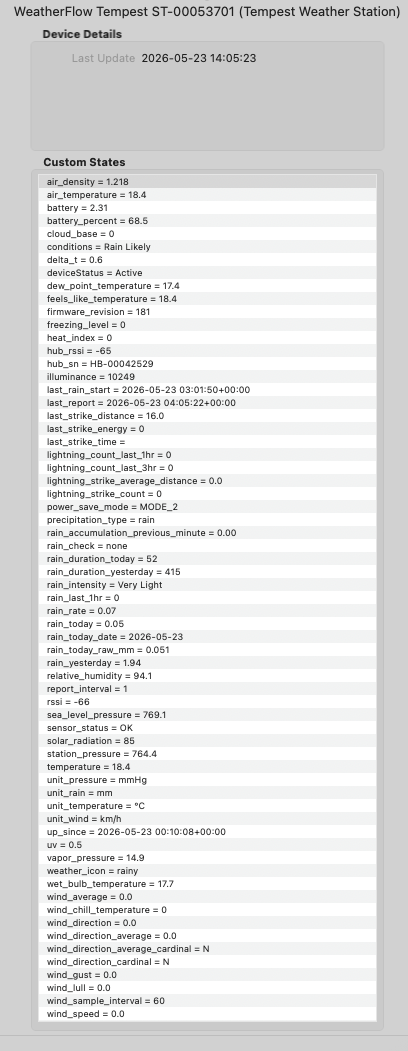
Indigo device states for a Tempest Weather Station showing live sensor readings and unit labels.
Features
- Temperature: Ambient, feels-like, dew point, wet bulb, wind chill, heat index, delta-T
- Atmospheric: Station pressure, sea-level pressure, relative humidity, vapour pressure, air density
- Wind: Instantaneous speed/direction (rapid-wind, ~3 s), 1-minute average, gust, lull, cardinal, sample interval
- Rain: Per-minute accumulation, rain rate, intensity label, daily total, yesterday's total, Rain Check status
- Lightning: Strike count, average distance, last-strike distance, energy and timestamp
- Light: Illuminance (lux), solar radiation (W/m²), UV index
- Battery: Voltage and percentage; power-save mode label; report interval
- Derived: Cloud base, freezing level (both require altitude to be set)
- Diagnostics: RSSI, firmware version, sensor fault flags, silence detection
- Hub: Firmware, Wi-Fi RSSI, uptime, reset reasons
Requirements
- Indigo: 2025.2 or later (ServerApiVersion 3.4)
- WeatherFlow hub: Any — must be on the same subnet as the Indigo Mac
Quick Start
- Install the plugin (double-click WeatherFlowTempest.indigoPlugin).
- Go to Plugins → WeatherFlow Tempest → Configure → Generate Devices.
- Done — states populate within 60 seconds of the first UDP broadcast.
Installation
- Download WeatherFlowTempest.indigoPlugin and double-click it to install.
- Indigo will prompt to enable the plugin — click Enable.
- The plugin begins listening on UDP port 50222 immediately. No further configuration is required to start receiving data.
Auto-create all devices at once (recommended)
- Open Plugins → WeatherFlow Tempest Weather Station → Configure.
- Click Generate Devices.
- The plugin creates one Indigo device for every Tempest and Hub currently broadcasting on the network.
- Re-click the button whenever new hardware is added.
- Go to Devices → New Device → Type: WeatherFlow Tempest Weather Station.
- Choose Tempest Weather Station or WeatherFlow Hub.
- Select your unit from the dropdown — devices are listed as soon as the hub broadcasts.
- Click Save.
Tip: If the device dropdown is empty, the hub has not yet sent a broadcast. Wait 30–60 seconds and use the Reload button in the dialog to refresh the list.
Tempest Device Configuration
- Tempest Device: Serial number of the Tempest (ST-xxxxxxxx), discovered automatically
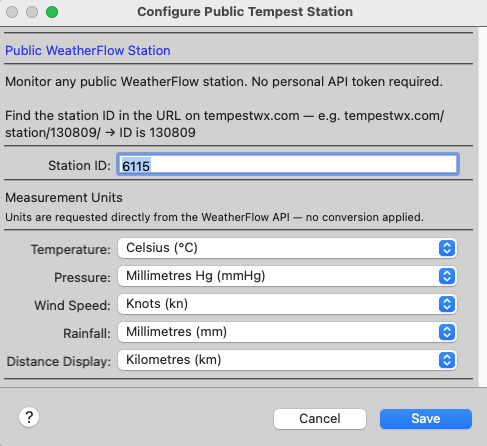
- Altitude (m): Station elevation in metres above sea level. Used to calculate sea-level pressure, cloud base, and freezing level. Set to 0 to omit those derived states.
- Units — Temperature: °C or °F
- Units — Pressure: hPa (mbar), mmHg, or inHg
- Units — Wind Speed: m/s, km/h, mph, or knots
- Units — Rain: mm or inches
Device States
Tempest Weather Station
Temperature
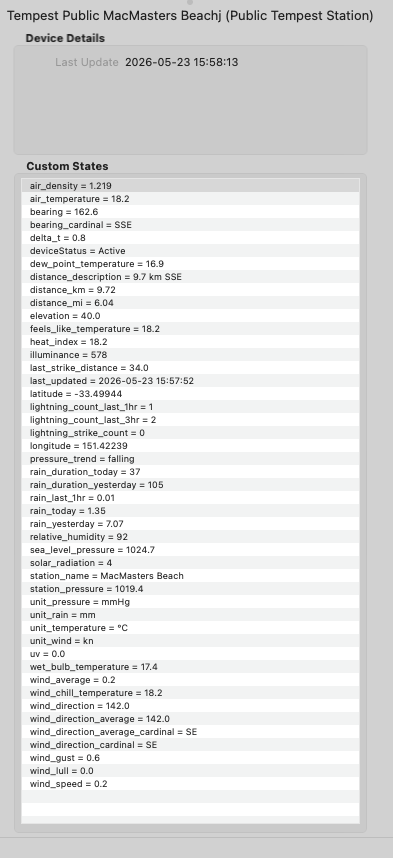
- air_temperature — Ambient temperature
- feels_like_temperature — Apparent / feels-like temperature
- dew_point_temperature — Dew point
- wet_bulb_temperature — Wet bulb temperature
- wind_chill_temperature — Wind chill
- heat_index — Heat index
- delta_t — Delta-T (dry bulb minus wet bulb)
- relative_humidity — Relative humidity (%)
- station_pressure — Raw station pressure
- sea_level_pressure — Sea-level corrected pressure (requires altitude > 0)
- vapor_pressure — Vapour pressure
- air_density — Air density (kg/m³, always metric)
- cloud_base — Estimated cloud base height above station
- freezing_level — Estimated freezing level height above station
- illuminance — Illuminance (lux)
- solar_radiation — Solar irradiance (W/m²)
- uv — UV index
- rain_accumulation_previous_minute — Rain accumulated in the previous minute
- rain_rate — Current rain rate (mm/h or in/h)
- rain_today — Total rain since local midnight
- rain_yesterday — Yesterday's total rain
- rain_intensity — None / Very Light / Light / Moderate / Heavy / Violent
- rain_check — WeatherFlow Rain Check verification status (none / on / off)
- precipitation_type — none, rain, hail, or rain_hail
- last_rain_start — Timestamp of the most recent rain-start event (UTC)
- lightning_strike_count — Strikes detected in the last 3 minutes
- lightning_strike_average_distance — Average distance of recent strikes
- last_strike_distance — Distance of the most recent strike
- last_strike_energy — Energy of the most recent strike
- last_strike_time — Timestamp of the most recent strike (UTC)
- wind_speed — Instantaneous wind speed (rapid-wind, ~3 s interval)
- wind_average — 1-minute average wind speed
- wind_gust — 1-minute wind gust
- wind_lull — 1-minute wind lull
- wind_direction — Instantaneous wind direction (°)
- wind_direction_average — 1-minute average wind direction (°)
- wind_direction_cardinal — Instantaneous cardinal direction (N, NE, …)
- wind_direction_average_cardinal — Average cardinal direction
- wind_sample_interval — Wind measurement window (seconds)
- unit_temperature — Active temperature unit (e.g. °C)
- unit_pressure — Active pressure unit (e.g. hPa)
- unit_wind — Active wind speed unit (e.g. km/h)
- unit_rain — Active rain unit (e.g. mm)
- battery — Battery voltage (V)
- battery_percent — Battery level (%)
- power_save_mode — Active power-save mode name
- report_interval — Observation reporting frequency (minutes)
- rssi — Tempest RF signal strength (dBm)
- hub_rssi — Hub RF signal strength (dBm)
- firmware_revision — Tempest firmware version
- hub_sn — Hub serial number
- up_since — Device power-on timestamp (UTC)
- last_report — Timestamp of the most recent observation (UTC)
- sensor_status — Sensor fault flags, or OK
- deviceStatus — Active / Waiting for data / No data — last seen N min ago
- firmware_revision — Hub firmware version
- rssi — Hub Wi-Fi signal strength (dBm)
- up_since — Hub power-on timestamp (UTC)
- uptime — Seconds since last boot
- reset_flags — Reason(s) for the last reset (comma-separated)
- deviceStatus — Connection status
Triggers
Three custom trigger types are available under Triggers → New Trigger → WeatherFlow Tempest Weather Station.
Each trigger includes a Tempest Device picker so it can be scoped to a specific station when you have more than one.
Lightning Strike Detected
Fires whenever the selected Tempest detects a lightning strike. The last_strike_distance, last_strike_energy, and last_strike_time device states are updated before the trigger fires.
Use cases:
- Send a push notification with distance and energy.
- Flash a light or sound an alert.
- Log strikes to a variable for counting.
Fires when the Tempest detects the onset of precipitation (the first rain-start event after a dry period). The last_rain_start state is updated when this trigger fires.
Use cases:Note: This trigger fires from the Tempest's dedicated rain-start event, which is sent immediately when the sensor detects rain — independent of the 1-minute observation cycle. It fires once per rain onset, not repeatedly while rain continues.
- Close roof vents or skylights.
- Retract a pergola awning.
- Send a "rain started" notification.
Fires when an instantaneous wind reading meets or exceeds a configurable speed. Rapid-wind readings arrive approximately every 3 seconds, giving near-real-time wind monitoring.
Configuration:
- Tempest Device: The Tempest station to watch.
- Threshold (m/s): Minimum wind speed (in m/s) required to fire the trigger.
Use cases:The threshold is always compared against the raw m/s magnitude regardless of the display unit set in the device configuration. Convert your target speed if needed: 1 m/s = 3.6 km/h = 2.237 mph = 1.944 kn.
- Close greenhouse vents above 10 m/s.
- Retract a sail shade above 15 m/s.
- Log wind gusts to a time-stamped variable.
- In power-save MODE_2 and above, rapid-wind events are not sent by the Tempest. The Rapid Wind Exceeds Threshold trigger will not fire in those modes. The wind_speed state still updates from the 1-minute observation, but at a lower frequency.
- Lightning and rain-start triggers fire from discrete UDP events and are not affected by power-save mode.
Station Silence Detection
The plugin monitors each Tempest station for data dropouts. If no observation is received for more than 5 minutes:
- The deviceStatus state is updated to "No data — last seen N min ago", making the outage visible in the Indigo device list without checking logs.
- A warning is written to the Indigo Event Log.
- The warning repeats every 30 minutes for as long as the silence continues, with an updated elapsed time.
The plugin also monitors the UDP listener itself. If the background socket task crashes for any reason, the listener is restarted automatically within 60 seconds.
Plugin Preferences
Open Plugins → WeatherFlow Tempest Weather Station → Configure.
- Generate Devices: Auto-create Indigo devices for all discovered WeatherFlow hardware
- UDP Port: Port the hub broadcasts on (default: 50222)
- Listen Address: Network interface to listen on (default: 0.0.0.0 = all interfaces)
- Indigo Log Level: Verbosity of messages in the Indigo Event Log
- File Log Level: Verbosity of messages written to the plugin log file
Plugin Menu
Plugins → WeatherFlow Tempest Weather Station exposes two menu commands:
- List Discovered WeatherFlow Devices — logs all currently-discovered serial numbers, models, and firmware versions to the Event Log.
- Restart UDP Listener — stops and restarts the listener without reloading the plugin (useful after network changes).
Troubleshooting
Device dropdown is empty / "No devices discovered yet"
- Confirm the WeatherFlow hub is on the same subnet as the Indigo Mac. UDP broadcast does not cross router boundaries.
- Check that nothing is blocking UDP port 50222 (macOS firewall, managed switch, VLAN separation).
- Wait 60 seconds — hubs broadcast a status packet roughly once per minute — then use the Reload button in the device dialog.
- The station has not sent an observation in over 5 minutes. Check the hub's power and Wi-Fi connection, and confirm the Tempest is within RF range.
- Check the Indigo Event Log for listener errors. Use Plugins → WeatherFlow → Restart UDP Listener to retry without reloading the plugin.
- Set Altitude (m) to a non-zero value in the Tempest device configuration.
- This is a known reporting quirk in some Tempest firmware versions where the raw hardware register value is broadcast before the sensor self-test completes. The plugin detects this pattern and displays OK instead. If only a subset of sensors are listed as failed, that is a genuine fault.
- Set Indigo Log Level to Debugging Messages in Plugin Preferences for verbose output in the Event Log.
- The plugin log file is written to ~/Library/Application Support/Perceptive Automation/Indigo 2025.x/Logs/. Set File Log Level to Detailed Debugging Messages for maximum detail.
Libraries & Acknowledgements
pyweatherflowudp — v1.5.2
by Nathan Spencer (@natekspencer)
The core UDP library that handles all communication with the WeatherFlow hub. It provides an event-based asynchronous interface, parses every WeatherFlow message type (observations, rapid wind, lightning strikes, rain events, device status), and exposes sensor values as typed properties with full unit support.
All derived meteorological calculations in the plugin — dew point, wet bulb temperature, heat index, feels-like temperature, vapour pressure, air density, sea-level pressure, cloud base, and freezing level — are provided by this library.
Licensed under MIT. If you find it useful, consider supporting Nathan on Ko-fi.
Pint — v0.25.3
Physical quantity handling with units. All sensor values carry their native unit (e.g. metres per second, millibars) and are converted to the user's chosen display unit using Pint's unit registry, ensuring numerically correct conversions.
PsychroLib — v2.5.0
Psychrometric calculations used by pyweatherflowudp to derive wet bulb temperature and related humidity metrics from the raw sensor readings.
License
MIT — see LICENSE for details.
Developed by GlennNZ.