HKLS Troubleshooting on OS 26.4

A plugin to integration Indigo devices into HomeKit (and Siri)
User avatar
GlennNZ
Posts: 1873
Joined: Sun Dec 07, 2014 3:33 pm
Location: Central Coast, Australia

HKLS Troubleshooting on OS 26.4

Post by GlennNZ »

There are a few issues here, including a plugin bug with newer version of zeroconf. (is not the root cause however). The plugin bug is the IVP selection only is applied if the interfaces is empty - which is why the mdns is now gone given no loopback. Deleting the interfaces and having these blank will return to the default failure behaviour you were seeing. But…

The multicast failure on 192.168.1.3 is the root cause. The routing table confirms multicast should work on en0:

Code: Select all

224.0.0/4    link#6    UmCS    en0    !
224.0.0.251  1:0:5e:0:0:fb  UHmLWI  en0
The easy to miss ! is the issue!
The ! flag on the 224.0.0/4 route means "reject" — this is your problem. That ! indicates a reject/blackhole route for multicast on en0. That's why 192.168.1.3 does not support multicast.

To fix it:

# Remove the reject route

Code: Select all

sudo route delete -net 224.0.0.0/4
# Add a proper multicast route via en0

Code: Select all

sudo route add -net 224.0.0.0/4 -interface en0
Then revert HKLS back to IPVersion.All,
Blank IP fields (the defaults) and restart the plugin.

With the multicast route fixed on en0, the IPv4 socket should be able to send mDNS packets correctly, and the 120-second expiry issue should resolve.

The ! reject flag is unusual and may have been introduced by a VPN client, network manager, or the UniFi application (which you can see also has mDNS sockets open on port 5353). That's the most likely culprit given all the utun interfaces visible in the routing table.

Fingers crossed resolves!
onlyjaymoo
Posts: 24
Joined: Fri Nov 25, 2011 4:07 pm

Re: HKLS Troubleshooting on OS 26.4

Post by onlyjaymoo »

First, I want to thank you very much for continuing to troubleshoot this with me, as this is all clearly beyond my depth. I will at least owe you a beer regardless of how this ends up!

I ran the delete route command (copy/paste) and then the add route command (copy/paste), this time the add route succeeded without error.

I then set the Configure...Advanced back to default (IPVersion All, blank fields) and restarted the Plugin as usual. I saw the advertisement come back like before, but, like before after the timeout, the Rmv came back. Also, immediately after the "Add" advertisement appeared, I tried to add the Bridge to HomeKit using the QR code and, like before, it did not succeed.

I ran the netstat command again after and noticed that the line with the ! was still there, even after the delete and re-add commands above, so I decided to check with ChatGPT to see if maybe the commands to fix the reject route needed to be different.

Since it seemed that you felt confident that the rejection route was the root cause, I asked ChatGPT to interpret the results of the netstat command so I copied and pasted the output and got this back:

Code: Select all

No — based on this exact output, I do not think it shows a “multicast reject route” that you need to remove.
The key point is that the ! at the far right of this line:
224.0.0/4          link#6             UmCS                  en0      !
is not a reject flag. On macOS netstat -rn, the route flags are the letters in the flags column (UmCS here). The ! you see at the end is in the Expire column, and Apple/Ask Different documentation shows that ! is printed when the route’s expire time is not greater than zero.
Your actual route flags there are:
U = route is up
m = multicast
C = cloning
S = static
The reject flag would be R, and it is not present in UmCS.
So, reading your line literally:
224.0.0/4  link#6  UmCS  en0  !
it means you have an active multicast route for IPv4 multicast traffic (224.0.0.0/4) on en0, not a reject route. The separate host route for 224.0.0.251 on en0 is also exactly what you would expect for mDNS/Bonjour, since mDNS uses multicast address 224.0.0.251.
I then tried some tcpdump commands that were suggested, but the conclusion was to try to submit a bug report, so I'm back here ready to perform more steps and log whatever is needed if you have more suggestions to try.
onlyjaymoo
Posts: 24
Joined: Fri Nov 25, 2011 4:07 pm

Re: HKLS Troubleshooting on OS 26.4

Post by onlyjaymoo »

OK, did some more logging based on some prompting from ChatGPT. I am able to confirm a few things:

1) ran: unifi:~ jaymoo$ dns-sd -L "HomeKitLink Bridge 186124 3BF073" _hap._tcp local

Code: Select all

Lookup HomeKitLink Bridge 186124 3BF073._hap._tcp.local
DATE: ---Sun 05 Apr 2026---
12:50:59.991  ...STARTING...
12:53:01.276  HomeKitLink\032Bridge\032186124\0323BF073._hap._tcp.local. can be reached at HomeKitLinkSiri-186124-hap.local.:51826 (interface 1)
 md=HomeKitLink\ Bridge\ 186124 pv=1.1 id=15:23:A3:3B:F0:73 c#=2 s#=1 ff=0 ci=2 sf=1 sh=knXdkg==
2) I think that proves that the plugin is working when it advertises. Also, when the above command is running, the advertisement stays up. Only after I kill the above process, 120s after that, the Rmv shows up

3) I was wrong when I said that my network does not support IPv6 internally. I am just not routed to public IPv6. Internally, apparently, IPv6 is passing within the network. I have removed all VPNs from this computer to try to remove that as a problem.
User avatar
GlennNZ
Posts: 1873
Joined: Sun Dec 07, 2014 3:33 pm
Location: Central Coast, Australia

Re: HKLS Troubleshooting on OS 26.4

Post by GlennNZ »

First of all: Bugger!

SecondL
The issue here is this computer is not accepting multicast on the Ivp4 address.

HKLS - uses largely iVP4. The IVP6 is can be used for advertisement - which is why we get a dns add/rmv if ivp6 is active, but nothing when it is just ivp4. (as blocked)

Bugger about the ! mark - issues with OSX/PC differences.

Seems to be largely Unifi App related which is using a least 8 mdns sockets on this PC.

1. Confirm the multicast group membership failure:

Code: Select all

netstat -gn | grep en0
This shows active multicast group memberships on en0. If 224.0.0.251 is already listed multiple times, that confirms the contention

2.
Code try this python code:

Code: Select all

python3 -c "
import socket, struct
s = socket.socket(socket.AF_INET, socket.SOCK_DGRAM)
s.setsockopt(socket.SOL_SOCKET, socket.SO_REUSEPORT, 1)
s.bind(('', 5353))
mreq = struct.pack('4sL', socket.inet_aton('224.0.0.251'), socket.INADDR_ANY)
try:
    s.setsockopt(socket.IPPROTO_IP, socket.IP_ADD_MEMBERSHIP, mreq)
    print('Multicast join succeeded')
except OSError as e:
    print(f'Multicast join FAILED: {e}')
"
this returns EADDRINUSE or ENOBUFS, the kernel membership table is full or already in use

3.
Quit Unifi App

Code: Select all

# Quit UniFi Network app completely, then:
sudo lsof -i UDP:5353
# Should only show mDNSResponder entries
# Then restart the HKLS bridge and test dns-sd
dns-sd -B _hap._tcp local
4. Check hosts for something strange.

Code: Select all

grep -i "homekit\|hap\|homekit" /etc/hosts
Post the above - but quit the UnfiAp and see if a difference is recorded. Leave IVP.v4ONLY and no IP addresses entered. (double check the boxs are completely empty - no spaces/other characters)

Post the debug log if still issues!

Glenn


Sent from my iPad using Tapatalk
onlyjaymoo
Posts: 24
Joined: Fri Nov 25, 2011 4:07 pm

Re: HKLS Troubleshooting on OS 26.4

Post by onlyjaymoo »

1) netstat -gn | grep en0

Code: Select all

1:0:5e:59:bc:1      	<none>          	en0
33:33:ff:eb:c3:58   	<none>          	en0
33:33:ff:4a:64:b8   	<none>          	en0
1:0:5e:0:0:fb       	<none>          	en0
1:0:5e:0:0:1        	<none>          	en0
33:33:0:0:0:fb      	<none>          	en0
33:33:ff:8a:81:1b   	<none>          	en0
33:33:0:0:0:1       	<none>          	en0
33:33:ff:ae:df:b0   	<none>          	en0
91:e0:f0:1:0:0      	<none>          	en0
1:80:c2:0:0:3       	<none>          	en0
233.89.188.1        	1:0:5e:59:bc:1  	en0
224.0.0.251         	1:0:5e:0:0:fb   	en0
224.0.0.1           	1:0:5e:0:0:1    	en0
ff02::2:ffeb:c358%en0	33:33:ff:eb:c3:58	en0
ff02::1:ff4a:64b8%en0	33:33:ff:4a:64:b8	en0
ff02::fb%en0        	33:33:0:0:0:fb  	en0
ff01::1%en0         	33:33:0:0:0:1   	en0
ff02::2:ff8a:811b%en0	33:33:ff:8a:81:1b	en0
ff02::1%en0         	33:33:0:0:0:1   	en0
ff02::1:ffae:dfb0%en0	33:33:ff:ae:df:b0	en0
This seems to only show one 224.0.0.251 entry if I'm reading it right. This is with the Unifi App running.

2) Code attempt:

Code: Select all

python3 -c "
> import socket, struct
> s = socket.socket(socket.AF_INET, socket.SOCK_DGRAM)
> s.setsockopt(socket.SOL_SOCKET, socket.SO_REUSEPORT, 1)
> s.bind(('', 5353))
> mreq = struct.pack('4sL', socket.inet_aton('224.0.0.251'), socket.INADDR_ANY)
> try:
>     s.setsockopt(socket.IPPROTO_IP, socket.IP_ADD_MEMBERSHIP, mreq)
>     print('Multicast join succeeded')
> except OSError as e:
>     print(f'Multicast join FAILED: {e}')
> "
Multicast join succeeded
3) Quit the Unifi App and then ran: sudo lsof -i UDP:5353

Code: Select all

COMMAND     PID           USER   FD   TYPE             DEVICE SIZE/OFF NODE NAME
mDNSRespo   193 _mdnsresponder    6u  IPv4 0xcd74cc774fce2b9c      0t0  UDP *:mdns
mDNSRespo   193 _mdnsresponder    7u  IPv6 0x1a39953d67e55e3b      0t0  UDP *:mdns
IndigoPlu 22288         jaymoo   14u  IPv6 0xa1229cf7048fc07d      0t0  UDP *:mdns
IndigoPlu 22288         jaymoo   15u  IPv6 0x21b44914447956fb      0t0  UDP homebase.local:mdns
IndigoPlu 22288         jaymoo   16u  IPv6 0x25a205498b582e56      0t0  UDP homebase.local:mdns
IndigoPlu 22288         jaymoo   17u  IPv6 0xc8932ae370032f25      0t0  UDP homebase.local:mdns
IndigoPlu 22288         jaymoo   18u  IPv6 0xa254308c10625d2a      0t0  UDP homebase.local:mdns
IndigoPlu 22288         jaymoo   19u  IPv6 0x68eb63f630d03968      0t0  UDP localhost:mdns
IndigoPlu 22288         jaymoo   20u  IPv6 0x3d0e0c9cb5c96a7a      0t0  UDP homebase.local:mdns
IndigoPlu 22288         jaymoo   21u  IPv6 0xfa49a6e459807912      0t0  UDP [fe80:f::e833:20ff:fe6a:2385]:mdns

unifi:~ jaymoo$ dns-sd -B _hap._tcp local
Browsing for _hap._tcp.local
DATE: ---Sun 05 Apr 2026---
19:51:19.330  ...STARTING...
Timestamp     A/R    Flags  if Domain               Service Type         Instance Name
19:51:19.332  Add        3   6 local.               _hap._tcp.           Thermostat
19:51:19.332  Add        3   6 local.               _hap._tcp.           HomePodSensor 916360
19:51:19.332  Add        3   6 local.               _hap._tcp.           HomePodSensor 95350
19:51:19.332  Add        3   6 local.               _hap._tcp.           MSL120-1b04
19:51:19.332  Add        3   6 local.               _hap._tcp.           Wemo Plug 901
19:51:19.332  Add        2   6 local.               _hap._tcp.           MSL120-2142
19:51:41.225  Add        2   1 local.               _hap._tcp.           HomeKitLink Bridge 186124 3BF073
** Note Rmv still occurred at 19:53:53 like before (120s)

4) grep -i "homekit\|hap\|homekit" /etc/hosts
[returned nothing]

Finally, attaching debug log with everything after 17:00, though most of these tests are around 19:39 and thereafter....
Attachments
plugin.log
(168.56 KiB) Downloaded 18 times
User avatar
GlennNZ
Posts: 1873
Joined: Sun Dec 07, 2014 3:33 pm
Location: Central Coast, Australia

Re: HKLS Troubleshooting on OS 26.4

Post by GlennNZ »

Change to IVP v4ONLY -- all the logging here is for IVVersion.ALL

The issue here:

Code: Select all

Their output proves the “bad” state is:

Indigo plugin bound to IPv6 UDP/5353
attempting IPv6 multicast (ff02::fb)
failing to route it → advert expires/removes
This is my output:

Code: Select all

 sudo lsof -i UDP:5353
COMMAND     PID           USER   FD   TYPE             DEVICE SIZE/OFF NODE NAME
mDNSRespo   197 _mdnsresponder    6u  IPv4 0x45c2617ff8173b16      0t0  UDP *:mdns
mDNSRespo   197 _mdnsresponder    7u  IPv6 0x6ed618d0c6176c29      0t0  UDP *:mdns
IndigoPlu 13955     indigohome   10u  IPv4 0x14a66e5e8c59313f      0t0  UDP *:mdns
IndigoPlu 13955     indigohome   11u  IPv4 0x755cde5643da3d45      0t0  UDP localhost:mdns
IndigoPlu 13955     indigohome   12u  IPv4 0x7bd9462aa81db2d4      0t0  UDP 192.168.1.6:mdns
IndigoPlu 13955     indigohome   13u  IPv4 0x2ba57351f556b182      0t0  UDP 192.168.1.155:mdns
IndigoPlu 56241     indigohome   14u  IPv4 0xec1f23b6b74f780a      0t0  UDP *:mdns
IndigoPlu 56241     indigohome   16u  IPv4 0x19e220e665169e18      0t0  UDP 192.168.1.6:mdns
IndigoPlu 56241     indigohome   17u  IPv4 0x660e7131285358cb      0t0  UDP localhost:mdns
indigohome@Indigo-Middle-i7-Mac-Mini ~ % 

You'll note no IVP6 anywhere - the HAP library needs IVP4 to work.

All the logging here is for IVPVersion.ALL and probably is defaulting to IVP6
Need to restart after applying these advanced settings.

Image

Delete the IP address in the entries in the pluginconfig - make sure blank.

Delete the file plugin.log in file directory.
Restart the plugin

Try again.
Post the log.

Have a new version moments away from trying... (fixes a few issues - but still is a very system specific issue happening here)
User avatar
GlennNZ
Posts: 1873
Joined: Sun Dec 07, 2014 3:33 pm
Location: Central Coast, Australia

Re: HKLS Troubleshooting on OS 26.4

Post by GlennNZ »

Try:

https://github.com/Ghawken/HomeKitLink- ... tag/0.7.45

Has some updates for coming Indigo changes -- should be backwards compatible.

Can return to earlier version with nothing lost.

If errors - would be keen to know them so can fix.

See here:

Image


Adds:
Bug fix for proper selection, changes default interfaces.
Logging item Support mDNS troubleshooting
(see plugin Menu)
onlyjaymoo
Posts: 24
Joined: Fri Nov 25, 2011 4:07 pm

Re: HKLS Troubleshooting on OS 26.4

Post by onlyjaymoo »

I'm trying to figure out how to download the 0.7.45 release... the asset links in the article that was linked to are for 0.6.50....
onlyjaymoo
Posts: 24
Joined: Fri Nov 25, 2011 4:07 pm

Re: HKLS Troubleshooting on OS 26.4

Post by onlyjaymoo »

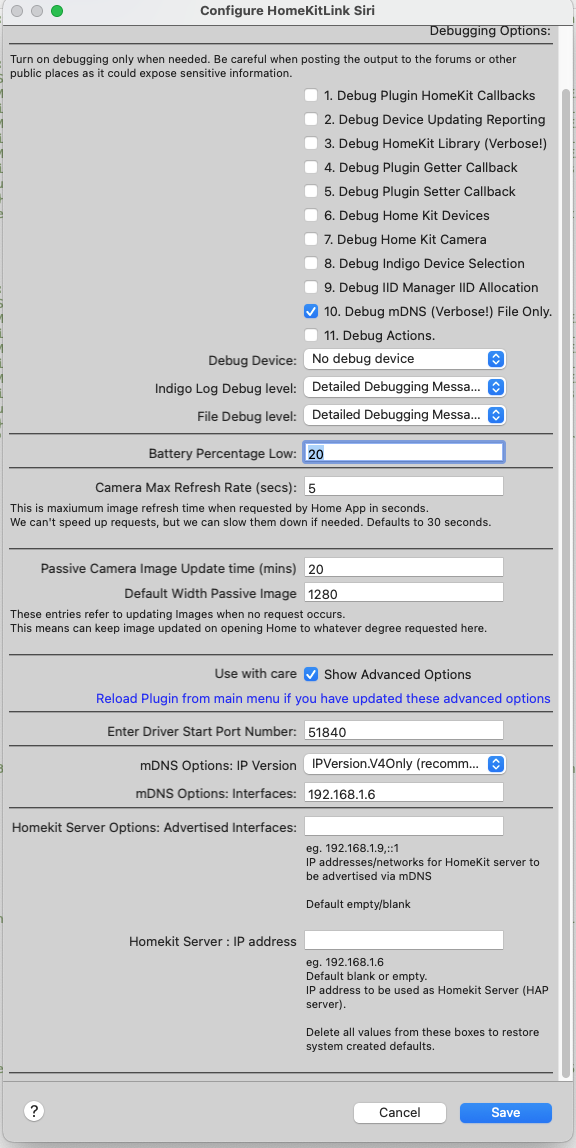
OK, I still wasn't able to find 0.7.45, but I could get to 0.7.40, so I installed that, and made sure to configure IPV4Only, and left the IP address fields blank.

Not sure if I was supposed to disable the other DEBUG boxes besides mDNS like in your picture, but I did so.

The GOOD news: the advertisement is staying up now -- I think that is progress! It doesn't go away. However, when I try to add the Bridge as an Accessory to the Home, it never succeeds.

I deleted the plugin.log before this last attempt and restarted Indigo completely to capture this latest log. Keep in mind the debug checkbox only has the mDNS checked just like in your picture.

I noticed an error in the attached log -- "No route to host" related to 192.168.1.3. Not exactly sure what to make of it, but pretty sure that's not a good thing. All machines on my network can ping it (including itself), so if that is not an optional thing, maybe it is the next thing we need to figure out, now that the advertisement is staying up.

I also changed another thing -- I noticed my python3 was at 3.11, so I updated it to the latest version, which is 3.14. However, the log still shows it is using 3.11, so I'm not sure if that is intended or not, but that is one other difference I noticed.

Lastly, this was all done with the Unifi server still turned off, so that is not a factor.
Attachments
plugin.log
(248.17 KiB) Downloaded 21 times
User avatar
GlennNZ
Posts: 1873
Joined: Sun Dec 07, 2014 3:33 pm
Location: Central Coast, Australia

HKLS Troubleshooting on OS 26.4

Post by GlennNZ »

Sorry - the 0.7.45 I linked to the wrong branch…. had a middle of night thought that I had done that.

https://github.com/Ghawken/HomeKitLink-Siri/releases


OKAY.

Download and use the 0.7.46 version.

Need debug logging from start up. Zip the file if needed.

So - you are still on IVPVersion.ALL ?? — needs to be IVP4Only

And the purpose of this build was the Menu item - mDNS Support - run that and post the troubleshooting output.

Finally: THe whole log file delete plugin.log, restart plugin - and post, almost had the beginning - but need the startup tags.

If the dns is staying up - the failure to add bridge may be unrelated.
eg, Needs to be a brand new QR code, can’t reuse a open browser from early startup

But do above first…
Additional:
- And debug selection - Picture was for the yellow box - but mDNS only.should be okay. File on debug logging.
- Python - Indigo uses its own python install, installing another can break a number of things and is not recommended. I would i uninstall the other version if not being used for anything.


Glenn


Sent from my iPad using Tapatalk
onlyjaymoo
Posts: 24
Joined: Fri Nov 25, 2011 4:07 pm

Re: HKLS Troubleshooting on OS 26.4

Post by onlyjaymoo »

Got 0.7.46 and installed.
Deleted plugin.log
Confirmed IPV4Only (my last post was with IPV4Only as well) and IP fields are blank
Starting Indigo from scratch.
Waited until everything came up, also tried to add Bridge as Accessory with a new QR code (all previous attempts were also with new QR code, not previously saved) -- takes a while trying "Connecting..." and spins and then eventually fails with "Accessory Not Found".
Bridge advertisement remains up.

Attached are the mDNS debug file and the plugin.log file.
Attachments
plugin.log
(107.27 KiB) Downloaded 9 times
Screenshot 2026-04-06 at 3.14.23 PM.png
Screenshot 2026-04-06 at 3.14.23 PM.png (333.56 KiB) Viewed 183 times
event log.txt
(57 KiB) Downloaded 9 times
User avatar
GlennNZ
Posts: 1873
Joined: Sun Dec 07, 2014 3:33 pm
Location: Central Coast, Australia

Re: HKLS Troubleshooting on OS 26.4

Post by GlennNZ »

Okay.

The plugin.log - the last few times seems to be the same file -which is why I thought was IVPVersion.ALL - as it is in that…

If can update that would be great.

I’ll look carefully at event log…


Sent from my iPad using Tapatalk
User avatar
GlennNZ
Posts: 1873
Joined: Sun Dec 07, 2014 3:33 pm
Location: Central Coast, Australia

Re: HKLS Troubleshooting on OS 26.4

Post by GlennNZ »

Okay. Odd and probably the issue.

The issue partially remains:

The Bridge is only registered on the loopback interface = 1, as opposed to the Ivp4 network which = 6

Loopback is only locally seen - so explains why advertisement still there and why you can’t add accessory.

Question is why is it registered on loopback only….

I would enter 192.168.1.3 into the addresses field for both mdns and HAP server. (this new version fixes an issue which may have impacted this working before)…

Try again….
(Still interested in the why here…)


Sent from my iPad using Tapatalk
onlyjaymoo
Posts: 24
Joined: Fri Nov 25, 2011 4:07 pm

Re: HKLS Troubleshooting on OS 26.4

Post by onlyjaymoo »

OK that's what I'll look for going forward... any changes we make, if it were to make a difference, would be to get that advertisement to show if of 6 instead of 1.

Added IP address 192.168.1.3 to both IP fields as per the screenshot. Advertisement is still on if 1 and thankfully continues to stay advertised.

Unfortunately adding Bridge as Accessory is still failing (as you pointed out, probably because Advertisement is still on if 1).

Captured event.log (renamed to event 20h36m.txt) and plugin.log (renamed to plugin 20h36m.log) so that if downloaded you're looking at the correct file (perhaps the same name file when downloaded has been renamed so you end up with plugin 2.log?)

Screenshot to confirm the Advanced settings and logs attached.
Attachments
event log 20h36m.txt
(44.76 KiB) Downloaded 10 times
plugin 20h36m.log
(94.65 KiB) Downloaded 9 times
Screenshot 2026-04-06 at 8.35.43 PM.png
Screenshot 2026-04-06 at 8.35.43 PM.png (351.53 KiB) Viewed 177 times
User avatar
GlennNZ
Posts: 1873
Joined: Sun Dec 07, 2014 3:33 pm
Location: Central Coast, Australia

Re: HKLS Troubleshooting on OS 26.4

Post by GlennNZ »

Okay.

The new log clears things up:

Code: Select all

2026-04-06 20:37:06.292	DEBUG	zeroconf.add_multicast_member:	Adding '192.168.1.3' (socket 13) to multicast group
2026-04-06 20:37:06.292	DEBUG	zeroconf.new_socket:	Creating new socket with port 5353, ip_version IPVersion.V4Only, apple_p2p False and bind_addr ('192.168.1.3',)
2026-04-06 20:37:06.292	DEBUG	zeroconf.new_socket:	Created socket <socket.socket fd=16, family=2, type=2, proto=0, laddr=('192.168.1.3', 5353)>
2026-04-06 20:37:06.292	DEBUG	zeroconf.new_respond_socket:	Configuring socket <socket.socket fd=16, family=2, type=2, proto=0, laddr=('192.168.1.3', 5353)> with multicast interface 192.168.1.3
Socket is created and bound.

Everytime tries to send a multicast announcement to 224.0.0.251:5353 this happens:

Code: Select all

2026-04-06 20:37:06.301	WARNING	zeroconf.log_exception_once:	Error with socket 16 (('192.168.1.3', 5353))): [Errno 65] No route to host
Traceback (most recent call last):
  File "/Library/Frameworks/Python.framework/Versions/3.11/lib/python3.11/asyncio/selector_events.py", line 1196, in sendto
    self._sock.sendto(data, addr)
OSError: [Errno 65] No route to host
Incoming is received.

Code: Select all

2026-04-06 20:38:00.931	DEBUG	zeroconf._read_ready:	Received from '192.168.1.247':5353 [socket 16 (('192.168.1.3', 5353))]: <DNSIncoming:id=0, flags=0, truncated=False, n_q=1, n_ans=0, n_auth=0, n_add=0, questions=[ptr[question,QU,in,_companion-link._tcp.local.]], answers=[]> (44 bytes) as [b'\x00\x00\x00\x00\x00\x01\x00\x00\x00\x00\x00\x00\x0f_companion-link\x04_tcp\x05local\x00\x00\x0c\x80\x01']
2026-04-06 20:38:13.812	DEBUG	zeroconf._read_ready:	Received from '192.168.1.247':5353 [socket 16 (('192.168.1.3', 5353))]: <DNSIncoming:id=0, flags=0, truncated=False, n_q=1, n_ans=0, n_auth=0, n_add=0, questions=[ptr[question,QU,in,_companion-link._tcp.local.]], answers=[]> (44 bytes) as [b'\x00\x00\x00\x00\x00\x01\x00\x00\x00\x00\x00\x00\x0f_companion-link\x04_tcp\x05local\x00\x00\x0c\x80\x01']

So seems we are back to a Network Stack issue. Nothing plugin or Home related it would seem....

Try:

Code: Select all

route -n get 224.0.0.251
We have done this in the check and seems okay.

&&

Code: Select all

python3 -c "
import socket
s = socket.socket(socket.AF_INET, socket.SOCK_DGRAM)
s.setsockopt(socket.IPPROTO_IP, socket.IP_MULTICAST_IF, socket.inet_aton('192.168.1.3'))
s.sendto(b'test', ('224.0.0.251', 5353))
print('OK')
"
I suspect the above will end up in the same place.

& Can try

Code: Select all

sudo tcpdump -ni en0 udp port 5353
And restart plugin - will be a bit of mDNS traffic - but question here is whether there is any outbound mDNS traffic...
Post Reply

Return to “HomeKitLink Siri”