If I understand your gate opener correctly, you may be able to use the Virtual Garage Door (VGD) plugin to meet your needs. VGD models a conventional (reversing) garage door opener that has a state transition diagram as follows:
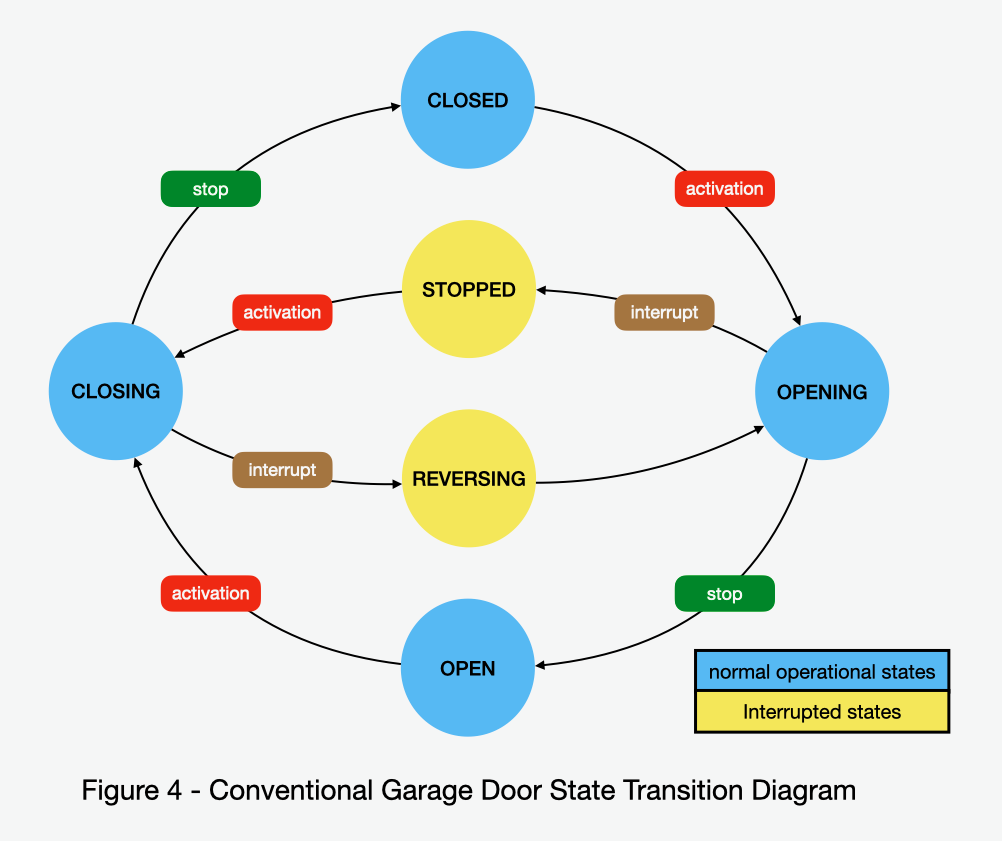
If you imagine that each "activation" and each "interrupt" event in the diagram is an execution of your START action group, then the model mostly fits:
Begin in the CLOSED state
START --> OPENING
Next START --> STOPPED
Next START --> CLOSING
Next START --> REVERSING --> OPENING
In VGD, the "activation" and "interrupt" events are closures of the VGD activation relay which is assumed to be a normal on/off relay device with an onOffState. If you modify your Indigo virtual on/off device to execute your START action group for turnOn, but not for turnOff, it can be a VGD activation relay. You do, of course, have to maintain the correct onOffState during the device operation.. I assume that you checked "Supports Status" and that your START action sets a boolean status variable to "true". The turnOff action group should only set the variable to "false".
With that change to your virtual on/off device, you can create a VGD opener device and select your virtual on/off device as the opener's activation relay. You may choose to create a VGD travel timer device, but that is not necessary. Using open and closed sensor devices would be helpful, but again, these are not needed. Publish your VGD opener device to HKLS as a garage door device and set it up in your Home app.
Using the Home app you should observe the following:
The opener device tile will show a CLOSED state at startup.
Tapping the opener icon will execute your START action group, begin opening the gate, and change the state to OPENING.
Tapping the opener icon a second time will execute your START action group again, stop the gate, and change the state to OBSTRUCTED (HomeKit has no STOPPED state).
Tapping the opener icon a third time will execute your START action group again, and begin closing the gate, but continue to display the state as OBSTRUCTED.
Tapping the opener icon a fourth time will execute your START action group again, and begin opening the gate, but continue to display the state as OBSTRUCTED,
In VGD, you can't escape the OBSTRUCTED state until you reach a stationary CLOSED state and you can't get to CLOSED without timer and/or sensor devices. The semantics of the scenario that I described are somewhat unsatisfactory because of the OBSTRUCTED state, but that could be improved using additional devices.
Also note that the same scenario can be run with the Indigo Touch app by turning the opener device on or off. Unfortunately, the semantics here are also a bit awkward; you turn the opener device off to open the gate and on to close it. This is also an artifact of HomeKit state definitions.
I don't quite understand how your gate stops either in the OPEN or CLOSED states. With a better understanding, I'm sure that we can figure out a way to make VGD work for you. Think about it and let me know how I can help. If you do choose to try it, be sure to get the latest version of the VGD plugin (v1.5.1) from my GitHub repository (github.com/papamac/VirtualGarageDoor). Some of the things that I described above may not work with the older plugin store version.
David Krause (aka papamac)


