Garage Doors, again

A plugin to integration Indigo devices into HomeKit (and Siri)
User avatar
berkinet
Posts: 3441
Joined: Tue Nov 18, 2008 2:08 pm
Location: Berkeley, CA, USA & Mougins, France

Garage Doors, again

Post by berkinet »

So... I have a gate that I publish to HomeKit as a Garage Door. It works, as in, I get the functionality I want. However, the problem is in the Home app which wants to reverse the open/close state. This has been discussed before and I have read all the relevant threads. However, the problem I have is a little different. I control the gate in both the Home app (usually in my car) as well as in Indigo and the Indigo touch app.

In my case, the gate device is actually an Indigo Virtual Devices device, with a single action [START] for both on and off. The gate control is a simple pushbutton, that follows the following logic...
  • START → open
  • Next START→ stop
  • Next START → close
  • Next START → open
    • At the end of the cycle, when the pause time has elapsed
      the control unit automatically closes the gate.
      or
    • START closes the gate
The virtual devices state is based on an Indigo variable that shows the current state: closed; opening; open; closing; closed...This works fine in an Indigo control page, where the states track the actual state of the gate. However, in the Home app the states cycle as: open; closing; closed; opening...

So, my question: how can I (or can I?) have this work in both the Home app and in Indigo? All I can think of at the moment is to have 2 virtual devices and maintain 2 status variables. Is there a better way, or perhaps an "inverse" like option that could be added to HKLS?
User avatar
GlennNZ
Posts: 1872
Joined: Sun Dec 07, 2014 3:33 pm
Location: Central Coast, Australia

Re: Garage Doors, again

Post by GlennNZ »

Probably would have a look at the great Virtual garage door plugin which might be stretched to fit this device type

I’ve been reluctant to, and remain reluctant to add an inverse - because this check would occur in front of any command of any device always. Whilst overhead is probably not much …


Sent from my iPhone using Tapatalk
User avatar
berkinet
Posts: 3441
Joined: Tue Nov 18, 2008 2:08 pm
Location: Berkeley, CA, USA & Mougins, France

Re: Garage Doors, again

Post by berkinet »

Unfortunately, the virtual garage door plug-in does not support reading states from variables, only devices. I might be able to have the virtual garage door read the state from the virtual device I created. I’ll take a look at it and let you know.
t-star
Posts: 146
Joined: Fri Oct 26, 2007 9:56 pm

Re: Garage Doors, again

Post by t-star »

A thought, you could have HomeKit call an action group and do all the checking and stuff via coding and steps in the action group.
User avatar
berkinet
Posts: 3441
Joined: Tue Nov 18, 2008 2:08 pm
Location: Berkeley, CA, USA & Mougins, France

Re: Garage Doors, again

Post by berkinet »

t-star wrote: Wed Dec 31, 2025 8:47 am A thought, you could have HomeKit call an action group and do all the checking and stuff via coding and steps in the action group.
I took the simple route and just created two Virtual devices and modified my state code to update two separate variables, one in su=ync, and one reversed (for the HKLS published device.

But, say more... are you saying I can have the Home app call back into Indigo somehow?
User avatar
berkinet
Posts: 3441
Joined: Tue Nov 18, 2008 2:08 pm
Location: Berkeley, CA, USA & Mougins, France

Re: Garage Doors, again

Post by berkinet »

GlennNZ wrote: Wed Dec 31, 2025 4:25 am ...I’ve been reluctant to, and remain reluctant to add an inverse - because this check would occur in front of any command of any device always. ...
In fact, while an inverse option could work for a 2 state system. It would not work for a four (or more -- like obstructed, paused, etc.) system.

In any case, as I have noted in another reply on this thread, I just created a second virtual device to be used for HKLS, and all is well.

Have a Happy New Year... I guess it's already 2026 for you.
t-star
Posts: 146
Joined: Fri Oct 26, 2007 9:56 pm

Re: Garage Doors, again

Post by t-star »

You can create a "device" in HomeKit Link and point it to an action group. Whenever you click it in Home it will run the action group in Indigo. May want to check the instructions on the ins and outs of that set up in HomeKit Link.
User avatar
papamac
Posts: 168
Joined: Wed Jan 29, 2014 2:07 pm

Re: Garage Doors, again

Post by papamac »

If I understand your gate opener correctly, you may be able to use the Virtual Garage Door (VGD) plugin to meet your needs. VGD models a conventional (reversing) garage door opener that has a state transition diagram as follows:
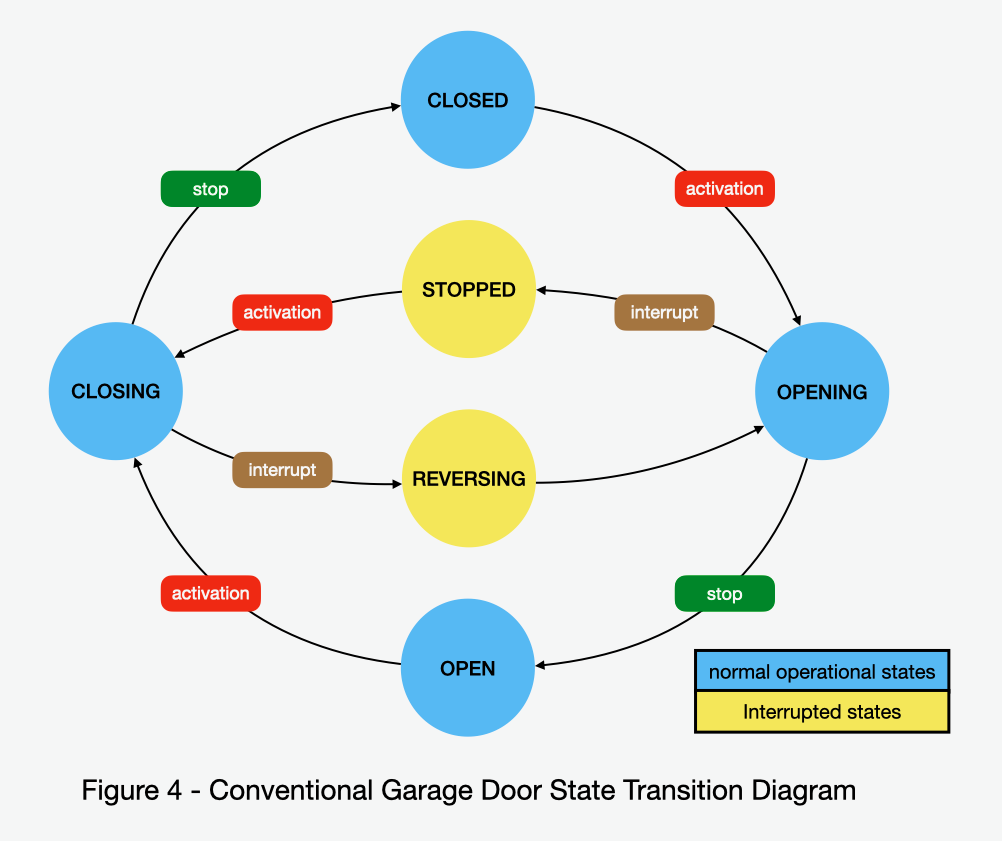
Image

If you imagine that each "activation" and each "interrupt" event in the diagram is an execution of your START action group, then the model mostly fits:

Begin in the CLOSED state
START --> OPENING
Next START --> STOPPED
Next START --> CLOSING
Next START --> REVERSING --> OPENING

In VGD, the "activation" and "interrupt" events are closures of the VGD activation relay which is assumed to be a normal on/off relay device with an onOffState. If you modify your Indigo virtual on/off device to execute your START action group for turnOn, but not for turnOff, it can be a VGD activation relay. You do, of course, have to maintain the correct onOffState during the device operation.. I assume that you checked "Supports Status" and that your START action sets a boolean status variable to "true". The turnOff action group should only set the variable to "false".

With that change to your virtual on/off device, you can create a VGD opener device and select your virtual on/off device as the opener's activation relay. You may choose to create a VGD travel timer device, but that is not necessary. Using open and closed sensor devices would be helpful, but again, these are not needed. Publish your VGD opener device to HKLS as a garage door device and set it up in your Home app.

Using the Home app you should observe the following:

The opener device tile will show a CLOSED state at startup.
Tapping the opener icon will execute your START action group, begin opening the gate, and change the state to OPENING.
Tapping the opener icon a second time will execute your START action group again, stop the gate, and change the state to OBSTRUCTED (HomeKit has no STOPPED state).
Tapping the opener icon a third time will execute your START action group again, and begin closing the gate, but continue to display the state as OBSTRUCTED.
Tapping the opener icon a fourth time will execute your START action group again, and begin opening the gate, but continue to display the state as OBSTRUCTED,

In VGD, you can't escape the OBSTRUCTED state until you reach a stationary CLOSED state and you can't get to CLOSED without timer and/or sensor devices. The semantics of the scenario that I described are somewhat unsatisfactory because of the OBSTRUCTED state, but that could be improved using additional devices.

Also note that the same scenario can be run with the Indigo Touch app by turning the opener device on or off. Unfortunately, the semantics here are also a bit awkward; you turn the opener device off to open the gate and on to close it. This is also an artifact of HomeKit state definitions.

I don't quite understand how your gate stops either in the OPEN or CLOSED states. With a better understanding, I'm sure that we can figure out a way to make VGD work for you. Think about it and let me know how I can help. If you do choose to try it, be sure to get the latest version of the VGD plugin (v1.5.1) from my GitHub repository (github.com/papamac/VirtualGarageDoor). Some of the things that I described above may not work with the older plugin store version.


David Krause (aka papamac)
User avatar
berkinet
Posts: 3441
Joined: Tue Nov 18, 2008 2:08 pm
Location: Berkeley, CA, USA & Mougins, France

Re: Garage Doors, again

Post by berkinet »

papamac wrote: Wed Dec 31, 2025 12:49 pm If I understand your gate opener correctly, you may be able to use the Virtual Garage Door (VGD) plugin to meet your needs. ...
Thank you for your reply. I have looked at the VGD plugin and, while it would work, the level of integration it would provide was less than I was able to achieve by using two Virtual Devices. The main reason is that VGD presents a time based model. However, in my situation, I am able to determine precisely which of the 4 operating states the gate is in at any time.
User avatar
berkinet
Posts: 3441
Joined: Tue Nov 18, 2008 2:08 pm
Location: Berkeley, CA, USA & Mougins, France

Re: Garage Doors, again

Post by berkinet »

Ok... as noted here already, the two device solution seems to be the way to go. But, I now have a small problem that seems to be in the HomeKitLink Siri plugin.

• The Indigo virtual device is correctly providing four distinct states: closing; closed; opening; open (they inverse of the actual states)
• In the Home app, the HomeKit device shows opening → open correctly
• But on the reverse transition it skips "closing" and then jumps to → closed
• I can see that Indigo itself gets the correct states as tracked in the variables used as the status input for the virtual device that is published in HomeKitLink Siri.

So, it looks like the HomeKitLink Siri logic may be missing the "closing" (or opening in it's view) transition.

I'd be glad to provide additional information if needed.

Thanks.
User avatar
papamac
Posts: 168
Joined: Wed Jan 29, 2014 2:07 pm

Re: Garage Doors, again

Post by papamac »

That's what led me to write the VGD plugin. A simple on/off switch can be used as a garage door device in HKLS, but it only sends the onOffState to HomeKit. HomeKit (or the Home app) tries to infer the actual states for display purposes. VGD opener devices send an integer dooorState that matches the HomeKit state enumeration:

https://developer.apple.com/documentati ... edoorstate

In the latest VGD version, I use:

Code: Select all

OPEN, CLOSED, OPENING, CLOSING, OBSTRUCTED = range(5)
I chose OBSTRUCTED instead of STOPPED because VGD can't tell the difference with its sensors, and furthermore, HomeKit doesn't't seem to use the STOPPED state. HomeKit does, however, have an OBSTRUCTED characteristic that it uses to flag troubles. Glenn and I modified HKLS to check for the OBSTRUCTED doorState and then set the OBSTRUCTED characteristic.

VGD tracks doorStates and sends them via HKLS to HomeKit. In all, it works pretty well... provided that VGD has the appropriate sensor data. As you mention, VGD can use a door travel time model, but it primarily relies on open and closed sensor data for accurate state tracking.

Do you have sensors on your gate? How do you tell when the gate is in a stationary OPEN or CLOSED position? There may still be some possibilities here.
User avatar
berkinet
Posts: 3441
Joined: Tue Nov 18, 2008 2:08 pm
Location: Berkeley, CA, USA & Mougins, France

Re: Garage Doors, again

Post by berkinet »

papamac wrote: Thu Jan 01, 2026 1:57 pm...Do you have sensors on your gate? How do you tell when the gate is in a stationary OPEN or CLOSED position? There may still be some possibilities here.
The gate has a warning light that flashes at 0.625HZ when opening and 1.25HZ when closing. From that, I can infer the 4 states. open and closed are determined by referencing the last known state if flashing stops. I also have limit sensors. However, at the moment I am not using them while I am fine tuning the flash frequency code. So, when this is done, opening and closing will be determined by the warning light frequency and open and closed will be determined by the limit switches. But, regardless of how they are determined, yes, I have the ability to sense all r gate states -- including stopped (neither open nor closed, and not moving). Though I am not using that.

Since the actual states of the Indigo virtual device I am using for the "gate" are fully under my control, I could set the state values to anything. I did try enumerated values 0 through 4, as suggested in the link you provided. However, only 0 (open) and 1 (closed) were recognized or passed through to the Home app.
User avatar
berkinet
Posts: 3441
Joined: Tue Nov 18, 2008 2:08 pm
Location: Berkeley, CA, USA & Mougins, France

Re: Garage Doors, again

Post by berkinet »

I may have found the problem. For a garage door/gate, the only useful device type available from the Indigo Virtual Devices plugin is an On/Off device. The virtual On/Off device correctly maps open and closed to onOffState on or off. However, closing and opening are not mapped to OnOffState. Instead, they are mapped to errorState, and onOffState remains unchanged. This means HKLS doesn't see the correct device state. The only odd thing is that HKLS does somehow detect the closing (actually opening) state, but not the opening (actually closing) state?
User avatar
papamac
Posts: 168
Joined: Wed Jan 29, 2014 2:07 pm

Re: Garage Doors, again

Post by papamac »

Based on what you have said, I'm going to speculate on how your software works. I will probably get some things wrong, but if my speculation is close, I think that we have a solution in the making. Tell me what you think.

So here goes... I believe that you have defined one (or two?) Indigo virtual on/offState devices that you publish to HKLS to allow use by HomeKit and the Home app for controlling and monitoring your gate. For the moment let's assume that there is only one such device and let's call it "berkinet-gate". berkinet-gate calls the START action group when it is turned on or off, has the "Supports Status" box checked, and defines a status variable... let's call it "gateState". The START action group has a section of code that sends a signal to the gate hardware to start moving (either opening of closing)... let's call this the "activation code". After executing the activation code, START monitors the warning light, determines its frequency, and sets the gateState to either 2 (OPENING) or 3 (CLOSING) depending on the frequency. START then continues to monitor the warning light to determine when the flashing stops. When it does, it sets the gateState to either 0 (OPEN) or 1 (CLOSED) and the berkinet-gate onOffState to 0 for OPEN, or 1 for CLOSED.

Assuming that my speculation is correct, let's walk through an opening use case. Suppose that we start with the gate closed: the gateState variable is 1 (CLOSED), the berkinet-gate onOffState is 1 (CLOSED), and the Home app is displaying CLOSED. You then tap the berkinet-gate icon on your phone. HomeKit tells HKLS to open berkinet-gate, HKLS issues an indigo.device.trunOff command for berkinet-gate, the berkinet-gate device executes the START action Group, START executes the activation code, sets the gateState variable to 2 (OPENING), and the gate hardware begins opening. In the meantime, the Home app displays OPENING, not because the gateState was set to 2, but simply because it intuits that OPENING happens after issuing an open command. Next, START determines that the flashing has stopped, sets the gateState to 0 (OPEN) and sets the berkinet-gate onOffState to 0 (OPEN). HKLS is monitoring the berkinet-gate onOffState, senses the change and tells HomeKit that berkinet-gate is open. Finally, the Home app displays OPEN.

This all works, but... as I think you now understand, the HomeKit and Home app response is based only on the berkinet-gate onOffState (and its pre-programmed rules) and not on the gateState. HomeKit and the Home app don't even know about the gateState. VGD solves this problem by defining an opener device with a 5-value doorState instead of the onOffState to communicate the instantaneous state to HKLS and HomeKit.

To use VGD, you need an activation relay, a closed sensor, and an open sensor (see the wiki for details). The activation relay can simply be an Indigo virtual on/off device that executes your activation code form the START action group when the device is turned on and simply resets the onOffState when it is turned off. Ideally, the closed and open sensors could be digital input devices using signals obtained directly from the gate limit switches. This is your best option. If this is difficult as I imagine it might be, you can define two additional Indigo virtual on/off devices and turn these on or off based on your current algorithm for monitoring the warning light. Without more details on the START action group code, I can't propose a specific way of doing this, but I believe that it is possible to create virtual closed and open sensor devices using your existing logic

I hope that my analysis has been helpful and stand ready to assist further should you choose to use VGD.

David
User avatar
berkinet
Posts: 3441
Joined: Tue Nov 18, 2008 2:08 pm
Location: Berkeley, CA, USA & Mougins, France

Re: Garage Doors, again

Post by berkinet »

papamac wrote: Fri Jan 02, 2026 12:40 am Based on what you have said, I'm going to speculate on how your software works. I will probably get some things wrong, but if my speculation is close, I think that we have a solution in the making. Tell me what you think.
You have pretty much described the system, with just a couple of minor variances.
While I do have two virtual devices, only one of them is being used for HKLS. That one is fed the inverse state which in turn causes HomeKit to display the proper state. The other device is used for internal control from control pages and the Indigo Touch app.

Then, your logic in determining open and closing state is correct, but I do it slightly differently than you have guessed. I monitor the state of the warning lamp circuit using an Indigo relay device tied to a digital input, which monitors the state of the lamp circuit. Then, in indigo, I run an attachment script that is loaded when Indigo starts. Finally, I have a trigger which watches the state of the indigo relay device. Every time it turns on, I call a function inside my attachment script. All the rest of the work is done there, including determining frequency between pulses, and setting variable values. There are two separate variables maintained, one is the inverse of the other.

Since I have two virtual devices representing the gate, I can use the onOff state of one to determine if the gate is open, and the onOff state of the other to determine if it is closed. Of course, one of those two devices operates inversely, but I can resolve that by using the inverse checkbox in the VGD plug-in on one input.

One last question, since I will be determining the actual open closed state with the equivalent of sensors, should I assume an actual event will override timing and use 20 seconds as the time value in the VGD plug-in device?
Post Reply

Return to “HomeKitLink Siri”