Triggering a zigbee device

lazlohollyfeld
Posts: 52
Joined: Mon Jan 09, 2012 10:37 pm

Re: Triggering a zigbee device

Post by lazlohollyfeld »

Ok - i deleted everything and started over..

I think i have a problem with my path - as I am able to read current state and send a payload, however the device is not opening/closing..

This is the log snippet - when the device is toggled in indigo:

Code: Select all

   MQTT Shims Debug                Main Water Valve: publish_topic: zigbee2mqtt/UTILITY_DEVICES/MAIN_WATER_SHUTOFF/ -> {"state":"ON"}
   MQTT Connector Debug            Zigbee2MQTT v3: publishMessageAction zigbee2mqtt/UTILITY_DEVICES/MAIN_WATER_SHUTOFF/: {"state":"ON"}, 0, False
   MQTT Connector Debug            Zigbee2MQTT v3: Message published: 47
   MQTT Shims Debug                Main Water Valve: getDeviceStateList returning: States : (list)
   MQTT Connector Debug            Main Water Valve: deviceUpdated: doExcludes = False, listedDevice = False
   MQTT Connector Debug            Main Water Valve: deviceUpdated: id = 504655790, devList = published_devices : (list)
Here is what I see in MQTT Explorer:
Image

notice the line "={"state":"ON"} is what is coming from Indligo - clearly in the wrong spot.. It looks like i'm not "sticking" the state in the right place...?

here is my device setup
the full action topic path is clipped in the screenshot, here it is:

Code: Select all

zigbee2mqtt/UTILITY_DEVICES/MAIN_WATER_SHUTOFF/ 
Image

Any ideas on what i'm doing wrong?
User avatar
FlyingDiver
Posts: 7830
Joined: Sat Jun 07, 2014 10:36 am
Location: Southwest Florida, USA

Re: Triggering a zigbee device

Post by FlyingDiver »

The payload looks fine, if it's supposed to be JSON. Get rid of the trailing slash on the topic.
joe (aka FlyingDiver)
my plugins: http://forums.indigodomo.com/viewforum.php?f=177
lazlohollyfeld
Posts: 52
Joined: Mon Jan 09, 2012 10:37 pm

Re: Triggering a zigbee device

Post by lazlohollyfeld »

ftr, i tried with and without trailing slash.. same

I did finally figure it out- via the zigbee2MQTT docs! I needed to add "set" to the end of the URL:

Code: Select all

zigbee2mqtt/UTILITY_DEVICES/MAIN_WATER_SHUTOFF/set
thanks for this AWESOME set of plugins and assistance!
lazlohollyfeld
Posts: 52
Joined: Mon Jan 09, 2012 10:37 pm

Re: Triggering a zigbee device

Post by lazlohollyfeld »

actually.... spoke too soon - i can control it - but cannot seem to get current state - any ideas?

I'm not getting the current state back - here is what i have.. I tried with and without the "/get" on the end:

Status Request Topic:
zigbee2mqtt/UTILITY_DEVICES/MAIN_WATER_SHUTOFF/get
Status Request Payload: {"state":""}
Indigo Log:

Code: Select all

   MQTT Shims Debug                Main Water Valve: actionControlUniversal: RequestStatus
   MQTT Shims Debug                Main Water Valve: publish_topic: zigbee2mqtt/UTILITY_DEVICES/MAIN_WATER_SHUTOFF/get -> {"state":""}
   MQTT Shims                      Sent 'Main Water Valve' Status Request
   MQTT Connector Debug            Zigbee2MQTT v3: publishMessageAction zigbee2mqtt/UTILITY_DEVICES/MAIN_WATER_SHUTOFF/get: {"state":""}, 0, False
   MQTT Connector Debug            Zigbee2MQTT v3: Message published: 103
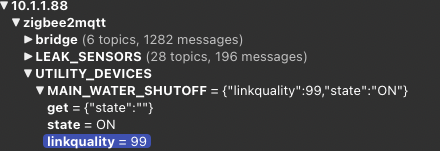
MQTT Explorer:

Image

Zigbee2MQTT Log:

Code: Select all

Debug 2022-11-18 11:02:09Received MQTT message on 'zigbee2mqtt/UTILITY_DEVICES/MAIN_WATER_SHUTOFF/get' with data '{"state":""}'
Debug 2022-11-18 11:02:09Publishing get 'get' 'state' to 'UTILITY_DEVICES/MAIN_WATER_SHUTOFF'
Debug 2022-11-18 11:02:09Received Zigbee message from 'UTILITY_DEVICES/MAIN_WATER_SHUTOFF', type 'readResponse', cluster 'genOnOff', data '{"onOff":1}' from endpoint 1 with groupID 0
Info 2022-11-18 11:02:09MQTT publish: topic 'zigbee2mqtt/UTILITY_DEVICES/MAIN_WATER_SHUTOFF', payload '{"linkquality":99,"state":"ON"}'
Info 2022-11-18 11:02:09MQTT publish: topic 'zigbee2mqtt/UTILITY_DEVICES/MAIN_WATER_SHUTOFF/state', payload 'ON'
Info 2022-11-18 11:02:09MQTT publish: topic 'zigbee2mqtt/UTILITY_DEVICES/MAIN_WATER_SHUTOFF/linkquality', payload '99'
User avatar
FlyingDiver
Posts: 7830
Joined: Sat Jun 07, 2014 10:36 am
Location: Southwest Florida, USA

Re: Triggering a zigbee device

Post by FlyingDiver »

The state updates are getting sent by zigbee2mqtt, it's these lines:

Code: Select all

Info 2022-11-18 11:02:09MQTT publish: topic 'zigbee2mqtt/UTILITY_DEVICES/MAIN_WATER_SHUTOFF', payload '{"linkquality":99,"state":"ON"}'
Info 2022-11-18 11:02:09MQTT publish: topic 'zigbee2mqtt/UTILITY_DEVICES/MAIN_WATER_SHUTOFF/state', payload 'ON'
Info 2022-11-18 11:02:09MQTT publish: topic 'zigbee2mqtt/UTILITY_DEVICES/MAIN_WATER_SHUTOFF/linkquality', payload '99'
You need a trigger for the `zigbee2mqtt/UTILITY_DEVICES/MAIN_WATER_SHUTOFF` topic so it sends that message to the Shim. And you need to specify the "On value" in the Shim as "ON".
joe (aka FlyingDiver)
my plugins: http://forums.indigodomo.com/viewforum.php?f=177
Post Reply

Return to “MQTT”