ZEAL - Getting started with Z-wave notifications

krissh
Posts: 105
Joined: Sun Nov 18, 2012 6:59 pm
Location: Norway

ZEAL - Getting started with Z-wave notifications

Post by krissh »

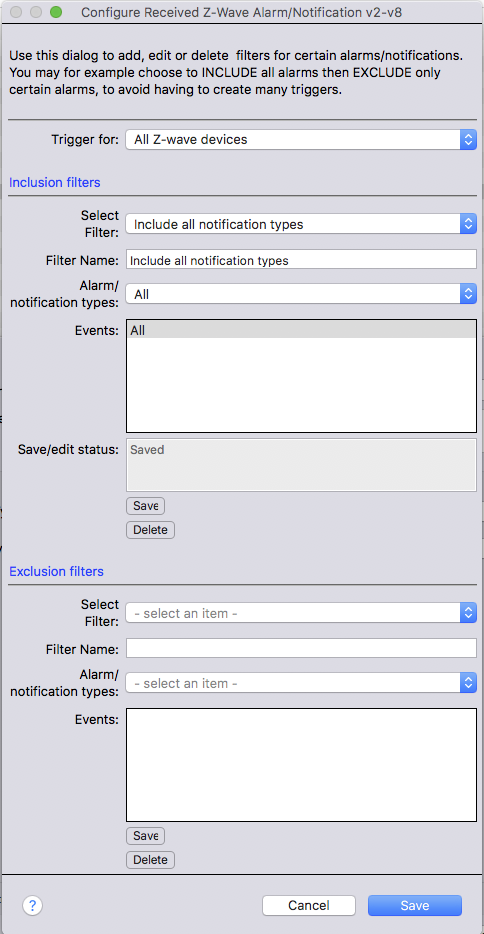
Since the z-wave notification reports are not currently visible in the Indigo logs, it might be a bit difficult to know which devices send which kind of notification reports. To get started and understand which devices send which notification reports, a trigger similar to the one below can be set up:
Skjermbilde 2017-11-30 kl. 23.14.00.png
Skjermbilde 2017-11-30 kl. 23.14.00.png (148.92 KiB) Viewed 4025 times
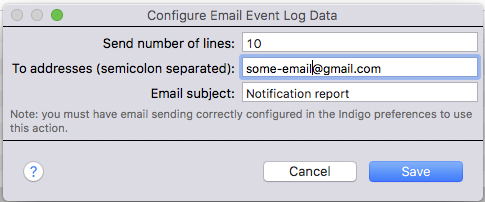
Then an action for example like this can be added to the trigger:
Skjermbilde 2017-11-30 kl. 23.20.21.png
Skjermbilde 2017-11-30 kl. 23.20.21.png (51.8 KiB) Viewed 4025 times
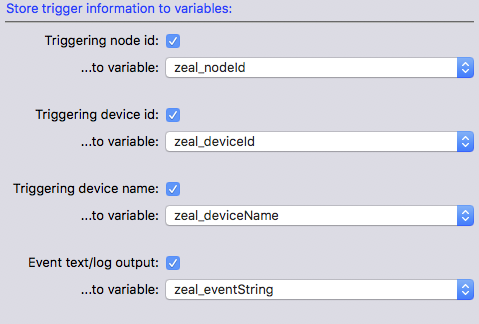
Alternatively, in the plugin options you can set up variables that will be updated with the information on the triggering event and device:
Skjermbilde 2017-11-30 kl. 23.23.07.png
Skjermbilde 2017-11-30 kl. 23.23.07.png (60.3 KiB) Viewed 4025 times
This allows you to use the variables to send more formatted e-mails or notifications.

Once you start getting "spammed" with notifications, you can continue to update the trigger with exclusion filters for the notification reports you don't want to trigger.
User avatar
wideglidejrp
Posts: 576
Joined: Sun Jan 15, 2012 4:34 pm
Location: Danbury, CT
Contact:

Re: ZEAL - Getting started with Z-wave notifications

Post by wideglidejrp »

I have used ZEAL in the past but no longer have an interest in it. My problem is I continue to get notifications such as:

"A new update of ZEAL plugin is available and can be updated from the plugin menu within Indigo"

I am getting multiple notices such as this. How can I unsubscribe?
John R Patrick
Author of
Home Attitude
krissh
Posts: 105
Joined: Sun Nov 18, 2012 6:59 pm
Location: Norway

Re: ZEAL - Getting started with Z-wave notifications

Post by krissh »

Hi,

If you disable the plugin or install the latest update you won’t get those notifications :)


Sent from my iPad using Tapatalk
User avatar
wideglidejrp
Posts: 576
Joined: Sun Jan 15, 2012 4:34 pm
Location: Danbury, CT
Contact:

Re: ZEAL - Getting started with Z-wave notifications

Post by wideglidejrp »

The ZEAL plugin is not installed on my system. It was in the past, but I removed it. But, I still get the notices.
John R Patrick
Author of
Home Attitude
krissh
Posts: 105
Joined: Sun Nov 18, 2012 6:59 pm
Location: Norway

Re: ZEAL - Getting started with Z-wave notifications

Post by krissh »

That sounds strange. Is it listed in the plugins menu in Indigo? Is there a ZEAL folder in the indigo plugins folder or in the disabled plugins folder?


Sent from my iPad using Tapatalk
User avatar
wideglidejrp
Posts: 576
Joined: Sun Jan 15, 2012 4:34 pm
Location: Danbury, CT
Contact:

Re: ZEAL - Getting started with Z-wave notifications

Post by wideglidejrp »

No, ZEAL does not exist anywhere on my system. There is no central place which generates the notices?
John R Patrick
Author of
Home Attitude
krissh
Posts: 105
Joined: Sun Nov 18, 2012 6:59 pm
Location: Norway

Re: ZEAL - Getting started with Z-wave notifications

Post by krissh »

No the notification is generated by the plugin itself so the plugin must be running.. how did you uninstall it? Did you double check the plugins folder in the Indigo folder? I don’t have a computer now but the folder might be named Z-wave event and alarm listener


Sent from my iPad using Tapatalk
Post Reply

Return to “Kristian's Plugins”