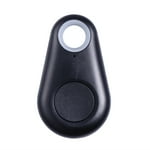
Fun facts about ITAG,s... I bought a 3 pack on Amazon for $10 a couple of years ago and they didn't work; stayed up for about 5 minutes when I pressed the button, then shut down till I hit the button again; not all that useful for presence detection. But since I had a few reward bucks on one of my credit cards, I tried again last week. This time I could get 4 for $10, AND THESE WORK FINE; They're getting really lousy reviews on Amazon because apparently their app on the phone triggers much too early (as in a couple of feet separation) but the one I powered up and left in the console of the truck shows up on the garage PI as soon as the vehicle gets home and the metal door opens, then expires as soon as it leaves for the past 8 days. But if you are planning on using them in PIBeacon, you don't need to use an app on the phone to ID them; they ALL have the same UUID: 0a00050202180eff05-2377-21569 (both the original 3 as well as the new one I enabled), but unique MACs that begin with FC:58:FA, so just power them up one at a time and then look for that UUID to separate them from any other Bluetooth sources around. I have only powered up the first new one so far, but unless the battery life is extremely short will probably bring up the rest as the XY's and XY3s everyone is currently carrying continue to croak.johnfdl wrote:So I've been playing with a few beacons.....
Itag
Same deal as Nonda ZUS and Fitbit.....it shows up in Bluetooth app on phone with label ITAG, then found it in Indigo Plugin device using MAC. Worked just fine (though had lower signal than ZUS). To be honest, I am unsure where I got these from, but they show on Wal-Mart website for $7. Nice form factor but I prefer the rechargeable battery on the ZUS.
Hope this helps folks.
piBeacon: 7- tested Beacons
-
johnpolasek
- Posts: 918
- Joined: Fri Aug 05, 2011 2:01 pm
- Location: Aggieland, Texas
Re: piBeacon: 7- tested Beacons
Re: piBeacon: 7- tested Beacons
Awesome heads up. They are £3-£4 in the UK, shipped from China or £7 local shipping. Bought one to try then will buy a whole load of they are useful.
Sent from my iPhone using Tapatalk
Sent from my iPhone using Tapatalk
Re: piBeacon: 7- tested Beacons
Hmmm, the one that I got seems to be like your original one. Only works for 5 minutes after the button is pressed then goes off. I haven't tried to set them up on the phone app.
It doesn't have the same uuid and Mac as yours.
Not sure how to try and ensure I get the newer style?
EDIT: I read the instructions on the app about holding for 3 seconds to activate it, and since then it is staying up when in range, going to off out of range, but coming back on again when it comes in range. Looking so good in fact I have just ordered 3 rPi zero Ws to complete the full house setup, and will order some more tags.
It doesn't have the same uuid and Mac as yours.
Not sure how to try and ensure I get the newer style?
EDIT: I read the instructions on the app about holding for 3 seconds to activate it, and since then it is staying up when in range, going to off out of range, but coming back on again when it comes in range. Looking so good in fact I have just ordered 3 rPi zero Ws to complete the full house setup, and will order some more tags.

Re: piBeacon: 7- tested Beacons
Hello Good People,
I am interested in the piBeacon plugin to use a few iBeacons with Indigo.
Would I simply install the plugin and do a setup or is there additional hardware required?
Thanks
I am interested in the piBeacon plugin to use a few iBeacons with Indigo.
Would I simply install the plugin and do a setup or is there additional hardware required?
Thanks
MacMini 2.3 GHz Intel Core i7 16GB DDR3
Indigo Pro 2022.1 macOS Mojave 10.14.6
Indigo Pro 2022.1 macOS Mojave 10.14.6
Re: piBeacon: 7- tested Beacons
As the first half of the plugin name suggests, you also need a raspberry pi as well, probably a few if you want whole house coverage.
Re: piBeacon: 7- tested Beacons
Thank you! 
MacMini 2.3 GHz Intel Core i7 16GB DDR3
Indigo Pro 2022.1 macOS Mojave 10.14.6
Indigo Pro 2022.1 macOS Mojave 10.14.6

Re: piBeacon: 7- tested Beacons
Hello and thank you John for the link with additional info info. I have arrived to the Raspberry party late but am very interested to learn how I can create some kind of automation that works with my old car when its home and away from home.
Thank you
Thank you
MacMini 2.3 GHz Intel Core i7 16GB DDR3
Indigo Pro 2022.1 macOS Mojave 10.14.6
Indigo Pro 2022.1 macOS Mojave 10.14.6
Re: piBeacon: 7- tested Beacons
You are welcome with your questions.
For the car we advice a strong beacon because the metal of the car can disturb the signal ("Faraday cage").
See also this list:
https://www.beaconzone.co.uk/LongRange
(the AnkhMaway's are working well )
For the car we advice a strong beacon because the metal of the car can disturb the signal ("Faraday cage").
See also this list:
https://www.beaconzone.co.uk/LongRange
(the AnkhMaway's are working well )
Re: piBeacon: 7- tested Beacons
Hello again John,
Your feedback is awesome!
So I simple need to:
1. Buy a Raspberry Pi 3
2. Get the software installed on
3. Connect raspberry to the computer running Indigo with the piBeacon plugin
4. Have my iBeacon located in the car
Time to learn how to get this done.
Thank you!
Your feedback is awesome!
So I simple need to:
1. Buy a Raspberry Pi 3
2. Get the software installed on
3. Connect raspberry to the computer running Indigo with the piBeacon plugin
4. Have my iBeacon located in the car
Time to learn how to get this done.
Thank you!
MacMini 2.3 GHz Intel Core i7 16GB DDR3
Indigo Pro 2022.1 macOS Mojave 10.14.6
Indigo Pro 2022.1 macOS Mojave 10.14.6
Re: piBeacon: 7- tested Beacons
It doesn’t need to be a Pi3. Zero Ws work as well and are cheaper and smaller. If you want iPhone tracking on those though you need a Bluetooth dongle.T-Power wrote:Hello again John,
Your feedback is awesome!
So I simple need to:
1. Buy a Raspberry Pi 3
2. Get the software installed on
3. Connect raspberry to the computer running Indigo with the piBeacon plugin
4. Have my iBeacon located in the car
Time to learn how to get this done.
Thank you!
I’m sure long range are preferable but depends how far your car is parked from the house and how close you can position a pi from the closest point. I have one (have 5 in all) at the corner nearest the drive and the car is no more than 5m away. A standard usb rechargeable beacon ( triangular one) works fine.
To avoid false notifications of car leaving it takes 2 mins for indigo to know the car has left, but it’s instant when it returns.

Re: piBeacon: 7- tested Beacons
I have it working -live - running with
P0w + ble dongle
Pi1 + ble
Pi2 + ble dongle
Pi3
Pi3+
Pi4
They all work.
Karl
Sent from my iPhone using Tapatalk
P0w + ble dongle
Pi1 + ble
Pi2 + ble dongle
Pi3
Pi3+
Pi4
They all work.
Karl
Sent from my iPhone using Tapatalk
Re: piBeacon: 7- tested Beacons
The Raspberry Pi Zero W has standard Bluetooth but no Ethernet.
In our case and for a more reliable standard, we are using the Raspberry 3b+ connected to ethernet, (it has also Wifi).
Your point 3 "Connect raspberry to the computer " has to be, connect Raspberry to Ethernet of Wifi.
In the car we are using two kind of beacons;
the named AnkhMaway (or that kind) with long battery life, so Indigo knows the car is at the house.
and
an USB beacon with antenna ; starts when the engine is on (or off), then "Indigo" knows the engine is started and with this strong signal," Indigo" knows when the car is coming home
We wish you a lot of pleasure with this nice hobby!
In our case and for a more reliable standard, we are using the Raspberry 3b+ connected to ethernet, (it has also Wifi).
Your point 3 "Connect raspberry to the computer " has to be, connect Raspberry to Ethernet of Wifi.
In the car we are using two kind of beacons;
the named AnkhMaway (or that kind) with long battery life, so Indigo knows the car is at the house.
and
an USB beacon with antenna ; starts when the engine is on (or off), then "Indigo" knows the engine is started and with this strong signal," Indigo" knows when the car is coming home
We wish you a lot of pleasure with this nice hobby!
Re: piBeacon: 7- tested Beacons
The System does not challenge the rpi neither pi0 nor pi1.
It’s mostly a question of taste, form factor, power supply, or if you have a spare one or Ethernet w WiFi.
Karl
Sent from my iPhone using Tapatalk
It’s mostly a question of taste, form factor, power supply, or if you have a spare one or Ethernet w WiFi.
Karl
Sent from my iPhone using Tapatalk
Re: piBeacon: 7- tested Beacons
Wow, thank you everyone for the hero response. I honest heard about the raspberry years ago but didn't sit with it long enough to get my head around it and how it could be used in a Mac environment. This thread is my very first real introduction so I hope to grasp what is being shared. I am now adjusting my thinking cap.
Thank you
Thank you
MacMini 2.3 GHz Intel Core i7 16GB DDR3
Indigo Pro 2022.1 macOS Mojave 10.14.6
Indigo Pro 2022.1 macOS Mojave 10.14.6