Smartphone Radar - Smartphone presence detection (Locked)

Smartphone presence detection.
bluenoise
Posts: 143
Joined: Sat Aug 23, 2008 3:21 pm

Re: Smartphone Radar - Smartphone presence detection (Update

Post by bluenoise »

travisc wrote:@bluenoise
Nice script, that would be fairly easy to incorporate into the plugin, see my question below.
BeNoOne wrote:Please note:
The information snmp returns is the same Smartphone Radar is getting out of the logging.
So it's not more or less reliable. It's only another (simpler) way to get the same information.
I was just going to ask that question, thanks BeNoOne.

I'm curious how long the iPhone's are listed in the snmp output in various situations.

i.e.:
- If the iPhone is asleep, connects to the network, checks it's email.
- If the iPhone is on charge and asleep.
- If the iPhone goes out of range of the base station.

It seems there's some persistence to the data as your script only runs every 5 minutes. I'm curious if that's often enough to not miss any activity.
The intent of my script running every five minutes is to determine whether or not the iPhone is connected to the WiFi network at the moment of polling. It doesn't try to determine that through any kind of connect/disconnect activity. It just says, "If the iPhone's MAC address is in the base station's list of currently-connected devices, set the variable to 'true.'"

For testing, I had the script run every 15 seconds. When I turned on Airplane Mode on my iPhone 4, the variable went to false almost immediately. Conversely, turning off Airplane Mode made it go true the next time it was polled. I chose to check every five minutes arbitrarily, with the thinking that it didn't matter since there was no need to worry about missing something happening. It might be a problem if, at the moments it's polled, the phone is not connected to the WiFi, but it appears that the iPhone 4 (and I assume the 4S) stays connected to the WiFi even while sleeping. Unfortunately, the iPhone 3 falls off the WiFi after a short while, so it's going to think my daughter is not home, even when she is. :)
bluenoise
Posts: 143
Joined: Sat Aug 23, 2008 3:21 pm

Re: Smartphone Radar - Smartphone presence detection (Update

Post by bluenoise »

Paste this into your console to see what is returned:

Code: Select all

snmpwalk -m AIRPORT-BASESTATION-3-MIB -Os -v 2c -c <SNMP Community String> <Bonjour Name> 1.3.6.1.4.1.63.501.3.2
Replace <SNMP Community String> as appropriate. The default is "public" (without quotes).

Replace <Bonjour Name> with the name of your base station. If you call it "Living Room," for example, the Bonjour name is probably "Living-Room.local" as shown in the Airport Utility. Again, omit the quotes in the command.
User avatar
travisc
Posts: 346
Joined: Tue Sep 07, 2010 7:24 am
Location: Toronto, Canada
Contact:

Re: Smartphone Radar - Smartphone presence detection (Update

Post by travisc »

Hmmm. This might be doable.

So just to confirm then. If I'm understanding both of you correctly, it seems like if the iPhone is running iOS 5, that script will indicate the iPhone is on the network if it is sleeping OR charging, even with just polling the snmp data every 5 minutes?

The part that confuses me is there has to be some sort of timeout in the base station to remove these MACs from the list. Obviously if the phone is put into Airport mode or turned off, it will disassociate itself from the base station and the MACs will be removed immediately. But what if you just run out the house with your phone. It may be out of range before it can disassociate from the base station. If that happens, how long will the MAC stay in the list?

I'd play with it myself but I don't use an Airport base station.
ckeyes888
Posts: 2438
Joined: Thu Nov 26, 2009 2:41 pm
Location: Kalispell, MT

Re: Smartphone Radar - Smartphone presence detection (Update

Post by ckeyes888 »

Would this plugin work with an iTouch running IOS 5?

Carl
BeNoOne
Posts: 30
Joined: Wed Oct 11, 2006 2:20 pm
Location: Netherlands

Re: Smartphone Radar - Smartphone presence detection (Update

Post by BeNoOne »

@travisc
I'm not sure about the exact amount of time it takes to flush the MAC address. But if I leave the house it seems to take only the poll time to disappear. Plus or minus a few minutes.
bluenoise
Posts: 143
Joined: Sat Aug 23, 2008 3:21 pm

Re: Smartphone Radar - Smartphone presence detection (Update

Post by bluenoise »

travisc wrote:Hmmm. This might be doable.

So just to confirm then. If I'm understanding both of you correctly, it seems like if the iPhone is running iOS 5, that script will indicate the iPhone is on the network if it is sleeping OR charging, even with just polling the snmp data every 5 minutes?

The part that confuses me is there has to be some sort of timeout in the base station to remove these MACs from the list. Obviously if the phone is put into Airport mode or turned off, it will disassociate itself from the base station and the MACs will be removed immediately. But what if you just run out the house with your phone. It may be out of range before it can disassociate from the base station. If that happens, how long will the MAC stay in the list?

I'd play with it myself but I don't use an Airport base station.
I'll have to try an experiment. Maybe I can have Indigo send me a text message the instant it detects my iPhone isn't home any longer. Of course, I'll have to figure out how to get it to send text messages. :D

One thing I found interesting is that it did see my daughter's iPhone 3G on the network while it was charging overnight. I think in the previous iOS, the wifi stayed connected, if the phone was charging and asleep. Only when it's not charging and asleep does it fall off the list.
User avatar
travisc
Posts: 346
Joined: Tue Sep 07, 2010 7:24 am
Location: Toronto, Canada
Contact:

Re: Smartphone Radar - Smartphone presence detection (Update

Post by travisc »

bluenoise wrote:I'll have to try an experiment. Maybe I can have Indigo send me a text message the instant it detects my iPhone isn't home any longer. Of course, I'll have to figure out how to get it to send text messages.
It would be great if we could know for sure. If it turns out to be usable, which it's looking like it might, I'll take the time to incorporate it into the plugin.

I use the iPhone app PushMail to send my phone instant messages, like when my alarm system goes off. It's $5 in the app store but it works well and is quite configurable. You get an email address that you send emails to from Indigo that are immediately pushed to the phone as a notification.
bluenoise
Posts: 143
Joined: Sat Aug 23, 2008 3:21 pm

Re: Smartphone Radar - Smartphone presence detection (Update

Post by bluenoise »

My wife just left the house at 13:05. I checked the variables list and it said she was home. At 13:09, the script must have run because the variable changed to her being away. So, it updated within the period of my script's scheduled interval.

Woo! :D

Edit to add: She just returned home and the variable updated again on the next cycle. It seems this is working as I had hoped.
loafbread
Posts: 137
Joined: Mon May 25, 2009 6:50 am

Re: Smartphone Radar - Smartphone presence detection (Update

Post by loafbread »

I have been running the SNMP script every 10 minutes for a couple days. It takes almost an hour to show that I left the house. Same duration on two tests. It detects my arrival home quite quickly, within one 10 minute cycle. My MAC address stays in the Airport all night while the iPhone is on the charger.

I don't know why mine takes so long to see me leave. Much longer than bluenoise is seeing. I am using my iPhone 4S iOS 5.0.1 with an Airport Extreme 4th Generation Version 7.6. I have the dhcp lease time set to 600 seconds.

Here is the log from the Airport Extreme. I left the house at 06:11.
Dec 14 18:14:12 ax2 80211: Associated with station d0:23:db:67:ea:a6
Dec 14 18:14:12 ax2 80211: Installed unicast CCMP key for supplicant d0:23:db:67:ea:a6
Dec 15 07:01:19 ax2 80211: Deauthenticating with station d0:23:db:67:ea:a6 (reserved 2).
Dec 15 07:01:19 ax2 80211: Disassociated with station d0:23:db:67:ea:a6
Dec 15 12:36:13 ax2 80211: Associated with station d0:23:db:67:ea:a6
Dec 15 12:36:13 ax2 80211: Installed unicast CCMP key for supplicant d0:23:db:67:ea:a6
User avatar
berkinet
Posts: 3441
Joined: Tue Nov 18, 2008 2:08 pm
Location: Berkeley, CA, USA & Mougins, France

Re: Smartphone Radar - Smartphone presence detection (Update

Post by berkinet »

EDIT... Just downloaded the plugin and see it forwards 514 to 1514.
Last edited by berkinet on Thu Dec 15, 2011 4:20 pm, edited 1 time in total.
bluenoise
Posts: 143
Joined: Sat Aug 23, 2008 3:21 pm

Re: Smartphone Radar - Smartphone presence detection (Update

Post by bluenoise »

loafbread wrote:I have been running the SNMP script every 10 minutes for a couple days. It takes almost an hour to show that I left the house. Same duration on two tests. It detects my arrival home quite quickly, within one 10 minute cycle. My MAC address stays in the Airport all night while the iPhone is on the charger.

I don't know why mine takes so long to see me leave. Much longer than bluenoise is seeing. I am using my iPhone 4S iOS 5.0.1 with an Airport Extreme 4th Generation Version 7.6. I have the dhcp lease time set to 600 seconds.

Here is the log from the Airport Extreme. I left the house at 06:11.
Dec 14 18:14:12 ax2 80211: Associated with station d0:23:db:67:ea:a6
Dec 14 18:14:12 ax2 80211: Installed unicast CCMP key for supplicant d0:23:db:67:ea:a6
Dec 15 07:01:19 ax2 80211: Deauthenticating with station d0:23:db:67:ea:a6 (reserved 2).
Dec 15 07:01:19 ax2 80211: Disassociated with station d0:23:db:67:ea:a6
Dec 15 12:36:13 ax2 80211: Associated with station d0:23:db:67:ea:a6
Dec 15 12:36:13 ax2 80211: Installed unicast CCMP key for supplicant d0:23:db:67:ea:a6
I have only been able to observe my wife's timing, because I forgot to look last night or this morning before I left to see how it resolved mine. I am curious now how long it took to realize I left this morning, since I was the last to leave. I'd look in the log, but I can no longer access my Mac from work to see (Now that I'm running Lion at home, I can no longer use "Back to my Mac" to access my home computers from work because my work Mac is not also running Lion :x ).

This reminds me that there are two features I'd REALLY like to see added to Indigo:

1. Put a link to the log on the page Indigo displays when accessing from a remote browser.
2. Make the log available from the iPhone client (Indigo Touch).
User avatar
jay (support)
Site Admin
Posts: 19232
Joined: Wed Mar 19, 2008 11:52 am
Location: Austin, Texas
Contact:

Re: Smartphone Radar - Smartphone presence detection (Update

Post by jay (support) »

bluenoise wrote:1. Put a link to the log on the page Indigo displays when accessing from a remote browser.
Sorry, I'm not quite following you - can you describe it in more detail?
bluenoise wrote:2. Make the log available from the iPhone client (Indigo Touch).
Yeah, it's close to the top of the list for features in Indigo Touch.
Jay (Indigo Support)
Twitter | Facebook | LinkedIn
bluenoise
Posts: 143
Joined: Sat Aug 23, 2008 3:21 pm

Re: Smartphone Radar - Smartphone presence detection (Update

Post by bluenoise »

jay wrote:
bluenoise wrote:1. Put a link to the log on the page Indigo displays when accessing from a remote browser.
Sorry, I'm not quite following you - can you describe it in more detail?.
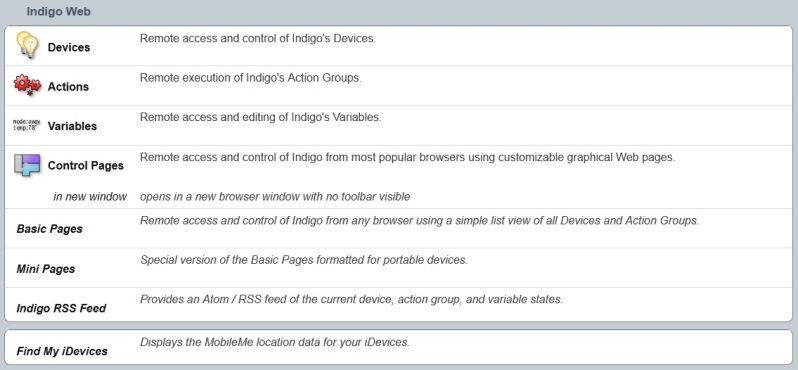
Basically, I'd like an easy way to view my log remotely. I was thinking a link to the current log (or past logs?) could be added to this page:

Image
jay wrote:
bluenoise wrote:2. Make the log available from the iPhone client (Indigo Touch).
Yeah, it's close to the top of the list for features in Indigo Touch.
Excellent! :D
User avatar
jay (support)
Site Admin
Posts: 19232
Joined: Wed Mar 19, 2008 11:52 am
Location: Austin, Texas
Contact:

Re: Smartphone Radar - Smartphone presence detection (Update

Post by jay (support) »

Gotcha - I was reading something else entirely. We will likely add the log to both Indigo Touch and the web pages at the same time.
Jay (Indigo Support)
Twitter | Facebook | LinkedIn
kpfriedberg

Re: Smartphone Radar - Smartphone presence detection (Update

Post by kpfriedberg »

Would love to get this to work, but I have Apple routers (and all iPhones/iPod Touches), has anyone had any success with getting this to consistently work? Also, are there any plans to enable triggers for one phone vs the all or nothing options available now?

Terrific work, thanks for the plugin!
Locked

Return to “Smartphone Radar”