
Everything seems to be working correctly when I issue command to Siri, but the following error keeps appearing in the Event Log.
Home app Client with IP address ('192.168.1.82', 51949) appears incompatible with this version of homekit. It attempted to connect to Bridge HomeKitLink Bridge 377113 and this connection failed to verify.
HomeKitLink Siri Typically this means this client hasn't been updated to latest OS version, or is incompatible with it. This needs to be addressed with the Client Home App. See forum for more details as needed.
Is this a HKSI error or the old HomeKit Bridge? It's confusing as the error mentions both. I have also deleted the old HomeKit Bridge from the device list.
Currently running 14.7 MacOS, Indigo 2024.1 and HKLS 0.6.61
Keep getting error in Event Log...
Keep getting error in Event Log...
Running OS X 14.7 on 2018 Mac Mini, Indigo 2024.1
http://www.p15-d24.com
http://www.p15-d24.com

Keep getting error in Event Log...
As per the error message - and lots of posts here regarding…P15-D24 wrote:Everything seems to be working correctly when I issue command to Siri, but the following error keeps appearing in the Event Log.
Home app Client with IP address ('192.168.1.82', 51949) appears incompatible with this version of homekit. It attempted to connect to Bridge HomeKitLink Bridge 377113 and this connection failed to verify.
HomeKitLink Siri Typically this means this client hasn't been updated to latest OS version, or is incompatible with it. This needs to be addressed with the Client Home App. See forum for more details as needed.
Is this a HKSI error or the old HomeKit Bridge? It's confusing as the error mentions both. I have also deleted the old HomeKit Bridge from the device list.
Currently running 14.7 MacOS, Indigo 2024.1 and HKLS 0.6.61
“Home App (<— this is the Home app running on a iOS device)
Client with IP Address (<— this is the IP address of the client - so you can find it)
appears incompatible with this version of homekit.”
Home App == Application for Home running on iOS
Homekitlink Bridge = the Indigo HKLS Bridge device
Homekit - the actual Home software running and versions of it.
The messages all refer to HomeKitLinkSiri Plugins and Bridge. There is a confusing similarity of terms…
So:
Home Client = 192.168.1.82 - is so old it cannot connect to whatever version of Homekit you are running (currently 18). This error message is regarding this. I could turn it off altogether as won’t change anything - but decided it was not ideal to have an incompatible client constantly trying to connect.
Find the Client (via IP) and disconnect it from the Home (as won’t be working anyway…). Typically it will be an old iPad that can’t be upgraded to recent OS …
Glenn
Sent from my iPad using Tapatalk
Re: Keep getting error in Event Log...
Again thanks for the quick response. Tracked it down to an old iPhone, will try to upgrade to current iOS.
One followup question, my Home app on Mac OS is Version 8.0 (873.7.6). Is the 18 you mentioned in the previous quote referring to the iOS version.
One followup question, my Home app on Mac OS is Version 8.0 (873.7.6). Is the 18 you mentioned in the previous quote referring to the iOS version.
Running OS X 14.7 on 2018 Mac Mini, Indigo 2024.1
http://www.p15-d24.com
http://www.p15-d24.com
Keep getting error in Event Log...
Glad you tracked it down. If not upgradable - which often the older ones aren’t - can just disable Home in settings (won’t be working anyway)P15-D24 wrote:Again thanks for the quick response. Tracked it down to an old iPhone, will try to upgrade to current iOS.
One followup question, my Home app on Mac OS is Version 8.0 (873.7.6). Is the 18 you mentioned in the previous quote referring to the iOS version.
The HomeKit architecture is running in the background that everything uses underlying. Home app which access this Homekit underneath - that is version of the Home software - which will vary depending on systems, OS version installed and App Store upgrades.
Most of the Homekit runs on the Hub (which is always on) which is why I believe the versioning stays inline with OS and tvOS, and HomePod Software versioning. Remembering that HomeKit Hub (can be either a appletv or HomePod).
(Homekit Hub == is device in your system to run background Homekit processes. Can be manually selected - but happens automatically)
Here this old client - is incompatible with the newer version of Homekit that you are running. (thats now default for us all) This was a breaking manual update at the time of the HomeKit software which also impacted the plugin, until updated. For this change you had to manually update to via a Software Update button - on a Home App. Giving the breaking nature.
Looked like this:
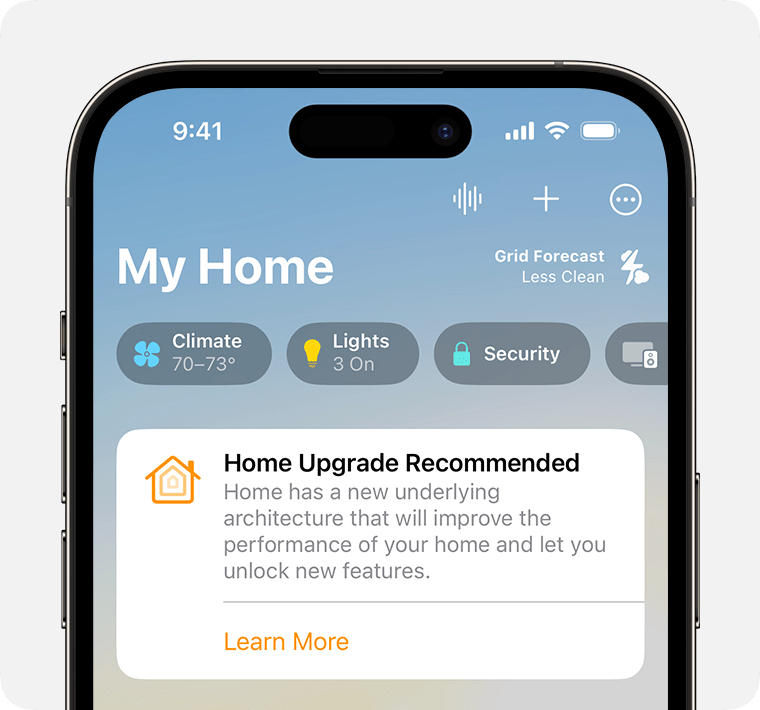
Thankfully there haven’t been any breaking Homekit architecture updates for a while now…
Anyway - there ends background!
Sent from my iPad using Tapatalk