
Starting my migration from HomeKit to HKlS but when I try to enable I get the red dot.
I'm starting on the older version so I can get HKLS installed , move my devices over from HomeKit and then remove Homekit.
Versions are: macOS 12.73, Indigo 2022.1 and HKLS plugin 05.11
Confirmed Python3 is installed.
Cryptography successful installed. Ran the xattr command per the readme with no errors.
Seems to install ok, just get the red dot.
I'm under the impression I could run both side by side (HKLS and HomeKit ) as long as they didn't share any devices. Has that changed?
How do I sort out the install issue?
HKLS won't enable...

Re: HKLS won't enable...
Hi
Presumably this relates to the very old version of Indigo and HomeKitLink and/or MacOS that you are running.
But yes - you can run both HKLS and HomeBridge.
Python3 should be installed via Indigo - if you have manually installed it then this may have caused issues?
The red-dot means either is incompatible, or can not start. If cannot start they should be some logging messages regarding what the issues are?
Glenn
Presumably this relates to the very old version of Indigo and HomeKitLink and/or MacOS that you are running.
But yes - you can run both HKLS and HomeBridge.
Python3 should be installed via Indigo - if you have manually installed it then this may have caused issues?
The red-dot means either is incompatible, or can not start. If cannot start they should be some logging messages regarding what the issues are?
Glenn
Re: HKLS won't enable...
Just checked the version of Python3, didn't do an actual install so I'm assuming it the Indigo installed copy.
Sorry, forgot to check the event log for errors, this is in the log:
Enabling plugin "HomeKitLink Siri 0.5.11" using API v3.0
Debugging plugin "HomeKitLink Siri 0.5.11" (pid 18102)
HomeKitLink Siri Error Error in plugin execution InitializeMain:
File "plugin.py", line 42, in <module>
File "/Library/Application Support/Perceptive Automation/Indigo 2022.1/Plugins/HomeKitLink-Siri.indigoPlugin/Contents/Server Plugin/pyhap/accessory_driver.py", line 51, in <module>
File "/Library/Application Support/Perceptive Automation/Indigo 2022.1/Plugins/HomeKitLink-Siri.indigoPlugin/Contents/Server Plugin/pyhap/hap_server.py", line 9, in <module>
File "/Library/Application Support/Perceptive Automation/Indigo 2022.1/Plugins/HomeKitLink-Siri.indigoPlugin/Contents/Server Plugin/pyhap/hap_protocol.py", line 15, in <module>
File "/Library/Application Support/Perceptive Automation/Indigo 2022.1/Plugins/HomeKitLink-Siri.indigoPlugin/Contents/Server Plugin/pyhap/hap_crypto.py", line 5, in <module>
File "/Library/Application Support/Perceptive Automation/Indigo 2022.1/Plugins/HomeKitLink-Siri.indigoPlugin/Contents/Server Plugin/chacha20poly1305_reuseable/__init__.py", line 21, in <module>
type: type 'cryptography.hazmat.bindings._rust.openssl.aead.ChaCha20Poly1305' is not an acceptable base type
Stopping plugin "HomeKitLink Siri 0.5.11" (pid 18102)
Stopped plugin "HomeKitLink Siri 0.5.11"
Sorry, forgot to check the event log for errors, this is in the log:
Enabling plugin "HomeKitLink Siri 0.5.11" using API v3.0
Debugging plugin "HomeKitLink Siri 0.5.11" (pid 18102)
HomeKitLink Siri Error Error in plugin execution InitializeMain:
File "plugin.py", line 42, in <module>
File "/Library/Application Support/Perceptive Automation/Indigo 2022.1/Plugins/HomeKitLink-Siri.indigoPlugin/Contents/Server Plugin/pyhap/accessory_driver.py", line 51, in <module>
File "/Library/Application Support/Perceptive Automation/Indigo 2022.1/Plugins/HomeKitLink-Siri.indigoPlugin/Contents/Server Plugin/pyhap/hap_server.py", line 9, in <module>
File "/Library/Application Support/Perceptive Automation/Indigo 2022.1/Plugins/HomeKitLink-Siri.indigoPlugin/Contents/Server Plugin/pyhap/hap_protocol.py", line 15, in <module>
File "/Library/Application Support/Perceptive Automation/Indigo 2022.1/Plugins/HomeKitLink-Siri.indigoPlugin/Contents/Server Plugin/pyhap/hap_crypto.py", line 5, in <module>
File "/Library/Application Support/Perceptive Automation/Indigo 2022.1/Plugins/HomeKitLink-Siri.indigoPlugin/Contents/Server Plugin/chacha20poly1305_reuseable/__init__.py", line 21, in <module>
type: type 'cryptography.hazmat.bindings._rust.openssl.aead.ChaCha20Poly1305' is not an acceptable base type
Stopping plugin "HomeKitLink Siri 0.5.11" (pid 18102)
Stopped plugin "HomeKitLink Siri 0.5.11"
Running OS X 14.7 on 2018 Mac Mini, Indigo 2024.1
http://www.p15-d24.com
http://www.p15-d24.com
HKLS won't enable...
Ok.
Will relate to newer versions of cryptography are not backwards compatible. Which was unknown at the time of this now quite old release.
Need version
cryptography==41.0.7
Not sure whether are other dependencies which may need older versions as well…. (they are included - so should be fine…)
To update this would:
pip3 install 'cryptography==41.0.7' --force-reinstall
or uninstall first and then install this specific version..
Sent from my iPad using Tapatalk
Will relate to newer versions of cryptography are not backwards compatible. Which was unknown at the time of this now quite old release.
Need version
cryptography==41.0.7
Not sure whether are other dependencies which may need older versions as well…. (they are included - so should be fine…)
To update this would:
pip3 install 'cryptography==41.0.7' --force-reinstall
or uninstall first and then install this specific version..
Sent from my iPad using Tapatalk
Re: HKLS won't enable...
Thank you the reinstall worked!
Once I have the devices moved and operational in HKLS, can I jump to the current version of the plug in after upgrading Indigo 2024.1?
Or would it be better to step thru the older upgrades to get to the current versions?
Once I have the devices moved and operational in HKLS, can I jump to the current version of the plug in after upgrading Indigo 2024.1?
Or would it be better to step thru the older upgrades to get to the current versions?
Running OS X 14.7 on 2018 Mac Mini, Indigo 2024.1
http://www.p15-d24.com
http://www.p15-d24.com
Re: HKLS won't enable...
Hmmm.
It is really hard to know ... reviewing the old updates from 0.5.11 to current. 0.6.27 adds some byte security pairing saving that was required by OS17. Also some latest OS18 updates for compatibility.
Should be able to go from this old version to new in one go - no point step wise upgrading...
Following upgrade:
Small risk Home App in iOS might technical term, follows 'crap out', and fail to work with the dreaded 'accessory not found' error...
Would think probably unlikely as we all made the same move at some point...
Safest option would be new version Indigo, latest version of HKLS (https://github.com/Ghawken/HomeKitLink-Siri/releases) - this needs Xcode tools installed for some systems, but also doesn't need xattr commands and libraries are all managed in house.
Edit:
Should also add should be possible to install Indigo 2024 with or without whatever plugins needed. And then go back and run the older current version until you are happy upgrade has been completed.
But ultimately up to your preference...
Glenn
It is really hard to know ... reviewing the old updates from 0.5.11 to current. 0.6.27 adds some byte security pairing saving that was required by OS17. Also some latest OS18 updates for compatibility.
Should be able to go from this old version to new in one go - no point step wise upgrading...
Following upgrade:
Small risk Home App in iOS might technical term, follows 'crap out', and fail to work with the dreaded 'accessory not found' error...
Would think probably unlikely as we all made the same move at some point...
Safest option would be new version Indigo, latest version of HKLS (https://github.com/Ghawken/HomeKitLink-Siri/releases) - this needs Xcode tools installed for some systems, but also doesn't need xattr commands and libraries are all managed in house.
Edit:
Should also add should be possible to install Indigo 2024 with or without whatever plugins needed. And then go back and run the older current version until you are happy upgrade has been completed.
But ultimately up to your preference...
Glenn
Re: HKLS won't enable...
Two quick operational questions:
1. How do you delete a device in the device setting list?
2. When adding new devices to a working bridge do I need to run the add accessory with QR code of each new device in the Home app?
I successfully added an outlet device to my the HKLS bridge in "room1". Used the QR code to add the accessory (ie Bridge) in Home app and everything works.
I then added another switch device to the same room without adding the accessory and QR code in Home app. It is in the same room , but when activated via Siri both the outlet device and switch device turn on.
I think I missed a step in the set up...
1. How do you delete a device in the device setting list?
2. When adding new devices to a working bridge do I need to run the add accessory with QR code of each new device in the Home app?
I successfully added an outlet device to my the HKLS bridge in "room1". Used the QR code to add the accessory (ie Bridge) in Home app and everything works.
I then added another switch device to the same room without adding the accessory and QR code in Home app. It is in the same room , but when activated via Siri both the outlet device and switch device turn on.
I think I missed a step in the set up...
Running OS X 14.7 on 2018 Mac Mini, Indigo 2024.1
http://www.p15-d24.com
http://www.p15-d24.com
HKLS won't enable...
Hi
Quick reply - I’ll add to this in a bit
1. The QR code is only needed for HKLS Bridge device that you can connect up to 95 Indigo devices to.
(and you can have an unlimited amount of the HKLS Bridges)
2. To remove a published device - you unpublish it - select and uncheck publish device checkbox from the device selection page. You need to be in the correct HKLS Bridge device (if have multiple bridges)
If 2 devices are activating at the same time - either Siri is mishearing, or turning on a room or a Zone (containing everything) or naming is very similar. Can have Zones - eg. upstairs, downstairs, outside as well - and turn those on or off, or open/close blinds etc.
The devices should appear as seperate devices in the Home App - which would be the first place to check to see everything is working as expected. Also within the device in the Home App can select and change some settings …
Glenn
Sent from my iPad using Tapatalk
Quick reply - I’ll add to this in a bit
1. The QR code is only needed for HKLS Bridge device that you can connect up to 95 Indigo devices to.
(and you can have an unlimited amount of the HKLS Bridges)
2. To remove a published device - you unpublish it - select and uncheck publish device checkbox from the device selection page. You need to be in the correct HKLS Bridge device (if have multiple bridges)
If 2 devices are activating at the same time - either Siri is mishearing, or turning on a room or a Zone (containing everything) or naming is very similar. Can have Zones - eg. upstairs, downstairs, outside as well - and turn those on or off, or open/close blinds etc.
The devices should appear as seperate devices in the Home App - which would be the first place to check to see everything is working as expected. Also within the device in the Home App can select and change some settings …
Glenn
Sent from my iPad using Tapatalk
Re: HKLS won't enable...
Looks like duplicate room/device name issue.
Thank you for the quick response.
Thank you for the quick response.
Running OS X 14.7 on 2018 Mac Mini, Indigo 2024.1
http://www.p15-d24.com
http://www.p15-d24.com
Re: HKLS won't enable...
Can I publish an Action Group? (I didn't see anything in the docs).
I see Action Group in the "Select Type to List" but the Device State drop down shows "invalid device type."
I see Action Group in the "Select Type to List" but the Device State drop down shows "invalid device type."
Running OS X 14.7 on 2018 Mac Mini, Indigo 2024.1
http://www.p15-d24.com
http://www.p15-d24.com
HKLS won't enable...
Yes.
Mostly uptodate documentation here:
https://github.com/Ghawken/HomeKitLink-Siri/tree/API3.4
Has to be a switch device in HomeKit though.
Action Group - only has On with no state reporting.
So in Home will turn On and then turn off again.
So from this document:
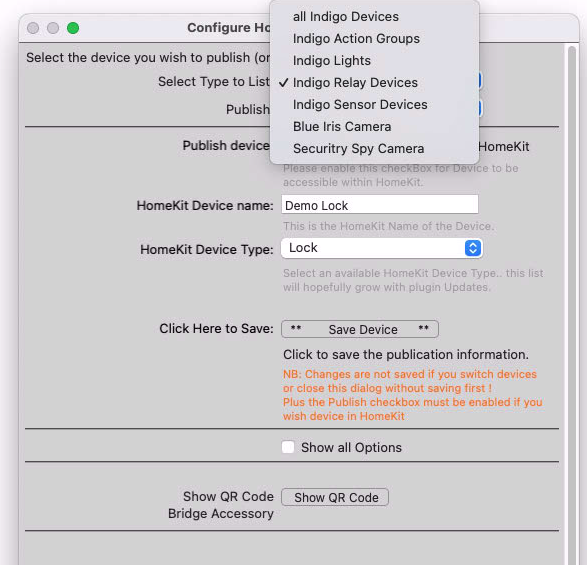
In the Edit HomeKitLink-Siri Bridge settings.
Select Type to list:
Select Indigo Action Groups
This will display all your action groups.
Publish: - Select the Action Group here —
The Select Type to List - is purely there to limit the enormous choices that come with the full list.
Have just checked and works fine on the latest version.
Glenn
Sent from my iPad using Tapatalk
Mostly uptodate documentation here:
https://github.com/Ghawken/HomeKitLink-Siri/tree/API3.4
Has to be a switch device in HomeKit though.
Action Group - only has On with no state reporting.
So in Home will turn On and then turn off again.
So from this document:
In the Edit HomeKitLink-Siri Bridge settings.
Select Type to list:
Select Indigo Action Groups
This will display all your action groups.
Publish: - Select the Action Group here —
The Select Type to List - is purely there to limit the enormous choices that come with the full list.
Have just checked and works fine on the latest version.
Glenn
Sent from my iPad using Tapatalk