Thanks again for your prompt reply.
I am getting the images saved e.g. cars or persons and this is very useful but I my question was more about identifying those particular objects. e.g. identify particular car so I can trigger a particular event if a different car enters my driveway. Even more powerful would be to identify faces.
DeepState AI Object Detection Indigo Plugin

Re: DeepState AI Object Detection Indigo Plugin
Not currently
You could possibly train deepstate for ‘your car’ and not your car - and use that training model dataset to trigger.
Faces I did look at and half did the code - but resolution needed was very high. Also need tight camera angle capturing head /shoulders only, which none of mine were. Also took a lot of time processing wise, as needed multiple frames a second to capture as movement/tight angle. Can also easily ‘spoof’ by holding up photo - so in practice didn’t seem that useful
Sent from my iPhone using Tapatalk
You could possibly train deepstate for ‘your car’ and not your car - and use that training model dataset to trigger.
Faces I did look at and half did the code - but resolution needed was very high. Also need tight camera angle capturing head /shoulders only, which none of mine were. Also took a lot of time processing wise, as needed multiple frames a second to capture as movement/tight angle. Can also easily ‘spoof’ by holding up photo - so in practice didn’t seem that useful
Sent from my iPhone using Tapatalk
Re: DeepState AI Object Detection Indigo Plugin
Thanks again.
just one additional question; how is the web server determining the latest picture to show in each page? is this stored in a particular directory? I want to use that file to send it via email with Better Email plugin.
just one additional question; how is the web server determining the latest picture to show in each page? is this stored in a particular directory? I want to use that file to send it via email with Better Email plugin.
Re: DeepState AI Object Detection Indigo Plugin
Hi
The website just date sorts the directory of images (past 24/48hours) and cycles through them on each page refresh. There is a action group to create a button for reset/go back to beginning/.
More useful to you will probably be the custom device states for that detected object in indigo. The deep state plugin object device. The custom states here have a link to the most recent image of that type detected.
Glenn
Sent from my iPad using Tapatalk
The website just date sorts the directory of images (past 24/48hours) and cycles through them on each page refresh. There is a action group to create a button for reset/go back to beginning/.
More useful to you will probably be the custom device states for that detected object in indigo. The deep state plugin object device. The custom states here have a link to the most recent image of that type detected.
Glenn
Sent from my iPad using Tapatalk

Re: DeepState AI Object Detection Indigo Plugin
https://youtu.be/nLH9GEcdb9Y
I had never heard of this until you introduced me, then i just ran across this video.
Thanks again for trailblazing areas like this!
I had never heard of this until you introduced me, then i just ran across this video.
Thanks again for trailblazing areas like this!
Re: DeepState AI Object Detection Indigo Plugin
Code: Select all
   DeepQuestAI Plugin Debug        Thread:AdddtoQue called. & Number of Active Threads:3 and current que:0
   DeepQuestAI Plugin Debug        threadDownloadImages called. & Number of Active Threads:3
   DeepQuestAI Plugin Debug        Saved Image attempt for:/Volumes/DeepStateTemp/Temp/TempFile_5eea93e5-46d5-490b-9089-a57d95571be6 in [seconds]:0.04109597206115723
   DeepQuestAI Plugin Debug        converting to Alert URL from urlphoto:http://Ixxxxxxxx/image/Cam5?s=100
   DeepQuestAI Plugin Debug        AlertURL:http://xxxxxxxxxx/admin?camera=Cam5&flagalert=3&memo=
   DeepQuestAI Plugin Debug        Putting SuperCharge.1 item into DeepState Que: Item:<__main__.deepstateitem object at 0x1081dd5a0>
   DeepQuestAI Plugin Debug        ************** Downloading Images:  Image:0 for Camera:Cam5
   DeepQuestAI Plugin Debug        Thread:SendtoDeepState: Processing: Velocity here:0.0002601146697998047
   DeepQuestAI Plugin Debug        threadDownloadandaddtoque called. & Number of Active Threads:4
   DeepQuestAI Plugin Debug        Thread:SendtoDeepstate: Processing next item in que: Cameraname:Cam5, image file:/Volumes/DeepStateTemp/Temp/TempFile_5eea93e5-46d5-490b-9089-a57d95571be6, from IndigoID:1506617444
   DeepQuestAI Plugin Debug        Thread:SendtoDeepState: Processing items now 0.0002601146697998047 seconds later than image captured.
   DeepQuestAI Plugin Error        Thread:SendtoDeepstate:Error sending to Deepstate: invalid literal for int() with base 10: ''
Traceback (most recent call last):
  File "plugin.py", line 1251, in threadSendtodeepstate
    if timedelay > int(self.timeLimit)/2:
ValueError: invalid literal for int() with base 10: ''
   DeepQuestAI Plugin Debug        downloadandaddtoque Saved Image attempt for:/Volumes/DeepStateTemp/Temp/TempFile_2a5a9e29-dc31-45ea-a1aa-4b4eede010bd in [seconds]:0.03859591484069824
   DeepQuestAI Plugin Debug        converting to Alert URL from urlphoto:http://Ixxxxxxx/image/Cam5?s=100
   DeepQuestAI Plugin Debug        AlertURL:http://xxxxxxxxxx/admin?camera=Cam5&flagalert=3&memo=
   DeepQuestAI Plugin Debug        downloadandaddtoque Putting item into DeepState Que: Item:<__main__.deepstateitem object at 0x107585150>
   DeepQuestAI Plugin Debug        Thread:SendtoDeepState: Processing: Velocity here:-0.00017690658569335938
   DeepQuestAI Plugin Debug        Thread:SendtoDeepstate: Processing next item in que: Cameraname:Cam5, image file:/Volumes/DeepStateTemp/Temp/TempFile_2a5a9e29-dc31-45ea-a1aa-4b4eede010bd, from IndigoID:1506617444
   DeepQuestAI Plugin Debug        Thread:SendtoDeepState: Processing items now 8.320808410644531e-05 seconds later than image captured.
   DeepQuestAI Plugin Error        Thread:SendtoDeepstate:Error sending to Deepstate: invalid literal for int() with base 10: ''
Traceback (most recent call last):
  File "plugin.py", line 1251, in threadSendtodeepstate
    if timedelay > int(self.timeLimit)/2:
I feel like I'm close.... if I upload a picture from an action on my desktop it works but I haven't had anything else processed.
(Deepstack is running on my BI machine.... initially installed using deep stack.cc docs, then to find out its almost built in to blue iris.... I stopped blue iris, changed the port number, allowed through windows firewall and still nothing. I'm semi-hoping its a code issue?!?
Any advice?.... Bc this may just revolutionize my automations!
DeepState AI Object Detection Indigo Plugin
Seems like a setup issue.
Away - at the moment - and this plugin isn’t front of mind as have been working well..
Looks like you haven’t entered a number for timedelay aspect. (Edit - see below - I think it is a blank abort image download - ideally should be 60)
From (distant memory) it will be in the supercharge settings;
This is the extra images taken, and the time delay between..
I’ll have a look and refresh my memory and update..
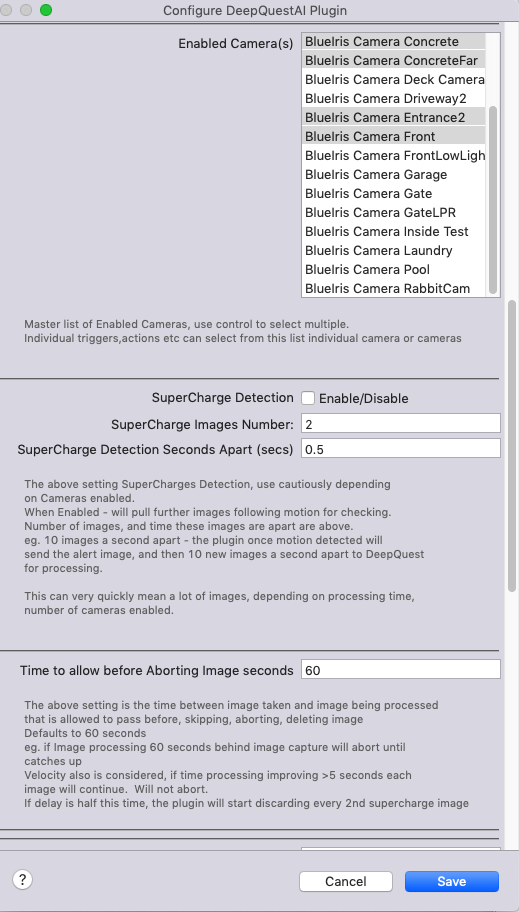
Have a look at the pluginConfig here - particularly the supercharge settings. (Potentially even if not enabled error may occur…)
Edit: Have looked - it seems to the the abort image downloading time settings — check this — currently seems to be blank?
(For me, closely followed by homeKitLink plugin (recently) this has had THE most impact.)
Glenn
Sent from my iPad using Tapatalk
Away - at the moment - and this plugin isn’t front of mind as have been working well..
Looks like you haven’t entered a number for timedelay aspect. (Edit - see below - I think it is a blank abort image download - ideally should be 60)
From (distant memory) it will be in the supercharge settings;
This is the extra images taken, and the time delay between..
I’ll have a look and refresh my memory and update..
Have a look at the pluginConfig here - particularly the supercharge settings. (Potentially even if not enabled error may occur…)
Edit: Have looked - it seems to the the abort image downloading time settings — check this — currently seems to be blank?
(For me, closely followed by homeKitLink plugin (recently) this has had THE most impact.)
Glenn
Sent from my iPad using Tapatalk
Re: DeepState AI Object Detection Indigo Plugin
I seen the defaults to 60 secs and thought I could skip it. Set as 30 and my images processed numbers are going through the roof. Thank you for such a quick and helpful response! I can go finally go to bed now 
Re: DeepState AI Object Detection Indigo Plugin
Mind blown! I hope you have someone in real life that can fully grasp how powerful this is and give you a pat on the back, you deserve it

Re: DeepState AI Object Detection Indigo Plugin
[Edited post after installing and experimenting]
I like the plugin. So far I have begun implementing it as an occupancy sensor. At the moment it is only updating variables, I haven't decided how to implement the new data.
I do have one feature request....
I would like it to save photos when an action checks a URL or a File. I get the log
To save PC bandwidth, my BI machine is configured to send the lower resolution DB images to deep state (CodeProject.AI now). So, I would like to use the "Send Image Immediately" with the camera URL so I can get a cropped image from the full resolution .jpg
Thank you for a great plugin!
I like the plugin. So far I have begun implementing it as an occupancy sensor. At the moment it is only updating variables, I haven't decided how to implement the new data.
I do have one feature request....
I would like it to save photos when an action checks a URL or a File. I get the log
.Image not saved as Camera NOT Selected in device State.
To save PC bandwidth, my BI machine is configured to send the lower resolution DB images to deep state (CodeProject.AI now). So, I would like to use the "Send Image Immediately" with the camera URL so I can get a cropped image from the full resolution .jpg
Thank you for a great plugin!
Bill
My Plugin: My People
My Plugin: My People
DeepState AI Object Detection Indigo Plugin
Sorry - missed this - downside of editing post - never gets marked as unread again.whmoorejr wrote:[Edited post after installing and experimenting]
I like the plugin. So far I have begun implementing it as an occupancy sensor. At the moment it is only updating variables, I haven't decided how to implement the new data.
I do have one feature request....
I would like it to save photos when an action checks a URL or a File. I get the log.Image not saved as Camera NOT Selected in device State.
To save PC bandwidth, my BI machine is configured to send the lower resolution DB images to deep state (CodeProject.AI now). So, I would like to use the "Send Image Immediately" with the camera URL so I can get a cropped image from the full resolution .jpg
Thank you for a great plugin!
Not completely sure I’m following..
1. Occupancy Sensor. Hmmm. Not sure this is the easiest option for that - although could check for Car etc. How are you using it for this?
2. Currently saving files occur when there is an indigo device type for that type of detection.
eg. I have car/vehicle, person, dog/fox — devices in indigo.
This means everything there is a detection then the image is saved, and can be reference with the web url for control page reviewing.
I would guess you are asking that if device type exists as above, but the request is via action group url/file check to save file as per the current BI automatically triggering process?
If I have that right should be relatively straight forward…
Try 0.8.12 - I believe it adds this…
Glenn
Sent from my iPad using Tapatalk
Re: DeepState AI Object Detection Indigo Plugin
GlennNZ wrote:
1. Occupancy Sensor. Hmmm. Not sure this is the easiest option for that - although could check for Car etc. How are you using it for this?
Let's say somone is sitting in a kitchen reading... when they first sit down, that causes motion -> AI (person detected) -> Indigo trigger as "Motion".
Now, if I want to automate the light in that room to turn off when no motion.... I might be turning off a light while someone is still sitting quietly reading. My thought is to force a view of the camera to look for a person before automatically shutting off the light. This can also be applied to a heat map to know where people are located... even if they are sitting still watching tv or reading. So now motion on a BI camera device will change a variable "Kitchen_Occupied" to "True" and run an action every X minutes to send an image of the kitchen to AI to look for a person. If there is still a person, wait another X minutes, repeat until false. I'm trying to figure out how to do the same thing with the driveway to basically have a virtual device for our cars. (on = present, off= gone) I know that will be harder because I'll have to get better at setting zones around where my wife and I each park
2. Currently saving files occur when there is an indigo device type for that type of detection.
eg. I have car/vehicle, person, dog/fox — devices in indigo.
This means everything there is a detection then the image is saved, and can be reference with the web url for control page reviewing.
I would guess you are asking that if device type exists as above, but the request is via action group url/file check to save file as per the current BI automatically triggering process?
I honestly don't remember what I was trying to do. I know I was tinkering around with different ways to get images and also to segeregate notifications. Example, I want Blue Iris to flag and record cars, dogs, people, etc that are in front of my house. I really only want a notifation on people. Similarly in my house, I want Blue Iris to flag and record the dogs and the kids, but I really only want notifications on people. I like the "motion" notification on the Blue Iris camera device for people and dogs, but I want more awarenss for people. I'll install the update now, try to get my head back into the AI stuff I was working on and see if I still have questions.
If I have that right should be relatively straight forward…
Try 0.8.12 - I believe it adds this…
Glenn
Sent from my iPad using Tapatalk
Bill
My Plugin: My People
My Plugin: My People
Re: DeepState AI Object Detection Indigo Plugin
Not on Github or plugin store yet.GlennNZ wrote: Try 0.8.12 - I believe it adds this…

Bill
My Plugin: My People
My Plugin: My People
Re: DeepState AI Object Detection Indigo Plugin
Sorry - I don’t do releases until needed really. Particularly as they all get pushed into the store.
Just check the commit message and click the green down code button, double click install. Double checking have right branch - now that python3 branch’s
https://github.com/Ghawken/DeepQuestAI/tree/Python3
Click green code button
Download zip
Download click to install
Glenn
Sent from my iPad using Tapatalk
Just check the commit message and click the green down code button, double click install. Double checking have right branch - now that python3 branch’s
https://github.com/Ghawken/DeepQuestAI/tree/Python3
Click green code button
Download zip
Download click to install
Glenn
Sent from my iPad using Tapatalk
Re: DeepState AI Object Detection Indigo Plugin
Very cool. That worked.
My current setup: I disabled the broadcast from the BI plugin so I could select all the cameras in the DeepState plugin config (so they would all be available for testing stuff without the plugin analyzing everything coming out of the BI plugin)
I set up devices for all the objects I want to be able to detect.
Note: Vehicle didn't work for me. I had to create a device for "car" and a device for "truck". Sometimes the AI thinks my SUV is a car, sometimes it's a truck.
Then using the "Send Image to DeepState Immediately" action, any objects it finds in a picture will then get plopped into the correct folder. The corresponding device "car, truck, potted plant" will also get updated.
That was the only action that I found that creates a saved image. Even the action to evaluate a BI camera (why I left the cameras enabled in plugin config) didn't create a saved image.
My point, the "Immediately" one, worked for me. Now I can start implementing it for a couple situations where a cropped or labeled image is preferred.
Thank you so much for this plugin. It's been a lot of fun and I've learned a lot
My current setup: I disabled the broadcast from the BI plugin so I could select all the cameras in the DeepState plugin config (so they would all be available for testing stuff without the plugin analyzing everything coming out of the BI plugin)
I set up devices for all the objects I want to be able to detect.
Note: Vehicle didn't work for me. I had to create a device for "car" and a device for "truck". Sometimes the AI thinks my SUV is a car, sometimes it's a truck.
Then using the "Send Image to DeepState Immediately" action, any objects it finds in a picture will then get plopped into the correct folder. The corresponding device "car, truck, potted plant" will also get updated.
That was the only action that I found that creates a saved image. Even the action to evaluate a BI camera (why I left the cameras enabled in plugin config) didn't create a saved image.
My point, the "Immediately" one, worked for me. Now I can start implementing it for a couple situations where a cropped or labeled image is preferred.
Thank you so much for this plugin. It's been a lot of fun and I've learned a lot
Bill
My Plugin: My People
My Plugin: My People