
I'm using DomoPad as the launcher for some desk Android VoIP phones and I ran into trouble trying to access the system's dialer/phone. I drew up a quick UI to test what could I do but I was left just staring at the thing when it was time to actually implement it. It might not be exactly dealbreaker as the dialer appears automatically when you pick up the handset but it gets sort of annoying/impossible dialing on hook.
Is there some magic link to order the phone to dig up the needed app? If not the dialer/phone app, any app already installed on the device (i.e; not a link to download an app kinda like iOS' Safari) I realize that I could just use tel: or sip: links but that isn't quite the same because those need some number or else they would error out or something.
Thanks !
How to invoke (run) an installed app
How to invoke (run) an installed app
I'll bet you think this post is about you. Don't you. ♪
-
RogueProeliator

- Posts: 2538
- Joined: Tue Nov 13, 2012 3:54 pm
- Location: Baton Rouge, LA
Re: How to invoke (run) an installed app
You can launch any application on the device, but you will need to know their bundle identifier (this sometimes shows in the Apps area in your Android settings). Do do so, on a control page you would choose a Client Action of "Go to External URL" and enter the URL like:Is there some magic link to order the phone to dig up the needed app? If not the dialer/phone app, any app already installed on the device (i.e; not a link to download an app kinda like iOS' Safari) I realize that I could just use tel: or sip: links but that isn't quite the same because those need some number or else they would error out or something.
Code: Select all
launch://[applicationId]Code: Select all
launch://com.android.deskclockAdam
Re: How to invoke (run) an installed app
Thanks! I searched within the installed apps but "Phone" isn't there. However, being an IP phone there are other ambiguous things like LDAP service, PublicMode (for hot desking, I believe), Phone Widget, MPK and Recorder; all of them related to calls but most of them have their own app. At least you solved the biggest part of the puzzle, the rest should be easy. The brand has an active forum and it's sort of developy, it should be easy to get a response directly from them. 
Thanks again for your help and happy New Year !
Thanks again for your help and happy New Year !
I'll bet you think this post is about you. Don't you. ♪
-
RogueProeliator
- Posts: 2538
- Joined: Tue Nov 13, 2012 3:54 pm
- Location: Baton Rouge, LA
Re: How to invoke (run) an installed app
On mobile phones it usually has dialer in the name, but of course you are dealing with a different animal there... if you don't see dialer then maybe the forums is your best bet. There is an Activity browser that you can download from the Play Store and will allow you to find any app/activity if you don't get good information from the forums. But could be time consuming to go through them all; still could be a backup plan.Thanks! I searched within the installed apps but "Phone" isn't there. However, being an IP phone there are other ambiguous things like LDAP service, PublicMode (for hot desking, I believe), Phone Widget, MPK and Recorder; all of them related to calls but most of them have their own app. At least you solved the biggest part of the puzzle, the rest should be easy. The brand has an active forum and it's sort of developy, it should be easy to get a response directly from them.
No problem - same to you!Thanks again for your help and happy New Year !
Re: How to invoke (run) an installed app
I did thanks to you ! 
The ID (URI) was launch://com.base.module.phone on a Grandstream GXV3275. First it wouldn't take because I inadvertently entered a enter/carriagereturn where the box shouldn't allow it:
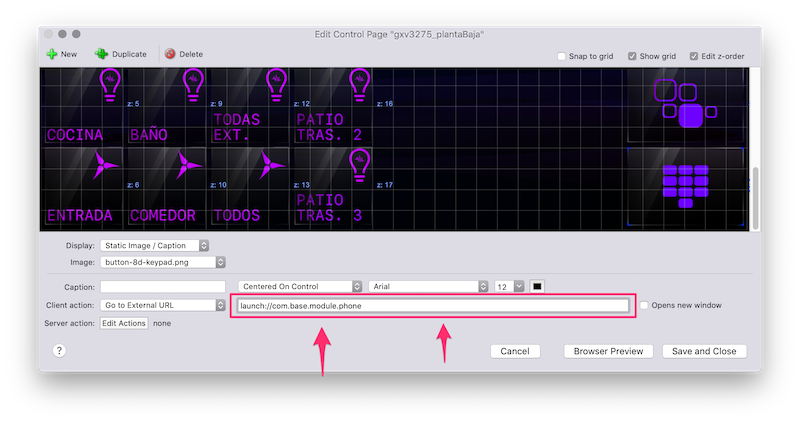
There's also com.base.module.phone.ui.VectorActivity. I think it's the frontend to the package because com.base.module.phone is listed as a parent to other processes. I really don't know, I'm not a dev, but it's not that hard to put 2&2 together.
…and then while trying, I set up the display mode in DomoPad to web mode and it sort of crashed but not really, it just returned to the page selection screen whenever I tried the launch:// link. When I switched it back it finally worked. I felt I needed to put this in writing somewhere in case there's somebody else with the same issue.
Sidenote: if anyone happens to be considering to get this phones; don't. They suck. They make great nightstand control surfaces though--and only that.
The ID (URI) was launch://com.base.module.phone on a Grandstream GXV3275. First it wouldn't take because I inadvertently entered a enter/carriagereturn where the box shouldn't allow it:
There's also com.base.module.phone.ui.VectorActivity. I think it's the frontend to the package because com.base.module.phone is listed as a parent to other processes. I really don't know, I'm not a dev, but it's not that hard to put 2&2 together.
…and then while trying, I set up the display mode in DomoPad to web mode and it sort of crashed but not really, it just returned to the page selection screen whenever I tried the launch:// link. When I switched it back it finally worked. I felt I needed to put this in writing somewhere in case there's somebody else with the same issue.
Sidenote: if anyone happens to be considering to get this phones; don't. They suck. They make great nightstand control surfaces though--and only that.
I'll bet you think this post is about you. Don't you. ♪
-
RogueProeliator
- Posts: 2538
- Joined: Tue Nov 13, 2012 3:54 pm
- Location: Baton Rouge, LA
Re: How to invoke (run) an installed app
The web view mode for control pages is probably going to go away anyway -- the Chrome view that it uses is just too restrictive now and doesn't operate well enough. Indigo Touch doesn't support a web view, either, so I feel okay killing it off. There is very little or no need now that you can embed web content (which in itself has limitations but they are easier to see/document/control).…and then while trying, I set up the display mode in DomoPad to web mode and it sort of crashed but not really, it just returned to the page selection screen whenever I tried the launch:// link. When I switched it back it finally worked. I felt I needed to put this in writing somewhere in case there's somebody else with the same issue.
Glad to hear you got it working!