NOAA Weather Plus discussions
Re: NOAA Weather Plus discussions
All of a sudden my current condition icon (and all condition icons) says "http://forecast". I reloaded the plugin. Any ideas?
Re: NOAA Weather Plus discussions
Hi.
I'm guessing you're talking about how the condition icons are appearing on a control page? Maybe you could attach a screen shot of what you're seeing.
I'm guessing you're talking about how the condition icons are appearing on a control page? Maybe you could attach a screen shot of what you're seeing.
Re: NOAA Weather Plus discussions
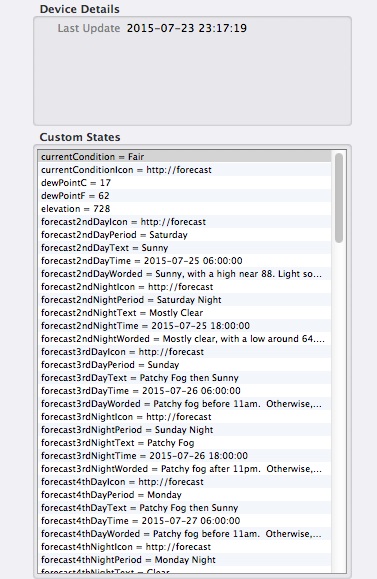
No, I am referring to the icons being called out by a NOAA Weather Plus Device. This is the states window for the device. Notice all the icons are reading "http://forecast":
Re: NOAA Weather Plus discussions
Got it. Yea. NOAA changed the weather icon URL so my basic string replace method of extracting the weather condition icon name failed. I've updated the plugin to version 1.1.18 and begun using a more flexible (but slightly slower) regular expression method of extracting the weather condition icon name. Version 1.1.18 is available for download now.
Re: NOAA Weather Plus discussions
Patch update 1.1.18 released:
(See main NOAA Weather Plus thread for download link).
Changes Since Version 1.1.17
(See main NOAA Weather Plus thread for download link).
Changes Since Version 1.1.17
- Fixed a bug that caused the weather condition icon name state to show up as a partial URL instead of the icon filename.
Re: NOAA Weather Plus discussions
God bless you Nathan Sheldon!
-
PottedPorkProduct

- Posts: 13
- Joined: Sun Jun 29, 2014 12:46 pm
- Location: San Diego, CA, USA
Re: NOAA Weather Plus discussions
The forecast icons for today and tomorrow aren't working on my system. Several are either empty or say "DualImage". I'm running version 1.1.18
currentConditionIcon is an empty string
forecastTodayIcon looks like it's working, it says "sct"
forecastTonightIcon says "DualImage"
forecastTomorrowIcon says "DualImage"
forecastTomorrowNightIcon says "DualImage"
forceast2ndDayIcon looks like it's working, it says "bkn"
forecast2ndNightIcon also looks like it's working, it says nra20
Same for the rest of the forecasts going out until day 6.
currentConditionIcon is an empty string
forecastTodayIcon looks like it's working, it says "sct"
forecastTonightIcon says "DualImage"
forecastTomorrowIcon says "DualImage"
forecastTomorrowNightIcon says "DualImage"
forceast2ndDayIcon looks like it's working, it says "bkn"
forecast2ndNightIcon also looks like it's working, it says nra20
Same for the rest of the forecasts going out until day 6.
Re: NOAA Weather Plus discussions
It looks like the National Weather Service has begun using just-in-time image generation for some forecast icons. The "DualImage" designation you're seeing is the result of forecast icon URLs specifying a PHP script (DualImage.php) instead of an actual image file name. The PHP script allows NOAA to specify URLs that pass a number of parameters which then dynamically generates a PNG image based on those parameters in real-time. So for instance the URL dynamically generates an image of nighttime rain with the text "90% ---> 60%" superimposed over the bottom part of the image.
The various weather icon states found in the NOAA Weather Plus plugin were intended to be used in Indigo control pages to specify a weather forecast image file name (locally stored on the Indigo server). Indigo wasn't designed to allow remote images to be used for dynamic device states. Device state icon images must reside in the /Library/Application Support/Perceptive Automation/Indigo 7/IndigoWebServer/images folder, but if they're generated in real-time now, there's no way to store all possible image mode state names as image files in that location.
I'll have to think about possible ways of working around this within the plugin. I don't have any ideas yet. Unfortunately, I don't see a viable workaround for this problem in a way that would allow images for the "DualImage" conditions to be shown. If you have any suggestions, I'd be happy to hear them.
Code: Select all
http://forecast.weather.gov/DualImage.php?i=nra&j=nra&ip=90&jp=60The various weather icon states found in the NOAA Weather Plus plugin were intended to be used in Indigo control pages to specify a weather forecast image file name (locally stored on the Indigo server). Indigo wasn't designed to allow remote images to be used for dynamic device states. Device state icon images must reside in the /Library/Application Support/Perceptive Automation/Indigo 7/IndigoWebServer/images folder, but if they're generated in real-time now, there's no way to store all possible image mode state names as image files in that location.
I'll have to think about possible ways of working around this within the plugin. I don't have any ideas yet. Unfortunately, I don't see a viable workaround for this problem in a way that would allow images for the "DualImage" conditions to be shown. If you have any suggestions, I'd be happy to hear them.
Re: NOAA Weather Plus discussions
Patch update 1.1.19 released:
(See main NOAA Weather Plus announcement post for download link).
Changes Since Version 1.1.18
(See main NOAA Weather Plus announcement post for download link).
Changes Since Version 1.1.18
- Fixed weather condition icon image names that appeared as "DualImage" for the icon name due to changes in NOAA data feed.
-
philipbasile
- Posts: 126
- Joined: Thu Jan 08, 2015 8:59 pm
- Location: NJ
Re: NOAA Weather Plus discussions
When I display the forecast icon on a control page all I get is something like shra80.
I dont understand how I am supposed to use this feature. Can someone explain this ?
Thanks
philip
I dont understand how I am supposed to use this feature. Can someone explain this ?
Thanks
philip
Re: NOAA Weather Plus discussions
The Current Condition Icon and various Forecast Icon device states are taken directly from the NOAA data feed. They specify the filename of an icon image file that corresponds to the weather condition. These icon image files aren't installed in Indigo and must be manually installed in order to work on Control Pages. This requires a bit of work.
You first need to download a ZIP file of the various weather icons from NOAA at http://w1.weather.gov/xml/current_obs/weather.php. Once you've unzipped those icons, you need to convert them all from JPEG to PNG files. The Preview application in macOS can do this, but not in batch (unless you create an AppleScript or Automator action). After converting to PNG, you need to edit the filename of each image by adding something distinctive such as "NOAA Condition" followed by a plus sign (+) in front of the existing file name. This allows you to select a single Device State image in the control page. Be sure you aren't currently editing the control page, then put all of the image files in the /Library/Application Support/Perceptive Automation/Indigo 7/IndigoWebServer/images/controls/devices directory. When you begin editing the control page again, create a new control item, set Display to Device State. Set For to your NOAA Weather Plus device and select your Forecast icon state. Make sure the "As image" radio button is selected and select the "NOAA Condition+.png" item from the list. Once you click Save and Close, you can view the Control Page and the new control you created will appear as a NOAA weather condition icon that corresponds to the forecasted weather.
You first need to download a ZIP file of the various weather icons from NOAA at http://w1.weather.gov/xml/current_obs/weather.php. Once you've unzipped those icons, you need to convert them all from JPEG to PNG files. The Preview application in macOS can do this, but not in batch (unless you create an AppleScript or Automator action). After converting to PNG, you need to edit the filename of each image by adding something distinctive such as "NOAA Condition" followed by a plus sign (+) in front of the existing file name. This allows you to select a single Device State image in the control page. Be sure you aren't currently editing the control page, then put all of the image files in the /Library/Application Support/Perceptive Automation/Indigo 7/IndigoWebServer/images/controls/devices directory. When you begin editing the control page again, create a new control item, set Display to Device State. Set For to your NOAA Weather Plus device and select your Forecast icon state. Make sure the "As image" radio button is selected and select the "NOAA Condition+.png" item from the list. Once you click Save and Close, you can view the Control Page and the new control you created will appear as a NOAA weather condition icon that corresponds to the forecasted weather.
-
philipbasile
- Posts: 126
- Joined: Thu Jan 08, 2015 8:59 pm
- Location: NJ
Re: NOAA Weather Plus discussions
Got it !
Thank You !
Thank You !
Re: NOAA Weather Plus discussions
I started getting this today. Anyone else?
Code: Select all
Apr 23, 2019 at 7:49:47 AM
   NOAA Weather Plus Error         Error parsing XML from NOAA for device Weather Plus NOAA: not well-formed (invalid token): line 149, column 28. Try using GPS coordinaetes for a nearby airport (NOAA often places weather stations at airports).
   NOAA Weather Plus Error         Error parsing XML from NOAA for device Weather Plus NOAA: not well-formed (invalid token): line 149, column 28. Try using GPS coordinaetes for a nearby airport (NOAA often places weather stations at airports).
   NOAA Weather Plus Error         Error parsing XML from NOAA for device Weather Plus NOAA: not well-formed (invalid token): line 149, column 28. Try using GPS coordinaetes for a nearby airport (NOAA often places weather stations at airports).
   NOAA Weather Plus Error         Error parsing XML from NOAA for device Weather Plus NOAA: not well-formed (invalid token): line 149, column 28. Try using GPS coordinaetes for a nearby airport (NOAA often places weather stations at airports).
   NOAA Weather Plus Error         Unable to find current condition or forecast data in the resulting data file. Try using different GPS coordinates.
Code: Select all
NOAA Weather Plus Error HTTP error getting weather for coordinates 33.689, -116.225: HTTP Error 504: Gateway Time-outRe: NOAA Weather Plus discussions
Looks like NOAA's DWML (XML-based weather info) system might be having trouble in your area. Not much anyone can do about that (other than NOAA, who has no tech support). Only workaround is to try different GPS coordinates, perhaps for another nearby town or airport.
Re: NOAA Weather Plus discussions
Good morning, learning Python and first time trying to call in a plugin device state (here a temperature from NOAA Weather Plus)
Could someone help with the following short script: what is my error calling the device state value please?
(the trigger is a change in minTemp2ndNight and I am trying to check if it dropped below my internal variable)
Much appreciated, thank you!!
theTemperatureV = indigo.variables[1708239780] #MinTemperatureVariable
dev = indigo.devices[23142400] #Weather Plus Station
if dev.states("minTemp2ndNight").value < theTemperatureV.value:
return True
else:
return False
Could someone help with the following short script: what is my error calling the device state value please?
(the trigger is a change in minTemp2ndNight and I am trying to check if it dropped below my internal variable)
Much appreciated, thank you!!
theTemperatureV = indigo.variables[1708239780] #MinTemperatureVariable
dev = indigo.devices[23142400] #Weather Plus Station
if dev.states("minTemp2ndNight").value < theTemperatureV.value:
return True
else:
return False
- Attachments
-
- Screen Shot 2020-04-30 at 12.14.26 PM.png (31.08 KiB) Viewed 4641 times