DSC Alarm Plugin (Locked)
Re: DSC Alarm Plugin
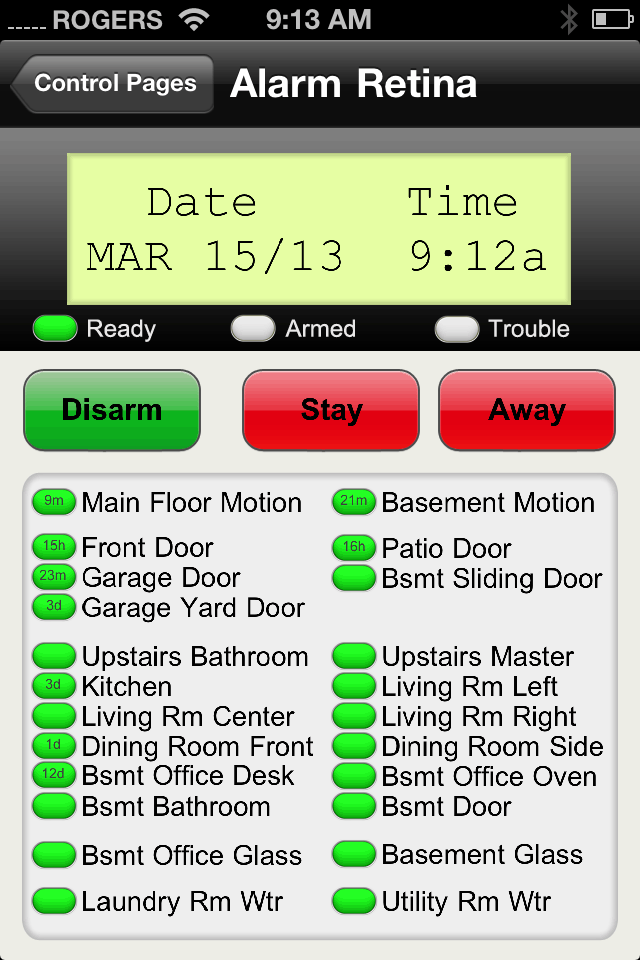
Hey, I'm making progress. Here's time and date using WD variables. Who Knew!!! 


Indigo 7.1.1, OS 10.14.6, MacMini .3.2 GHz 6 Intel Core i7, 64 GB ram
Re: DSC Alarm Plugin
@colovin:
To get the correct text on your LCD display you should be using...
Display: Device State
For: select Alarm Keypad Device, LCD Line 1
Repeat for LCD Line 2
The three Ready/Armed/Trouble LEDs are also in the keypad device. Display as image and select the appropriate alarm_ready_led, alarm_trouble_led, etc.
For zone states it's similar ...
Display: Device State
For: select Alarm Zone Device, Current State
As Image: Select the alarm_zone_led_lg+.png image.
To get the correct text on your LCD display you should be using...
Display: Device State
For: select Alarm Keypad Device, LCD Line 1
Repeat for LCD Line 2
The three Ready/Armed/Trouble LEDs are also in the keypad device. Display as image and select the appropriate alarm_ready_led, alarm_trouble_led, etc.
For zone states it's similar ...
Display: Device State
For: select Alarm Zone Device, Current State
As Image: Select the alarm_zone_led_lg+.png image.
Re: DSC Alarm Plugin
I have weird stuff going on, I don't know if it's because I'm running beta software or what. I just upgraded from 4.x to 6 .0.0.B10. Did the upgrade because 4.x (whatever the last one was) didn't support the firmware of a INSTEON device I just got. Wasn't thrilled about getting beta software but that was the only option. BUT. The alarmbg_lg.png image which you indicated to put in the image folder is only seen in the image/background folder which OK that makes sense. Now the weird part, all the other images which you called for going in images/control will only be seen in: images/control/devices and then only 6 of the 15. I've taken all the other 144 device images out and left only your 15 and this is what I get

I don't know if this is a bug in the beta software but I don't have access to all the icons, and of the 144 icons that come stocked in the device folder I could only see about 30 when they are all in there. Is this a beta thing or am I missing something?

I don't know if this is a bug in the beta software but I don't have access to all the icons, and of the 144 icons that come stocked in the device folder I could only see about 30 when they are all in there. Is this a beta thing or am I missing something?
Indigo 7.1.1, OS 10.14.6, MacMini .3.2 GHz 6 Intel Core i7, 64 GB ram
- jay (support)
- Site Admin
- Posts: 19232
- Joined: Wed Mar 19, 2008 11:52 am
- Location: Austin, Texas
- Contact:
Re: DSC Alarm Plugin
No - beta wasn't your only option. When you upgraded from 4 we sent you an Indigo 6 beta code because most people want to use the latest version. However, we also generated you an Indigo 5 code which works with new INSTEON devices. Feel free to install and use Indigo 5 if you like (use the registration code lookup page to find all of your registration codes including the Indigo 5 code). If you had let us know that you didn't want to use the beta, we would have let you know.
Nothing about how images are used has changed between Indigo 5 and Indigo 6. Any time you add/change images you must restart the Indigo Server to make sure the change gets propagated.
Images which you put in images/control/devices will only be seen when you inspect device state. Likewise, images you put in images/control/variables, etc. You won't see all of the images which are in those folders because some of them are used to represent different values for the same object. Specifically, for images that match the pattern "SOMENAME+SOMEVALUE.png" you will only see "SOMENAME+.PNG" in the popup menu - that indicates that the image will change based on the value being inspected.
See the custom images wiki article for details of how custom images and the image selection heuristics work.
Nothing about how images are used has changed between Indigo 5 and Indigo 6. Any time you add/change images you must restart the Indigo Server to make sure the change gets propagated.
Images which you put in images/control/devices will only be seen when you inspect device state. Likewise, images you put in images/control/variables, etc. You won't see all of the images which are in those folders because some of them are used to represent different values for the same object. Specifically, for images that match the pattern "SOMENAME+SOMEVALUE.png" you will only see "SOMENAME+.PNG" in the popup menu - that indicates that the image will change based on the value being inspected.
See the custom images wiki article for details of how custom images and the image selection heuristics work.
Re: DSC Alarm Plugin
In all my reading though posts I thought I saw where you could setup a trigger or event by the user code for disarming the system. Now that I want to do something like that I can't find it. Is it possible to setup a trigger for a specific user?
Indigo 7.1.1, OS 10.14.6, MacMini .3.2 GHz 6 Intel Core i7, 64 GB ram
Re: DSC Alarm Plugin
I'm trying to be clever, which always puts me in a bad position. I'm trying to add a garage door open icon to my DSC alarm Control page. I'm using a EZIO2X4 controller and using 2 sensors for the garage door open indictor. I have one at that is on when the garage door is open and one that is on when the garage door is closed. One would probably work just fine but I'm looking for redundancy. Using the " alarm_zone_led_lg+.png" for when the garage door is open gives the expected result. Green when closed, Red when open. On sensor #2 I was looking for the opposite. For sensor two I was wanting Red when closed, Green when opened so both icon were the same color when the garage door was open.
I made copies of the alarm_zone_led_lg+ to alarm_Azone_led_lg+ switching the closed and on names so that they were the opposite color hoping that, that would give me both sensors one on the other off a green icon and then when the garage door was open both icon giving me red.
That didn't happen (da I wouldn't be posting if it did
)
Is there a way to set up the opposite case with the excellent graphic package in this thread?
I made copies of the alarm_zone_led_lg+ to alarm_Azone_led_lg+ switching the closed and on names so that they were the opposite color hoping that, that would give me both sensors one on the other off a green icon and then when the garage door was open both icon giving me red.
That didn't happen (da I wouldn't be posting if it did
Is there a way to set up the opposite case with the excellent graphic package in this thread?
Indigo 7.1.1, OS 10.14.6, MacMini .3.2 GHz 6 Intel Core i7, 64 GB ram
Re: DSC Alarm Plugin
What images are you using to show the zone status (e.g. the oval shaped green lights in your image above)?travisc wrote:Very nice! What are you using for your door lock if you don't mind me asking?
I've got a new version of the DSC alarm plugin in the works. You can assign zones to groups and setup triggers that fire if any of the zones in that group are open or closed for a period of time. So for example you could easily setup a trigger to turn off the HVAC system if in any window or door as been open for 5 minutes.
It also allows you to display the last-changed time in your control pages if you want...
Re: DSC Alarm Plugin
They're included in the plugin download on the first page of this thread.cpeek wrote:What images are you using to show the zone status (e.g. the oval shaped green lights in your image above)?
Re: DSC Alarm Plugin
Thanks - found them in the Retina folder. I had only been using the non-Retina icons.travisc wrote:They're included in the plugin download on the first page of this thread.cpeek wrote:What images are you using to show the zone status (e.g. the oval shaped green lights in your image above)?
I have had a chance to play around with the plug-in. I would like to thank you for doing such a wonderful job on putting it together. This plugin is what makes it possible to set everything up for my situation.
Re: DSC Alarm Plugin
I have another question for you - is there any way to determine whether the alarm was armed in stay or away mode? I went the the various options in the triggers and did not see anything. I saw some old posts/questions about adding some type of trigger for this, but did not see anything else.
Re: DSC Alarm Plugin
I have installed an Envisalink 2DS and the unit works perfectly with the web interface for EyezOn; I can review complete status, history, etc. However, I keep getting the following error:
Error opening socket: Could not open port socket://192.168.1.17:4025: (60, 'Operation timed out')
Meaning I have no integration with Indigo. EyezOn says it's an Indigo problem. Here is the latest version info for the Envisalink 2DS:
MAC: 001C2A00479B
Version: 114
Last Update: July 11, 2013, 2:46 pm
Any ideas?
Error opening socket: Could not open port socket://192.168.1.17:4025: (60, 'Operation timed out')
Meaning I have no integration with Indigo. EyezOn says it's an Indigo problem. Here is the latest version info for the Envisalink 2DS:
MAC: 001C2A00479B
Version: 114
Last Update: July 11, 2013, 2:46 pm
Any ideas?
Re: DSC Alarm Plugin
@craigg577
Are you sure you have the correct IP address? Maybe try pinging it in the terminal to be sure? I just use "envisalink" as the address. Most routers support using the hostname like that on the local network. "envisalink.local" or "envisalink.lan" may also work.
Re: DSC Alarm Plugin
That was it- wrong address. Thanks.
-
eme jota ce
- Posts: 655
- Joined: Thu Jul 09, 2009 1:25 pm
- Location: SW Florida
Re: DSC Alarm Plugin - Chime status tracking
Hi Travis,
Thanks for a great plugin.
I use it to toggle the door chime by sending the command *4, which toggles the chime status. Works great but sometimes gets out of sync if someone makes a manual keypad entry. Wondering if the plugin could send on/off commands instead of a toggle command. Or, as a second alternative if it could report the status of the chime so that I could use Indigo logic to reliably track and control the on/off status?
mjc
Thanks for a great plugin.
I use it to toggle the door chime by sending the command *4, which toggles the chime status. Works great but sometimes gets out of sync if someone makes a manual keypad entry. Wondering if the plugin could send on/off commands instead of a toggle command. Or, as a second alternative if it could report the status of the chime so that I could use Indigo logic to reliably track and control the on/off status?
mjc
Re: DSC Alarm Plugin - Chime status tracking
Hi mjc,eme jota ce wrote:Hi Travis,
Thanks for a great plugin.
I use it to toggle the door chime by sending the command *4, which toggles the chime status. Works great but sometimes gets out of sync if someone makes a manual keypad entry. Wondering if the plugin could send on/off commands instead of a toggle command. Or, as a second alternative if it could report the status of the chime so that I could use Indigo logic to reliably track and control the on/off status?
mjc
I just checked the documentation. There doesn't appear to be a way for me to set the chime status directly. Our only option is to toggle it by sending it *4 as you're doing now.
The good news is your alternative is possible. The plugin is indeed notified when the chime status is turned on or off. I'll create a keypad state to keep track of the chime status. You should be able to use that in a condition to determine if you need to toggle the status.
This feature will be in the next release which will probably be out in a day or two.
Travis