Enphase Envoy-S Solar Power Plugin (with Panel Monitoring)

User avatar
GlennNZ
Posts: 1872
Joined: Sun Dec 07, 2014 3:33 pm
Location: Central Coast, Australia

Enphase Envoy-S Solar Power Plugin (with Panel Monitoring)

Post by GlennNZ »

Image

Enphase Envoy Plugin for Indigo Domotics

Monitor your Enphase solar system — production, consumption, battery, and individual panel output — directly from Indigo Domotics via your local Envoy gateway. No cloud dependency; data updates every 60 seconds.

Latest Release | Indigo Plugin Store | Full Wiki Documentation

Features
  • Real-time solar monitoring — production, consumption, net flow, and grid status updated every 60 seconds direct from the local Envoy
  • Per-panel microinverter devices — one Indigo device per panel, showing watts, temperature, DC/AC voltage, energy totals, and last-heard time
  • Battery & grid support — full Encharge battery state, charge/discharge rate, state of charge, storage mode, and grid import/export
  • Cost tracking — optional Cost device calculates daily, 7-day, and lifetime energy costs against your configured tariff rates
  • Power production control — enable or disable all inverter output via an Indigo action (installer token required)
  • DPEL — Dynamic Power Export Limiting — cap grid export or total production at a configurable watt limit and slew rate
  • Battery storage mode control — switch between Self-Consumption, Savings (TOU), and Full Backup; enable/disable grid charging; set reserve SOC
  • Firmware ≥7 JWT authentication — auto-generates and refreshes installer or owner tokens; supports manual token entry
  • Multi-Envoy — run multiple Envoy devices simultaneously for homes with more than one gateway
  • No external dependencies — all required packages are bundled inside the plugin; no manual pip installs needed
Screenshots

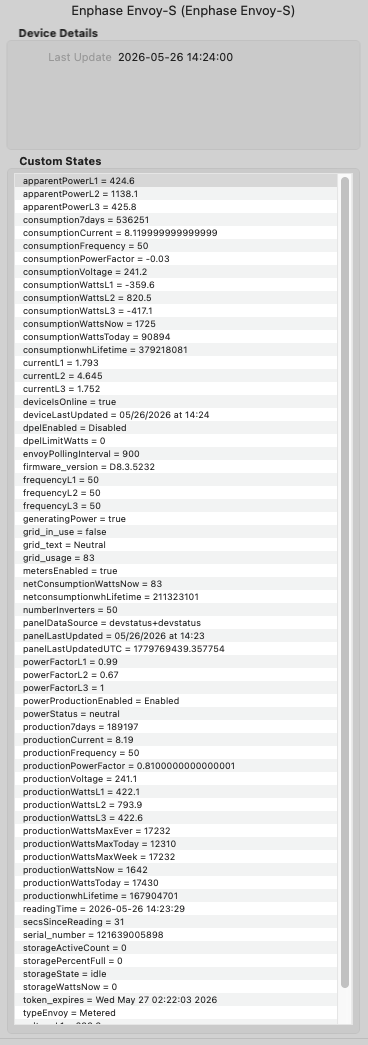
Live device states — Envoy-S Metered, 50 panels, firmware D8.3.5232:
Image

Device settings dialog:
Image

Quick Start
  1. Download the latest .indigoPlugin from GitHub Releases or from the Indigo Plugin Store.
  2. Double-click the downloaded file — Indigo will prompt to install and enable it.
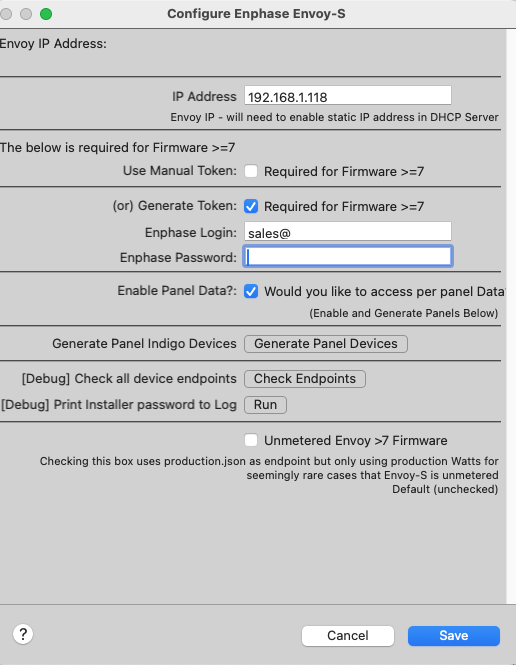
  3. Create a device — go to Devices → New Device…, select model Enphase Envoy-S, and enter your Envoy's local IP address.
  4. Add a token (firmware ≥7 only) — use Generate Token with your Enphase Enlighten credentials, or paste a manual token from entrez.enphaseenergy.com.
  5. Save — the plugin polls immediately; within 30 seconds deviceIsOnline will be True and live data will appear.
Full step-by-step instructions: Installation & Setup wiki page

Documentation

All documentation is in the GitHub Wiki:
Supported Device Types
  • Enphase Envoy-S — Main gateway: production, consumption, storage, per-phase metering
  • Enphase Legacy — Older Envoy-C hardware without metering support
  • Enphase Panel — One device per microinverter: watts, temperature, DC/AC voltage, energy totals
  • Enphase Battery & Grid — Encharge battery state, grid flow, storage mode settings
  • Enphase Cost — Calculates energy costs against your tariff rates
What's New — v1.8.0
  • Menu item: Log Last Time Envoy Heard from Panels — highlights panels that have gone silent and shows reporting delay
  • New states: panelLastUpdated, panelLastUpdatedUTC, panelDataSource
  • New state: grid_text — human-readable summary e.g. "Grid in use & Importing 450 Watts"
  • New states: grid_in_use (Boolean) and grid_usage (signed watts)
  • powerStatus neutral band — flows under 100 W classified as neutral rather than importing/exporting
  • Bug fix: voltage states were not divided by phase count on multi-phase systems
Full changelog: GitHub Releases

Requirements
  • Indigo Domotics 2025.1+
  • Python 3.10+ (bundled with modern Indigo)
  • Network — Indigo Mac and Envoy must be on the same LAN
  • Enphase account — required only for firmware ≥7 token generation
Actions at a Glance
  • Refresh all devices / Refresh single device — any token
  • Enable / Disable power production — installer token required
  • Enable / Disable DPEL (export limiting) — installer token required
  • Set storage mode (self-consumption / savings / backup) — installer token recommended
  • Enable / Disable charge from grid — installer token recommended
  • Set battery reserve SOC — installer token recommended
Full parameter details and workflow examples: Actions Reference

Support & Community
Image
Last edited by GlennNZ on Sun Aug 19, 2018 12:53 am, edited 3 times in total.
midd
Posts: 374
Joined: Sun Apr 18, 2010 3:00 pm

Re: Enphase Envoy-S Solar Power Plugin (with Panel Monitorin

Post by midd »

Thanks for doing this! I'll try it out with my system and report back.
M4 Mac mini.
User avatar
jay (support)
Site Admin
Posts: 19232
Joined: Wed Mar 19, 2008 11:52 am
Location: Austin, Texas
Contact:

Re: Enphase Envoy-S Solar Power Plugin (with Panel Monitorin

Post by jay (support) »

Sweet! Thanks for contributing to the ecosystem.
Jay (Indigo Support)
Twitter | Facebook | LinkedIn
midd
Posts: 374
Joined: Sun Apr 18, 2010 3:00 pm

Re: Enphase Envoy-S Solar Power Plugin (with Panel Monitorin

Post by midd »

Why is it when I download it, the plugin appears as folder?
M4 Mac mini.
User avatar
GlennNZ
Posts: 1872
Joined: Sun Dec 07, 2014 3:33 pm
Location: Central Coast, Australia

Re: Enphase Envoy-S Solar Power Plugin (with Panel Monitorin

Post by GlennNZ »

midd wrote:Why is it when I download it, the plugin appears as folder?
Hopefully you have figured out -
Just need to delete the github added master off the end of the folder name- but have updated zip file with this already done.
Glenn
User avatar
FlyingDiver
Posts: 7830
Joined: Sat Jun 07, 2014 10:36 am
Location: Southwest Florida, USA

Re: Enphase Envoy-S Solar Power Plugin (with Panel Monitorin

Post by FlyingDiver »

GlennNZ wrote: Hopefully you have figured out -
Just need to delete the github added master off the end of the folder name- but have updated zip file with this already done.
Glenn
I've found it's better to have the git repository actually set for the folder enclosing the .indigoplugin folder. That way you can put in a README or other supplementary files along with the plugin. See how any of mine are setup.
joe (aka FlyingDiver)
my plugins: http://forums.indigodomo.com/viewforum.php?f=177
User avatar
GlennNZ
Posts: 1872
Joined: Sun Dec 07, 2014 3:33 pm
Location: Central Coast, Australia

Re: Enphase Envoy-S Solar Power Plugin (with Panel Monitorin

Post by GlennNZ »

FlyingDiver wrote:
GlennNZ wrote: Hopefully you have figured out -
Just need to delete the github added master off the end of the folder name- but have updated zip file with this already done.
Glenn
I've found it's better to have the git repository actually set for the folder enclosing the .indigoplugin folder. That way you can put in a README or other supplementary files along with the plugin. See how any of mine are setup.
Thanks. Did originally create it along those lines - changing the ghpu path setting to deal with.

But found when moved development to PyCharm and Symbolic links to Plugin folders - that only seems to start with the .indigoPlugin file (as the current github)
In my brief looking - and learning with PyCharm and its git settings- couldn't quite see how to add extra folder and keep symbolic link intact.

Glenn
User avatar
jay (support)
Site Admin
Posts: 19232
Joined: Wed Mar 19, 2008 11:52 am
Location: Austin, Texas
Contact:

Re: Enphase Envoy-S Solar Power Plugin (with Panel Monitorin

Post by jay (support) »

I also recommend zipping up just the plugin and adding it to the release (named exactly as the plugin should be named). This will make it much simpler for users to download and install. See the Alexa-Hue Bridge releases tab for examples. It's a tiny bit of extra work, but you generally don't do releases that often so I think it's a small price to pay for convenience.

And I agree with FlyingDiver - making the repo the actual plugin directory (as opposed to putting it inside a "master" folder) is a bit problematic when trying to store other things (readme's, images for the readme, etc) that aren't actually part of the plugin hierarchy.
Jay (Indigo Support)
Twitter | Facebook | LinkedIn
User avatar
FlyingDiver
Posts: 7830
Joined: Sat Jun 07, 2014 10:36 am
Location: Southwest Florida, USA

Re: Enphase Envoy-S Solar Power Plugin (with Panel Monitorin

Post by FlyingDiver »

I wouldn't bother trying to use the git integration in PyCharm. Use GitKraken or some other Git client.
joe (aka FlyingDiver)
my plugins: http://forums.indigodomo.com/viewforum.php?f=177
User avatar
GlennNZ
Posts: 1872
Joined: Sun Dec 07, 2014 3:33 pm
Location: Central Coast, Australia

Re: Enphase Envoy-S Solar Power Plugin (with Panel Monitorin

Post by GlennNZ »

jay (support) wrote:I also recommend zipping up just the plugin and adding it to the release (named exactly as the plugin should be named). This will make it much simpler for users to download and install. See the Alexa-Hue Bridge releases tab for examples. It's a tiny bit of extra work, but you generally don't do releases that often so I think it's a small price to pay for convenience.

And I agree with FlyingDiver - making the repo the actual plugin directory (as opposed to putting it inside a "master" folder) is a bit problematic when trying to store other things (readme's, images for the readme, etc) that aren't actually part of the plugin hierarchy.
Thanks Jay,
Okay - obviously it must be possible with PyCharm (and auto push to github) and using Symbolic links?

Symbolic link - is to the .indigoPlugin file. Opening this in Pycharm - and then pushing to github - give the folder structure I have.
How do I add a folder above from within Pycharm and keeping symbolic link?

Or do I need a seperate folder for that being uploaded to github? - which I update perdiocally from the symbolic link contents?

Will keep fiddling.

Glnn
User avatar
FlyingDiver
Posts: 7830
Joined: Sat Jun 07, 2014 10:36 am
Location: Southwest Florida, USA

Re: Enphase Envoy-S Solar Power Plugin (with Panel Monitorin

Post by FlyingDiver »

Here's what my folder structure looks like. The "BetterEmail" folder is the git repository. The symlink from the Plugins folder points to the BetterEmail.indigoPlugin folder. If PyCharm has a problem with that, then just don't use PyCharm to push updates to GitHub. There are lots of Git clients out there.
Attachments
Screen Shot 2016-12-20 at 6.09.01 PM 12-20.png
Screen Shot 2016-12-20 at 6.09.01 PM 12-20.png (245.13 KiB) Viewed 19990 times
joe (aka FlyingDiver)
my plugins: http://forums.indigodomo.com/viewforum.php?f=177
User avatar
GlennNZ
Posts: 1872
Joined: Sun Dec 07, 2014 3:33 pm
Location: Central Coast, Australia

Re: Enphase Envoy-S Solar Power Plugin (with Panel Monitorin

Post by GlennNZ »

FlyingDiver wrote:Here's what my folder structure looks like. The "BetterEmail" folder is the git repository. The symlink from the Plugins folder points to the BetterEmail.indigoPlugin folder. If PyCharm has a problem with that, then just don't use PyCharm to push updates to GitHub. There are lots of Git clients out there.
Thanks Joe
Will restructure folders/files - presume PyCharm shouldn't have problem with it.
Glenn
Bollar
Posts: 528
Joined: Sun Aug 11, 2013 3:14 pm

Re: Enphase Envoy-S Solar Power Plugin (with Panel Monitorin

Post by Bollar »

Neat. I wonder if it works on my legacy Envoy? I'll play with it over the weekend.
Insteon / Z-Wave / Bryant Evolution Connex /Tesla / Roomba / Elk M1 / SiteSage / Enphase Enlighten / NOAA Alerts
User avatar
GlennNZ
Posts: 1872
Joined: Sun Dec 07, 2014 3:33 pm
Location: Central Coast, Australia

Re: Enphase Envoy-S Solar Power Plugin (with Panel Monitorin

Post by GlennNZ »

Bollar wrote:Neat. I wonder if it works on my legacy Envoy? I'll play with it over the weekend.
Cool,
Let me know how you go.
Apparently there are some differences - the per panel option may not work (but just don't enable it if it doesn't)
Welcome to post differences and can incorporate the different models

Glenn
Bollar
Posts: 528
Joined: Sun Aug 11, 2013 3:14 pm

Re: Enphase Envoy-S Solar Power Plugin (with Panel Monitorin

Post by Bollar »

GlennNZ wrote:
Bollar wrote:Neat. I wonder if it works on my legacy Envoy? I'll play with it over the weekend.
Cool,
Let me know how you go.
Yeah, no luck. the local API on my Envoy is quite limited and it doesn't even respond to your plugin.
Insteon / Z-Wave / Bryant Evolution Connex /Tesla / Roomba / Elk M1 / SiteSage / Enphase Enlighten / NOAA Alerts
Post Reply

Return to “Enphase Envoy Solar”