Travis, I'm having difficulty getting the plugin to communicate with an Envisalink 3 and hope you can help me get it working. I recently connected the Envisalink 3 (Firmware 01.09.111A) to my Honeywell Vista 20P and after verifying it was working thru the Eyez-On portal, I attempted to get it working with Indigo and the DSC Alarm plugin (v1.0.9) but with no success. After enabling debug in the plugin, here is what gets written to Indigo's event log:
2013-03-09 11:33:25 DSC Alarm Debug STATE: Startup
2013-03-09 11:33:25 DSC Alarm Debug getConfiguration start
2013-03-09 11:33:26 DSC Alarm Initializing communication at address: 192.168.114.8:4025
2013-03-09 11:33:27 DSC Alarm Debug RX: Login:
2013-03-09 11:33:27 DSC Alarm Error IT-100/2DS Error: Received a response with invalid characters
2013-03-09 11:33:27 DSC Alarm Debug TX: 005user54
2013-03-09 11:33:27 DSC Alarm Debug RX: FAILED
2013-03-09 11:33:27 DSC Alarm Error Checksum did not match on a received packet.
2013-03-09 11:33:27 DSC Alarm Error Connection RX Error: lost socket connection
I did some further investigation with Terminal and telnet, reproducing the login steps, and in my case when the Envisalink prompts with "Login:", I believe it expects just the password (ex: "user"), not the network login command+password+checksum:
telnet> open 192.168.114.8 4025
Trying 192.168.114.8...
Connected to 192.168.114.8.
Escape character is '^]'.
Login:
user
OK
[F700000F1008001C08020000],"****DISARMED**** Ready to Arm "
1) Is my analysis correct and, if so, 2) Is there a way to get the plugin in to handle this case?
Thank you and thanks a lot for writing the plugin.
DSC Alarm Plugin (Locked)

Re: DSC Alarm Plugin
I may be completely wrong... But... While the serial bus may be similar, the VISTA 20P uses a different messaging protocol from the DSC panels. Since the DSC plugin is designed to decode tHe DSC protocol, I don't see how it could work with the VISTA panel unless the Envisalink was doing a protocol translation: VISTA/Honelwell/ADEMCO -> DSC.rbrown wrote:Travis, I'm having difficulty getting the plugin to communicate with an Envisalink 3 and hope you can help me get it working. I recently connected the Envisalink 3 (Firmware 01.09.111A) to my Honeywell Vista 20P...
The ad2usb plugin can decode the VISTA message stream, but is designed specifically for the ad2usb interface product and would almost certainly not work with the raw VISTA protocol.
But, as I noted above, this could be all wrong. YMMV
EDIT: I took a quick glance at the Envisalink 3 documentation and it looks like it supports the VISTA panels for reporting purposes. I.e, connecting to a monitoring center in lieu of a phone line. But, it doesn't look like it would provide the message stream the DSC plugin is looking for.
Re: DSC Alarm Plugin
My assumption (now that you've got me to think about it) was that the DSC plugin uses the Envisalink's third party interface (TPI) and that thru the TPI, the Envisalink would control the Vista 20P. And to your point, when installing the Envisalink, Eyez-On requires identifying that type of panel it is attached to, DSC or Honeywell. I'm guessing/assuming they change the communication protocol the Envisalink uses based on that setting.berkinet wrote:Since the DSC plugin is designed to decode tHe DSC protocol, I don't see how it could work with the VISTA panel unless the Envisalink was doing a protocol translation: VISTA/Honelwell/ADEMCO -> DSC.
I'll do some more investigation using Terminal and telnet to determine whether via the TPI, the Envisalink can control the Vista 20P. If that is the case and the plugin does use the TPI, then hopefully much of the plugin's existing code would work.
I'd considered the AD2USB but my Vista 20P panel is two floors below the Indigo server and running wiring between the two was going to be a big challenge. Because the Envisalink worked over IP, it allowed me to skip the wiring via a wireless bridge. If the Envisalink won't work, I'll have to revisit running wiring between the two locations.berkinet wrote:The ad2usb plugin can decode the VISTA message stream, but is designed specifically for the ad2usb interface product and would almost certainly not work with the raw VISTA protocol.
Re: DSC Alarm Plugin
ad2usb + Rasberry-Pi* = no new wiresrbrown wrote:...
I'd considered the AD2USB but my Vista 20P panel is two floors below the Indigo server and running wiring between the two was going to be a big challenge. Because the Envisalink worked over IP, it allowed me to skip the wiring via a wireless bridge. If the Envisalink won't work, I'll have to revisit running wiring between the two locations.

*and a serial over IP program like ser2sock, netcat, socat, etc.

Re: DSC Alarm Plugin
Your the best Travis!
I got everything up and running a few days ago (minus a couple little odds and ends) and finally finished putting together an iPhone Control panel to take advantage of your plugin features. Now to work on the iPad version.
Thanks again.
Bill
Icons I arranged top to bottom, let to right: Return to main page, keyboard input page, speak status, Fire, Panic, Police, CS repulsar, front door lock, recycle, arm home, arm away, chime.
I got everything up and running a few days ago (minus a couple little odds and ends) and finally finished putting together an iPhone Control panel to take advantage of your plugin features. Now to work on the iPad version.
Thanks again.
Bill
Icons I arranged top to bottom, let to right: Return to main page, keyboard input page, speak status, Fire, Panic, Police, CS repulsar, front door lock, recycle, arm home, arm away, chime.
- Attachments
-
- IMG_0291.PNG (240.54 KiB) Viewed 6181 times
-
- IMG_0289.PNG (242.04 KiB) Viewed 6181 times
Bill
My Plugin: My People
My Plugin: My People
Re: DSC Alarm Plugin
Awesome graphics! Did you create them yourself?
Re: DSC Alarm Plugin
Sorta yes, sorta no. Background was a picture of a 5501 that I photoshopped into a rectangle and removed the keyboard. The icons I found at http://icons.mysitemyway.com/ but the icons are all 528x528 with about 50% of the space taken up by fading. So I trimmed them up a bit.
Bill
My Plugin: My People
My Plugin: My People

Re: DSC Alarm Plugin
Very nice! What are you using for your door lock if you don't mind me asking?
I've got a new version of the DSC alarm plugin in the works. You can assign zones to groups and setup triggers that fire if any of the zones in that group are open or closed for a period of time. So for example you could easily setup a trigger to turn off the HVAC system if in any window or door as been open for 5 minutes.
It also allows you to display the last-changed time in your control pages if you want...
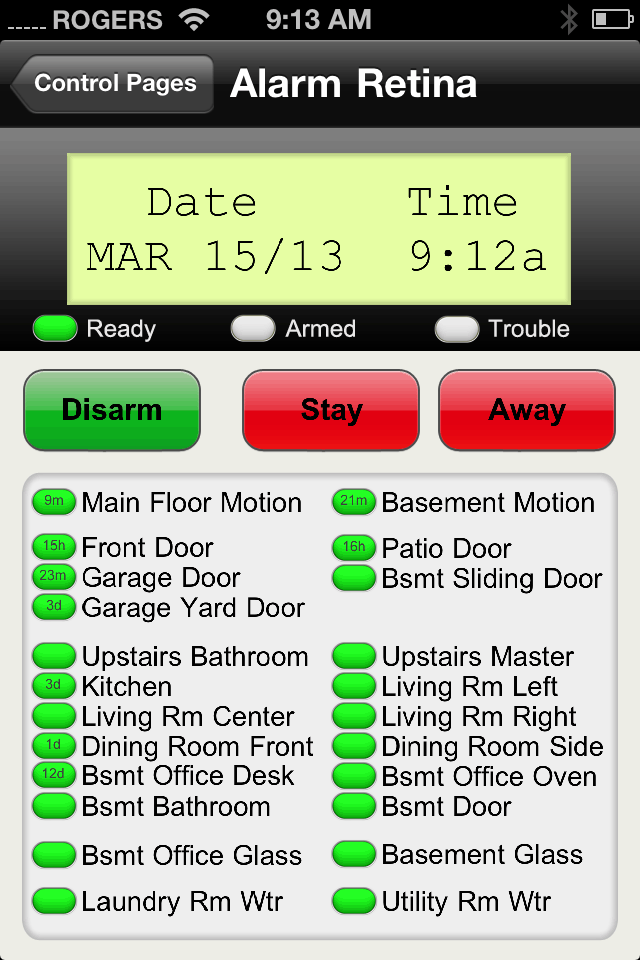
I've got a new version of the DSC alarm plugin in the works. You can assign zones to groups and setup triggers that fire if any of the zones in that group are open or closed for a period of time. So for example you could easily setup a trigger to turn off the HVAC system if in any window or door as been open for 5 minutes.
It also allows you to display the last-changed time in your control pages if you want...
Re: DSC Alarm Plugin
I like the "last changed time" thing. I time stamp all security variables at the moment but they are a little lengthy to fit into a button. I can't wait to see it when it's released.
Door lock is currently of the Morning Link RF variety. It's ok, but my next will be a doorstrike with Insteon I/O.
Morning Link has no form of position sensor of the deadbolt. If I unlock via RF remote or through an Insteon button, I only get a confirmation that the device received the command (not if it executed the command). If I lock or unlock manually the system doesn't know.
Door strikes are typically programmable for fail secure. So, if you know the door is closed (DSC alarm zone1) = door is locked.
To rant a little bit... that morning link is what started this whole automation adventure of mine. I did the x-10 for a while and after I really got into it, everything started acting really buggy. I wanted an electronic way to enter my house without a key and liked the technology behind Insteon. (All the z-wave locks have some keypad thing that I didn't want to see on my door).
Started with the Smartlink Central Controller + Morning Link RF and a couple I/O devices for door position monitoring.
Never got that dang thing to work right. ($99 Central Controller in Attic)
Picked up a MiCase Verde with the Insteon Modem to control insteon & future z-wave with some pretty $60 app --> Crap. MiCasa Verde Tech support said "Sorry" our system only supports some Insteon Moduals. The Morning Link isn't one of them. ($199 MiCase Verde in Attic)
So, now I'm neck deep into Indio (a software I picked up initially just so I could lock/unlock my front door) but now it integrates: Apple TV Control, Airfoil, iTunes, DSC, CCTV, Facetime, and working on Energy Management.
Door lock is currently of the Morning Link RF variety. It's ok, but my next will be a doorstrike with Insteon I/O.
Morning Link has no form of position sensor of the deadbolt. If I unlock via RF remote or through an Insteon button, I only get a confirmation that the device received the command (not if it executed the command). If I lock or unlock manually the system doesn't know.
Door strikes are typically programmable for fail secure. So, if you know the door is closed (DSC alarm zone1) = door is locked.
To rant a little bit... that morning link is what started this whole automation adventure of mine. I did the x-10 for a while and after I really got into it, everything started acting really buggy. I wanted an electronic way to enter my house without a key and liked the technology behind Insteon. (All the z-wave locks have some keypad thing that I didn't want to see on my door).
Started with the Smartlink Central Controller + Morning Link RF and a couple I/O devices for door position monitoring.
Never got that dang thing to work right. ($99 Central Controller in Attic)
Picked up a MiCase Verde with the Insteon Modem to control insteon & future z-wave with some pretty $60 app --> Crap. MiCasa Verde Tech support said "Sorry" our system only supports some Insteon Moduals. The Morning Link isn't one of them. ($199 MiCase Verde in Attic)
So, now I'm neck deep into Indio (a software I picked up initially just so I could lock/unlock my front door) but now it integrates: Apple TV Control, Airfoil, iTunes, DSC, CCTV, Facetime, and working on Energy Management.
Bill
My Plugin: My People
My Plugin: My People
Re: DSC Alarm Plugin
Very cool Jr - usually how it starts, some kickstart that gets you interested, and then you find what works. I'd ordered a lockatron (sp?!) but ended up having to cancel as it wouldn't fit my install. Like you I didn't want a big lock system on the outside, and wanted more state info.
Travis!!! Looking forward to the new plugin! I've yet to get 6 - I will, just waiting to do a few upgrades at once and further along in beta. I had an idea I wanted to mention to you about that awesome plugin, but I forgot wtf it was. Either way - looking forward to some new features. It's certainly a key plugin in my setup. I have to find out what my installer code is and add some water sensors to the DSC as well as the ones I have. (and temp?)
Cheers!
Travis!!! Looking forward to the new plugin! I've yet to get 6 - I will, just waiting to do a few upgrades at once and further along in beta. I had an idea I wanted to mention to you about that awesome plugin, but I forgot wtf it was.
Either way - looking forward to some new features. It's certainly a key plugin in my setup. I have to find out what my installer code is and add some water sensors to the DSC as well as the ones I have. (and temp?)Cheers!
Re: DSC Alarm Plugin
My background and LEDs as PNGs if anyone wants them.
- Attachments
-
- LEDtrouble30+off.png (4.58 KiB) Viewed 6130 times
-
- LEDtrouble30+on.png (4.72 KiB) Viewed 6130 times
-
- LEDready30+off.png (3.97 KiB) Viewed 6130 times
-
- LEDReady30+on.png (4.31 KiB) Viewed 6130 times
-
- LEDarmed30+off.png (3.45 KiB) Viewed 6130 times
-
- LEDarmed30+on.png (3.43 KiB) Viewed 6130 times
-
- iPhoneDSC.png (53.16 KiB) Viewed 6130 times
Bill
My Plugin: My People
My Plugin: My People
Re: DSC Alarm Plugin
Finished my iPad version today.
Note:
1) Finished is a word I use loosely with anything Indigo
2) I didn't break any windows for the screenshot... set several devices to a motion detector to check out the icons.
Thanks again to Travis for making this all possible!
Note:
1) Finished is a word I use loosely with anything Indigo
2) I didn't break any windows for the screenshot... set several devices to a motion detector to check out the icons.
Thanks again to Travis for making this all possible!
- Attachments
-
- IMG_0078.PNG (375.58 KiB) Viewed 6102 times
Bill
My Plugin: My People
My Plugin: My People
Re: DSC Alarm Plugin
Well off topic, but I'm curious what type of script you are running for the timestamp for the various devices? Is that something you could share? I am currently time stamping my motion detectors with the time... but minutes, hours days makes a much clearer picture than simply a time.travisc wrote:Very nice! What are you using for your door lock if you don't mind me asking?
I've got a new version of the DSC alarm plugin in the works. You can assign zones to groups and setup triggers that fire if any of the zones in that group are open or closed for a period of time. So for example you could easily setup a trigger to turn off the HVAC system if in any window or door as been open for 5 minutes.
It also allows you to display the last-changed time in your control pages if you want...
Re: DSC Alarm Plugin
It's not a script, it's built-in to the next version of the plugin. Once I've tested it some more I'll post it for everyone else.Dewster35 wrote:Well off topic, but I'm curious what type of script you are running for the timestamp for the various devices? Is that something you could share? I am currently time stamping my motion detectors with the time... but minutes, hours days makes a much clearer picture than simply a time.
Re: DSC Alarm Plugin
Dang... I don't use the plugin. I really only have insteon motion sensors, open close sensors on some doors and some leak sensors... nothing that would fit into the plugin, unless your plugin also allows someone to roll in their insteon devicestravisc wrote: It's not a script, it's built-in to the next version of the plugin. Once I've tested it some more I'll post it for everyone else.